How channels work
Every place customers write to you, from your website to Zalo, Facebook and email, lands in one inbox. See what you can connect and how.
Updated on
On this page
A channel is a place where customers write to you: the chat widget on your website, your Zalo Official Account, a Facebook Page, a support mailbox and so on. Once a channel is connected, its messages land in the Inbox next to every other channel, so your team answers everything from one screen, and each customer keeps one profile whatever app they wrote from.
What you can connect
You manage channels under Customer Support → Channels. Click Add channel to open the catalogue.
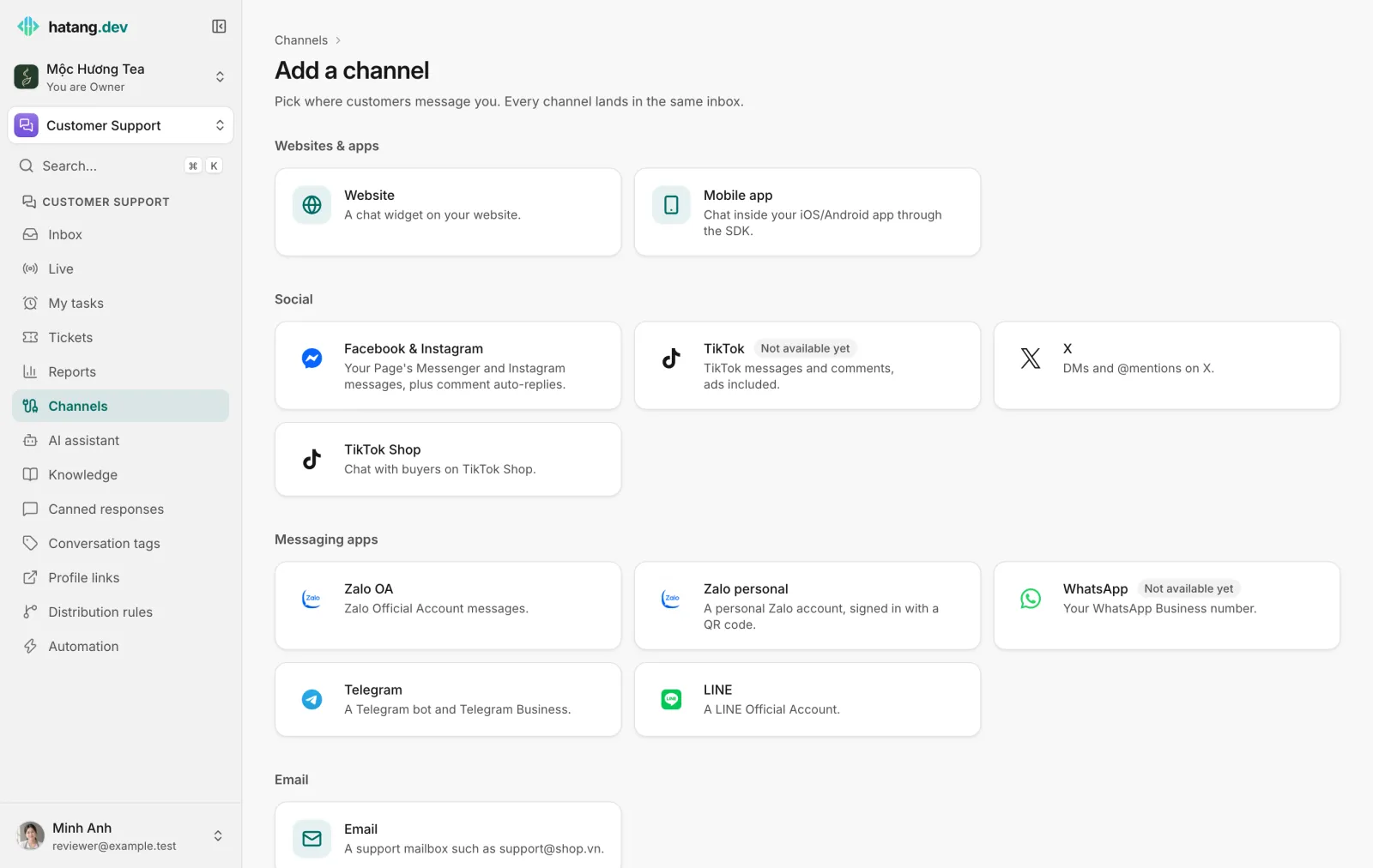
| Group | Channels | How you connect |
|---|---|---|
| Websites & apps | Website (the chat widget), Mobile app | Paste a snippet on your site, or add the SDK to your app |
| Social | Facebook & Instagram, TikTok, X, TikTok Shop | Sign in to the platform and allow access (X uses your own X app) |
| Messaging apps | Zalo OA, Zalo personal, WhatsApp, Telegram, LINE | Sign in, scan a QR code, or paste a token, depending on the app |
Support mailbox such as [email protected] |
Forward your mail to Ha Tang, or point an MX record at it |
Each channel has its own guide:
- Vietnam: Zalo OA, Zalo personal, TikTok, TikTok Shop
- Social and messaging apps: Facebook Messenger and Instagram, WhatsApp, Telegram, LINE, X
- Support email
- The website chat widget: Install the chat widget
- Mobile apps are connected by your developers with the Ha Tang SDK: see the SDK overview. Users signed in to the app should be verified with the same identity secret: see Recognise logged-in users.
Who can manage channels
You need the Manage level on the Customer Support module (owners and admins always have it). Without it, Channels does not appear in the sidebar. Agents with the Work level answer conversations from every channel in the Inbox without seeing these settings. See Module access.
Every channel belongs to a website
Conversations from a social or messaging account belong to one of your websites. The website decides which reports, distribution rules and automation apply to them. That is why the business needs at least one website before you connect anything else: if it has none, the connect page asks you to add one first (click Add site). The website does not need the widget installed for this.
When the business has several websites, the connect page shows Attach new connections to site. Pick the website the new account belongs to before you connect it. To move an account to another website later, connect it again with that website selected.
The Channels page
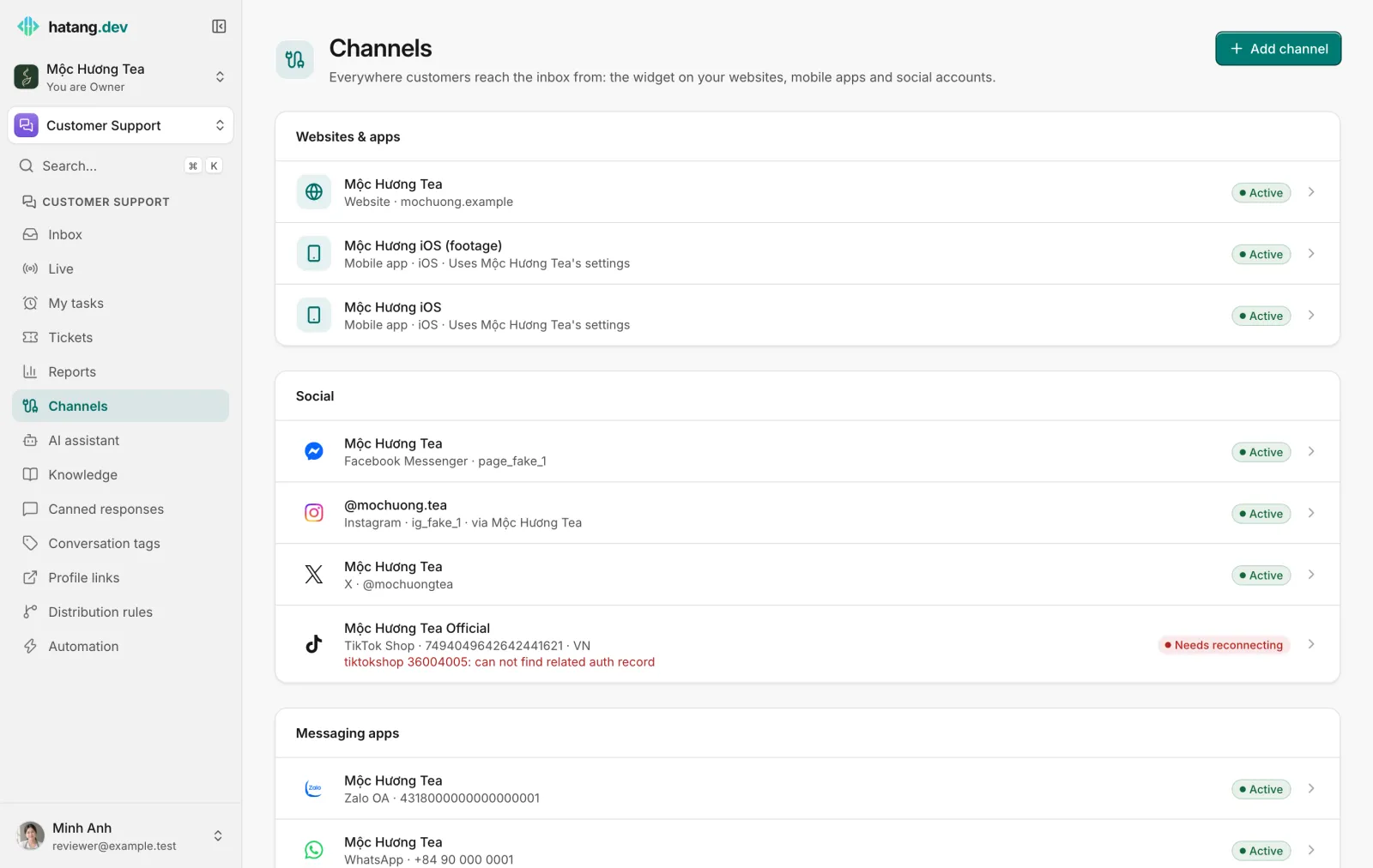
Each connected account is one row, grouped like the catalogue. A row shows the account's name, the kind of channel and its handle, phone number or domain. An Instagram account shows the Facebook Page it came with (via Page name). When you have several websites, each row also names its website.
The badge on the right is the channel's status:
| Status | Meaning |
|---|---|
| Active | Messages arrive and replies go out. |
| Needs reconnecting | The platform stopped accepting Ha Tang's access. New messages may not arrive and replies fail. See Reconnect a channel. |
| Not installed | A website whose widget has not loaded on any page yet. |
| Not used yet | A mobile app that has not connected yet. |
| No messages yet | A mailbox that has not received any mail yet. |
| Off | The channel was turned off or its access was removed on the platform's side. |
At the bottom, the Zalo ZNS card opens ZNS settings, where you send templated Zalo notifications to customers' phone numbers through your Zalo OA. See Zalo ZNS.
A channel's own page
Click a row to open the account's page:
- Connection shows the account's ID, when it was connected, the last message or event received, and the website it belongs to.
- How it works sums up how the platform behaves, such as reply windows and limits.
- Disconnect stops new messages from reaching the inbox and removes the channel from the list. Past conversations and customers are kept.
Facebook Pages, Instagram, TikTok and X accounts also have an Auto-reply to comments tab. See Comment auto-replies.
An account can belong to only one business at a time. Connecting the same account again in the same business keeps its conversations and settings.
What every channel shares
- One inbox. Conversations from every channel are listed together. Filter by channel when you want to focus on one.
- One customer profile. Names, phone numbers and history from each channel go to the customer's profile in Customers.
- The same tools. Canned responses, conversation tags, distribution rules, flows, the AI assistant and reports work on every channel. Distribution rules can match the channel, for example to send Zalo conversations to one team: tick the channel under the rule's Channels (none ticked = any).
What differs is what each platform allows: some only let you reply for a while after the customer's last message (24 hours on Messenger, Instagram and WhatsApp, 48 hours on Zalo OA), and some charge for messages. Each channel's guide lists its limits.
Useful next steps
Was this article helpful?
Related articles
- Reconnect a channelWhen a channel shows Needs reconnecting, messages stop arriving and replies fail. Here is why it happens and how to fix it for each channel.
- Connect a Zalo Official AccountMessages customers send to your Zalo OA land in the inbox, and your team replies from Ha Tang within Zalo's 48-hour window.
- Connect Facebook Messenger and InstagramConnect a Facebook Page and its linked Instagram account so Messenger and Instagram messages land in the inbox, and answer comments automatically.
- Add the chat widget to your websiteCreate a website channel, paste its code on every page and check that visitors can chat with your team from the Inbox.
Not finding what you are looking for?
Our team answers in the chat, in English or Vietnamese.