Connect X (Twitter)
Bring X direct messages into the inbox and answer mentions and replies to your posts automatically, through your own X developer app.
Updated on
On this page
Connect an X account and the direct messages (DMs) customers send it land in the Inbox, next to your other channels. When someone @mentions the account or replies to one of its posts, an auto-reply rule can answer publicly, send them a DM and like the post, the same way comment auto-replies work for Facebook and TikTok.
X charges for API use per call, so each business connects through its own X developer app and pays X directly. Setting it up takes about 15 minutes.
What it supports
| Feature | Supported |
|---|---|
| DMs received | Text, images and video (when X lets the app download them; otherwise a note says to open X) |
| DMs sent | Text with one image or MP4 video; other files are sent as links |
| From the X app | DMs you send from the X app show in the conversation |
| Mentions and replies to your posts | Public reply, DM and like, through the Auto-reply to comments tab |
| Not supported | Encrypted chats (XChat), group DMs, read receipts, recalling a DM |
Before you start
- An X account for the business, and access to developer.x.com with the pay-per-use plan and some credits.
- A website under Customer Support → Channels, and the Manage level on the Customer Support module.
Step 1: Create the X app
- In Ha Tang, go to Customer Support → Channels → Add channel and pick X. Keep the page open: it shows the Callback URI for your X app with a copy button.
- Sign in to developer.x.com with the business's X account, choose pay-per-use and add credits.
- Create an app. Under User authentication settings, set:
- App permissions: Read and write and Direct message.
- Type of App: Web App, Automated App or Bot (a confidential client).
- Callback URI: the address you copied from Ha Tang.
- Website URL: your website.
- Under Keys and tokens, copy the Bearer Token, the OAuth 2.0 Client ID and the Client Secret.
Step 2: Connect the account
- Back on the X page in Ha Tang, choose the website under Attach new connections to site if the business has several.
- Paste the Bearer Token, Client ID and Client Secret, then click Connect X account.
- X opens its authorization page. Sign in as the account you want to connect and click Authorize app. You have 10 minutes to finish.
- Back in Ha Tang, the account appears under Social as
@usernamewith the status Active.
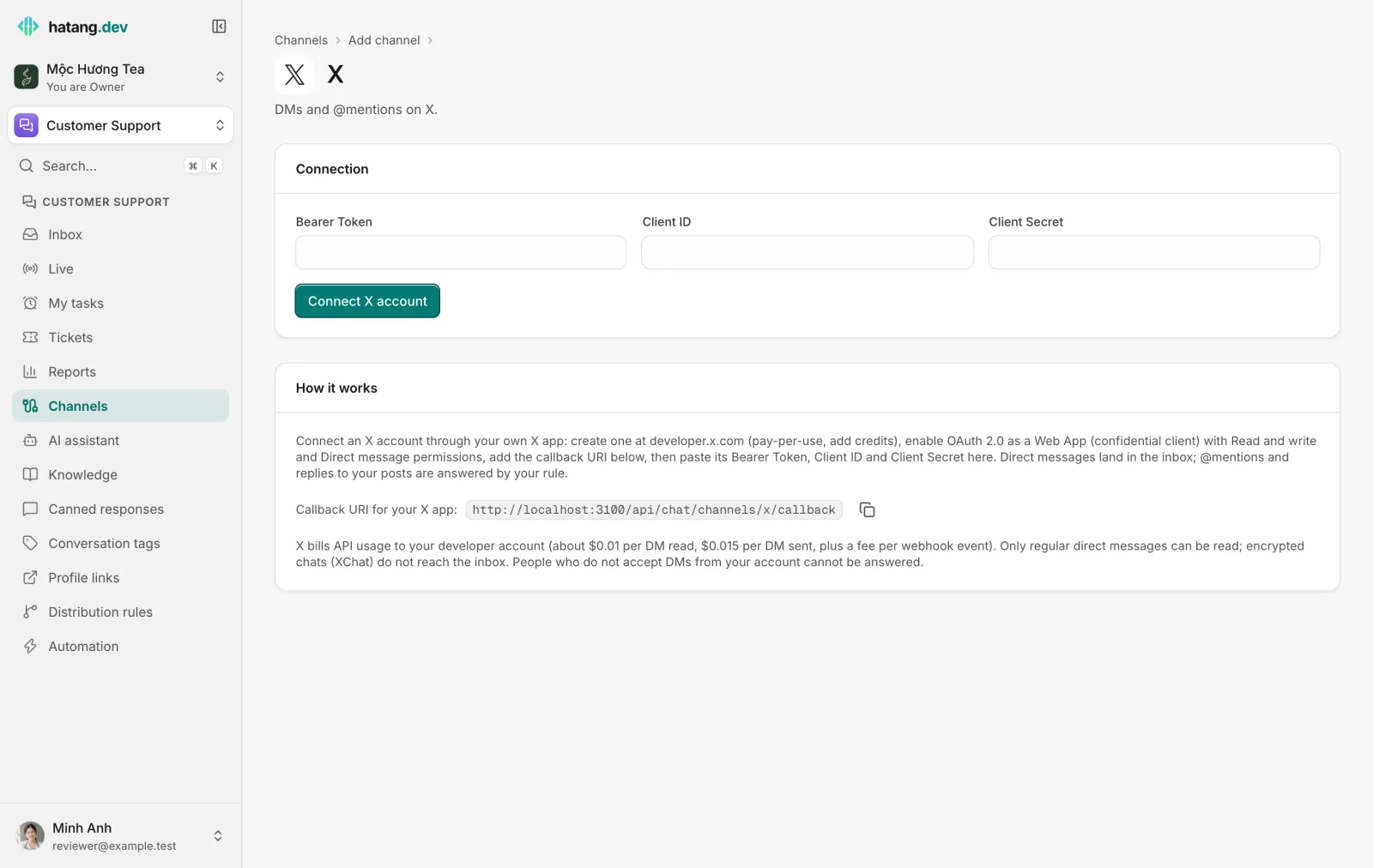
Ha Tang then subscribes to the account's DMs (received and sent), mentions and replies to its posts.
Step 3 (optional): Auto-reply to mentions and replies
Open the account's page and switch to the Auto-reply to comments tab:
| Setting | What it does |
|---|---|
| Turn on comment auto-replies | Switches the rule on |
| Posts | All posts, or only the posts you list, one link or id per line (https://x.com/shop/status/…) |
| Only when the comment contains | Keywords, comma-separated; blank answers every mention and reply |
| Public reply | A random line from below (with {{name}}), Written by the AI from the comment (counts as AI replies) or No public reply |
| Guidance for the AI | Tone and instructions for AI-written replies |
| Message the commenter privately | A DM with a fixed text, or one the AI writes from the post |
| Like comments automatically | Likes the post that mentioned or replied to you |
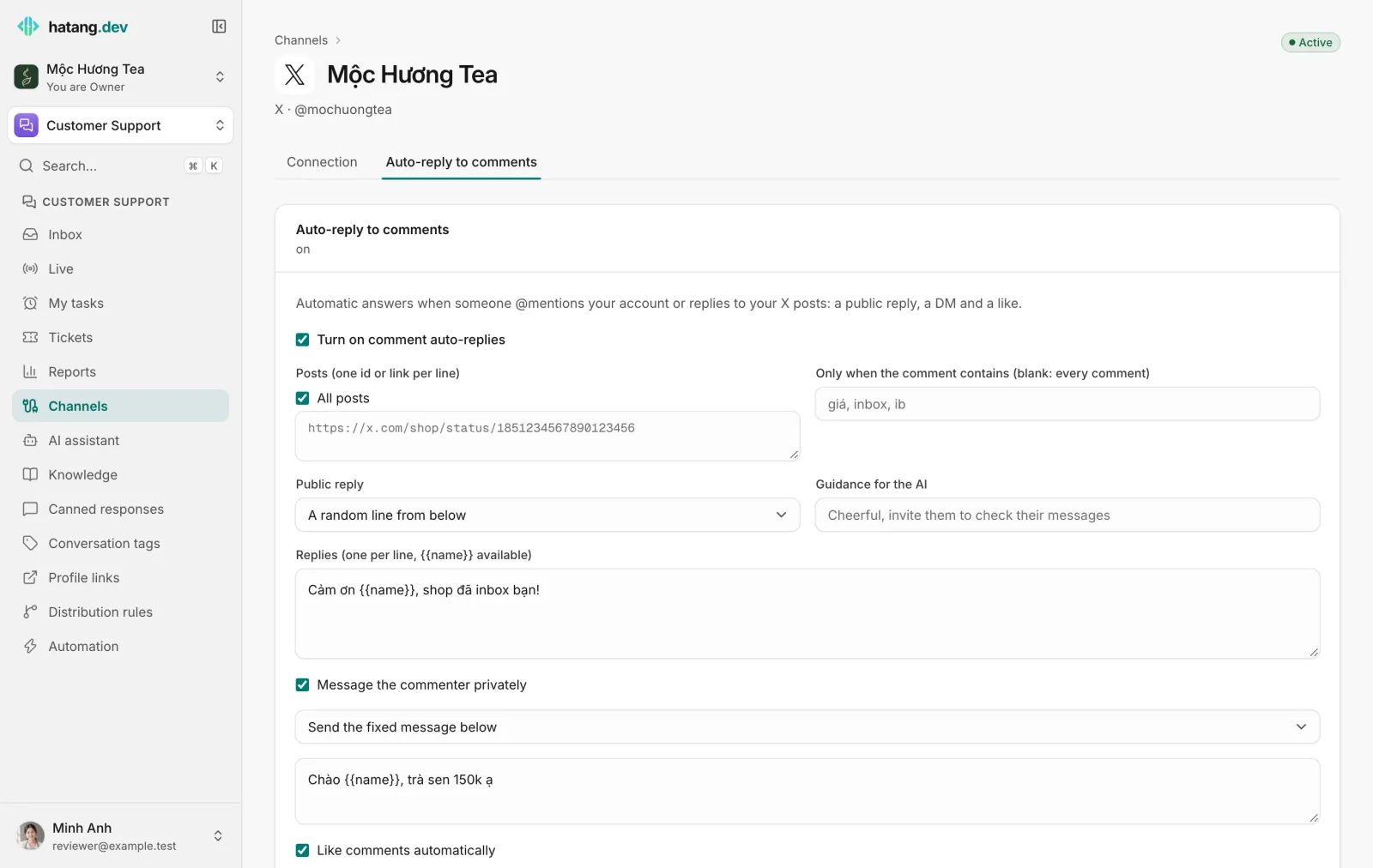
Each person gets at most one public reply per post in 24 hours. Your own posts are ignored. When the person answers the DM, the conversation lands in the Inbox like any other X DM. See Comment auto-replies.
Costs
X bills usage to your developer account, not to Ha Tang. In October 2026 that was about $0.01 per DM read and $0.015 per DM sent, plus a fee per incoming event. Check current prices in the X developer console. When the credits run out, X stops sending events and replies fail.
Limits
| Item | Limit |
|---|---|
| Media per DM | One image (up to 5 MB) or one MP4 video (up to 15 MB) |
| Who you can DM | Only people who accept DMs from your account (usually followers, or people with open DMs) |
| Encrypted chats | XChat messages never reach the Inbox: X does not give apps their content |
| Session | Ha Tang renews X's access on its own, including for quiet accounts |
To send X conversations to one team, tick X under a distribution rule's Channels (none ticked = any).
Reconnecting and disconnecting
If you revoke the app's access in X, change the Client Secret, or the session cannot be renewed, the account shows Needs reconnecting with "The X session expired or was revoked: paste the app keys above again and reconnect." Click Reconnect, paste the app keys again and authorize.
Disconnect stops new messages from reaching the Inbox. Past conversations are kept, and reconnecting the same account keeps its history.
Troubleshooting
| Problem | Cause | What to do |
|---|---|---|
| The Inbox says "this person does not accept direct messages from your X account" | They do not follow you, blocked you, or turned DMs off | Reply publicly on X or reach them on another channel |
| The Inbox says "the X session expired or the app's access was revoked" | The session could not be renewed, or access was revoked | Reconnect the X account |
| The Inbox says "the X app hit its API limit or ran out of credits" | Rate limit or no credits | Wait a moment; check the credits at developer.x.com |
| "Connected @…, but X refused the webhook setup" when connecting | The app has no pay-per-use credits or lacks DM permissions | Fix the app settings, then reconnect |
| "Connect session expired, start again" | More than 10 minutes passed on X's page | Start the connection again |
Useful next steps
Was this article helpful?
Related articles
- Auto-reply to commentsAnswer comments on your Facebook, Instagram, TikTok and X posts automatically, in public and by private message, so commenters end up in your inbox.
- Connect Facebook Messenger and InstagramConnect a Facebook Page and its linked Instagram account so Messenger and Instagram messages land in the inbox, and answer comments automatically.
- Reconnect a channelWhen a channel shows Needs reconnecting, messages stop arriving and replies fail. Here is why it happens and how to fix it for each channel.
Not finding what you are looking for?
Our team answers in the chat, in English or Vietnamese.