Auto-reply to comments
Answer comments on your Facebook, Instagram, TikTok and X posts automatically, in public and by private message, so commenters end up in your inbox.
Updated on
On this page
When a post or an ad gets dozens of "giá?" and "ib" comments, nobody can answer them all by hand. Comment auto-replies answer each new comment under the post and send the commenter a private message. When the commenter replies to that message, the conversation lands in your inbox like any other chat, and your flows, the AI assistant and your team take it from there.
Where it works
| Account | Public reply under the comment | Private message | Like the comment |
|---|---|---|---|
| Facebook Page (posts and ads) | A random line, or written by the AI | Fixed text | No |
| A random line, or written by the AI | Fixed text | No | |
| TikTok (videos) | A random line, or written by the AI | Fixed text, or written by the AI | Yes |
| TikTok (ads account) | A random line, or written by the AI | No | No |
| X (mentions and replies to your posts) | A random line, or written by the AI | Fixed text, or written by the AI | Yes |
On Facebook, Instagram and TikTok, only top-level comments are answered, not replies inside a thread. On X, every mention of your account and every reply to your posts counts.
Turn it on
- Go to Customer Support → Channels and open the account (your Facebook Page, Instagram, TikTok or X account).
- Click the Auto-reply to comments tab.
- Tick Turn on comment auto-replies.
- Under Posts (one id or link per line), tick All posts, or paste the links of the posts to cover, one per line.
- Optional: under Only when the comment contains (blank: every comment), list words such as
giá, ib, inbox, còn hàng. Accents are ignored. - Choose the Public reply:
- A random line from below: write a few lines under Replies (one per line, {{name}} available). One is picked at random so your replies do not all look the same.
- Written by the AI from the comment (counts as AI replies): the AI writes the reply. Use Guidance for the AI to set the tone ("Cheerful, invite them to check their messages"). If the AI cannot run, a line from your list is used.
- No public reply.
- Tick Message the commenter privately and write the message, or on TikTok and X choose to let the AI write it.
- On TikTok and X, tick Like comments automatically if you want.
- Click Save.
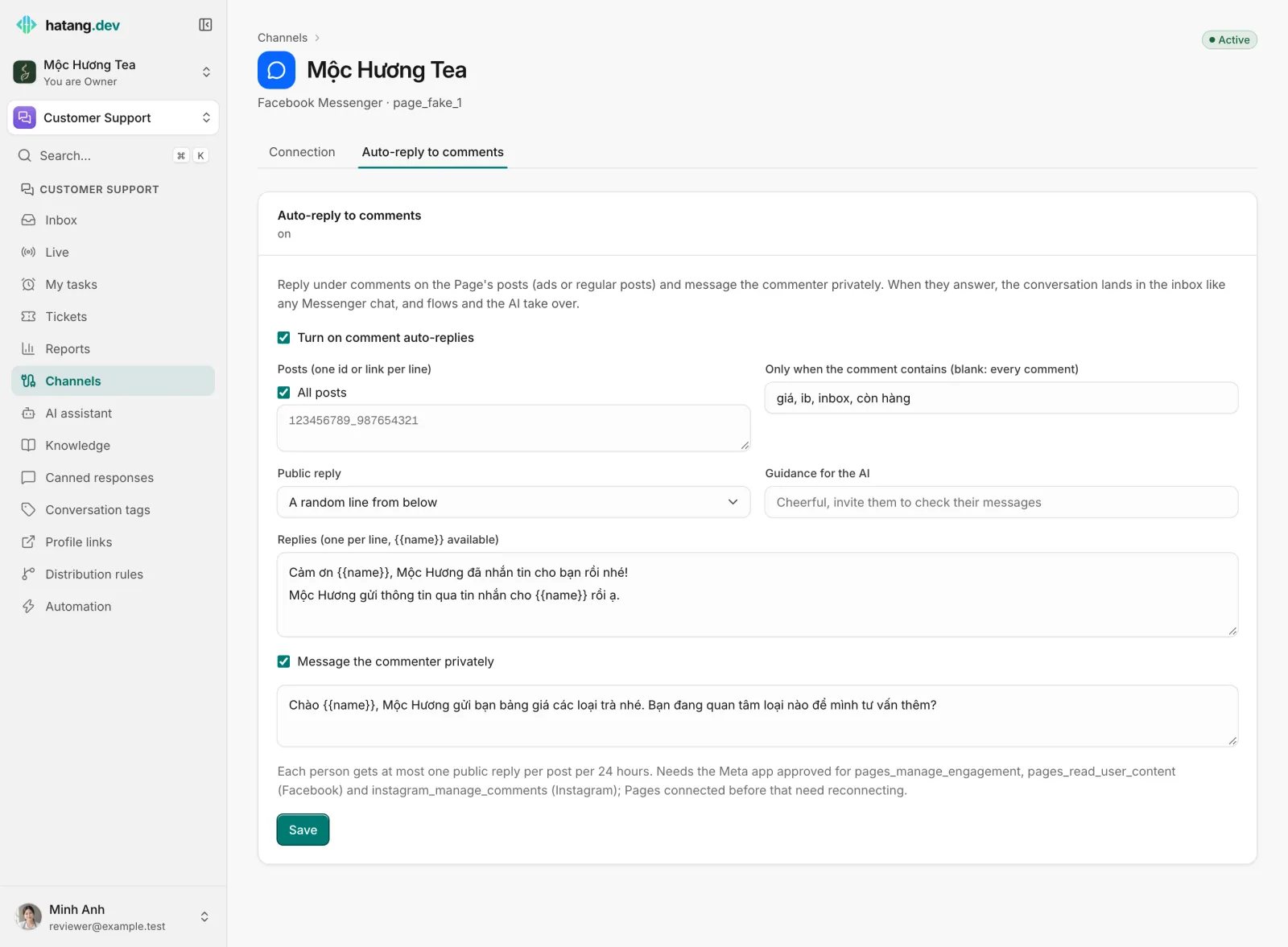
{{name}} is replaced with the commenter's name.
Limits
- A rule covers up to 50 posts (or All posts), up to 20 keywords and up to 10 public reply lines of 500 characters each; the private message holds up to 1,000 characters.
- Each person gets at most one public reply per post per 24 hours, so a long thread does not fill up with your answers.
- On TikTok, Ha Tang checks for new comments every 5 minutes; on Facebook, Instagram and X, comments arrive as they are posted.
- Facebook and Instagram need Ha Tang's Meta app approved for comment permissions. Pages connected before those permissions were granted must be reconnected. See Reconnect a channel.
- AI-written replies count toward your AI budget like any other AI reply.
Good practice
- Make the public line an invitation, not an answer: "Mộc Hương đã nhắn tin cho bạn rồi nhé." Prices and stock belong in the private conversation, where the AI or your team can follow up.
- Use keywords on busy posts so that compliments and tags of friends do not get a sales message.
- Pair it with a flow that starts on the first message of a conversation, so commenters who answer are greeted and qualified straight away.
Useful next steps
Was this article helpful?
Related articles
- Connect Facebook Messenger and InstagramConnect a Facebook Page and its linked Instagram account so Messenger and Instagram messages land in the inbox, and answer comments automatically.
- Connect TikTokBring a TikTok Business account's direct messages into the inbox, and answer comments on your videos and ads automatically.
- Connect X (Twitter)Bring X direct messages into the inbox and answer mentions and replies to your posts automatically, through your own X developer app.
- Greet and qualify customers with flowsA flow is a scripted bot that greets customers, asks questions, shows buttons and products, and passes the conversation to the AI or your team.
Not finding what you are looking for?
Our team answers in the chat, in English or Vietnamese.