Reconnect a channel
When a channel shows Needs reconnecting, messages stop arriving and replies fail. Here is why it happens and how to fix it for each channel.
Updated on
On this page
Ha Tang talks to Zalo, Facebook, TikTok and the other platforms with an access the platform granted when you connected the channel. When the platform stops accepting that access, the channel shows Needs reconnecting. New messages may stop arriving and replies fail until you reconnect it. Reconnecting takes a minute and keeps every conversation.
How to tell
- Under Customer Support → Channels, the channel's badge reads Needs reconnecting, and the platform's error appears in red under its name.
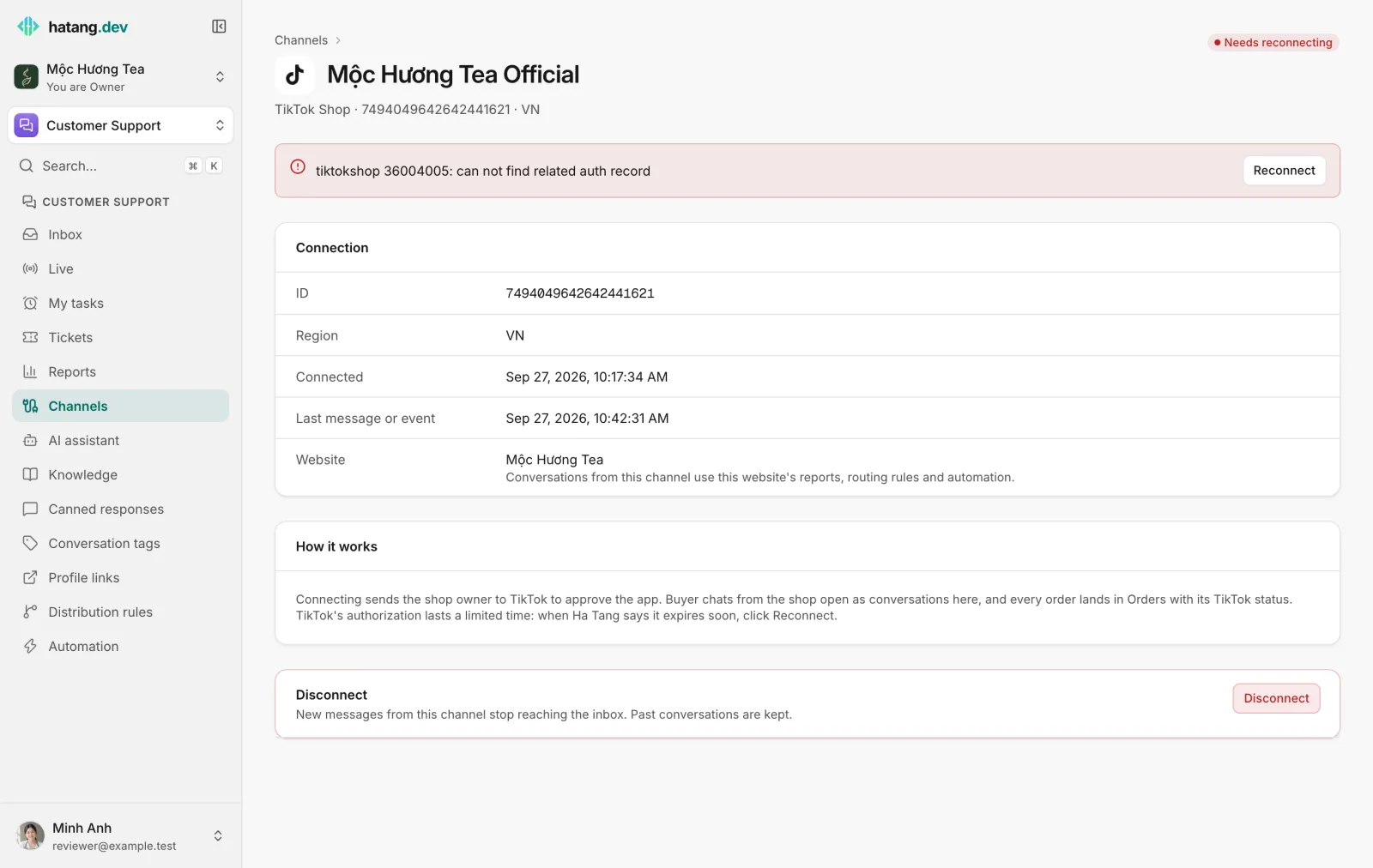
- On the channel's own page, a red banner at the top shows the error with a Reconnect button (Scan the QR code again for a personal Zalo account).
- In the Inbox, replies on that channel show Not delivered with a reason such as "the OA access token expired" or "the Page's access token expired".
Only people with the Manage level on the Customer Support module see the Channels page. If you are an agent and see these errors in the Inbox, ask an owner or admin to reconnect the channel.
Why it happens
| Cause | Examples |
|---|---|
| Access removed on the platform | A Page admin removed the app in Facebook, the seller removed the app's authorization in TikTok Shop, an admin revoked the app in Zalo |
| Access expired | The platform's session ran out and could not be renewed, for example after a long time without activity |
| Password or security change | The account's password was changed, or the platform asked to sign in again |
| Credentials replaced | A Telegram bot token was revoked in @BotFather, a LINE access token was reissued, an X app's Client Secret was changed |
| Session ended | Someone signed in to Zalo Web with a personal Zalo account connected to Ha Tang |
Ha Tang renews access on its own where the platform allows it (Zalo OA, TikTok, TikTok Shop, WhatsApp and X), so most channels never need reconnecting. TikTok Shop's authorization does run out: when TikTok warns that it expires soon, the shop stays Active and its page shows a yellow warning with a Reconnect button. Reconnect before it expires and nothing stops.
Reconnect
- Go to Customer Support → Channels and click the channel.
- Click Reconnect in the banner.
- Go through the same steps as when you connected it, signed in as an admin of the account:
| Channel | What Reconnect does |
|---|---|
| Zalo OA | Opens Zalo's permission page. Sign in as the OA admin and allow access. |
| Facebook Messenger, Instagram | Runs Connect Page again. Select the Page and its Instagram account and allow every permission. |
| TikTok, TikTok Ads, TikTok Shop | Opens TikTok's authorization page. Approve the app again. |
| Opens the Facebook window. Pick the same business and number. | |
| Zalo personal | Shows a new QR code. Scan it with the Zalo app on the phone and confirm. |
| Telegram | Opens the connect page. Paste the bot's current token from @BotFather. |
| LINE | Opens the connect page. Paste the Channel secret and a newly issued channel access token. |
| X | Opens the connect page. Paste the app's Bearer Token, Client ID and Client Secret, then authorize. |
When it works, the badge turns back to Active. Messages that customers sent while the channel was broken may not arrive, depending on the platform, so check the platform's own inbox for anything you missed.
What reconnecting keeps
Reconnecting the same account in the same business keeps its conversations, customers, settings (such as comment auto-replies and the HUMAN_AGENT tag) and the website it belongs to. To attach it to another website, reconnect it from Add channel with that website selected under Attach new connections to site.
Disconnect a channel
To stop using a channel, open its page and click Disconnect at the bottom. New messages stop reaching the inbox, the channel leaves the Channels list, and past conversations are kept. You can connect it again later; its history comes back.
An account can belong to only one business at a time. If connecting fails with "This account is already connected to another business. Disconnect it there first, then try again.", disconnect it in the other business first.
Still not working
| Symptom | What to do |
|---|---|
| The badge is Active but nothing arrives | Open the channel and look at Last message or event. Send a test message from another account. If nothing changes, reconnect the channel anyway. |
| Off instead of Needs reconnecting | The access was removed on the platform's side (for example, TikTok Shop deauthorized). Click Reconnect. |
| Reconnect fails with "Connect session expired, start again" | More than 10 minutes passed on the platform's page. Start again. |
| A personal Zalo account keeps disconnecting | Make sure nobody uses Zalo Web (chat.zalo.me) with that account. Use only the Zalo phone and computer apps. |
| Replies still fail after reconnecting | Read the reason under the message. It may be a platform limit, such as a closed reply window, rather than the connection. See Message not delivered. |
Useful next steps
Was this article helpful?
Related articles
- How channels workEvery place customers write to you, from your website to Zalo, Facebook and email, lands in one inbox. See what you can connect and how.
- A message was not deliveredWhat "Not sent" and "Not delivered" mean under a reply, every reason a channel gives, and how to fix it.
- Connect a Zalo Official AccountMessages customers send to your Zalo OA land in the inbox, and your team replies from Ha Tang within Zalo's 48-hour window.
- Connect Facebook Messenger and InstagramConnect a Facebook Page and its linked Instagram account so Messenger and Instagram messages land in the inbox, and answer comments automatically.
Not finding what you are looking for?
Our team answers in the chat, in English or Vietnamese.