A message was not delivered
What "Not sent" and "Not delivered" mean under a reply, every reason a channel gives, and how to fix it.
Updated on
On this page
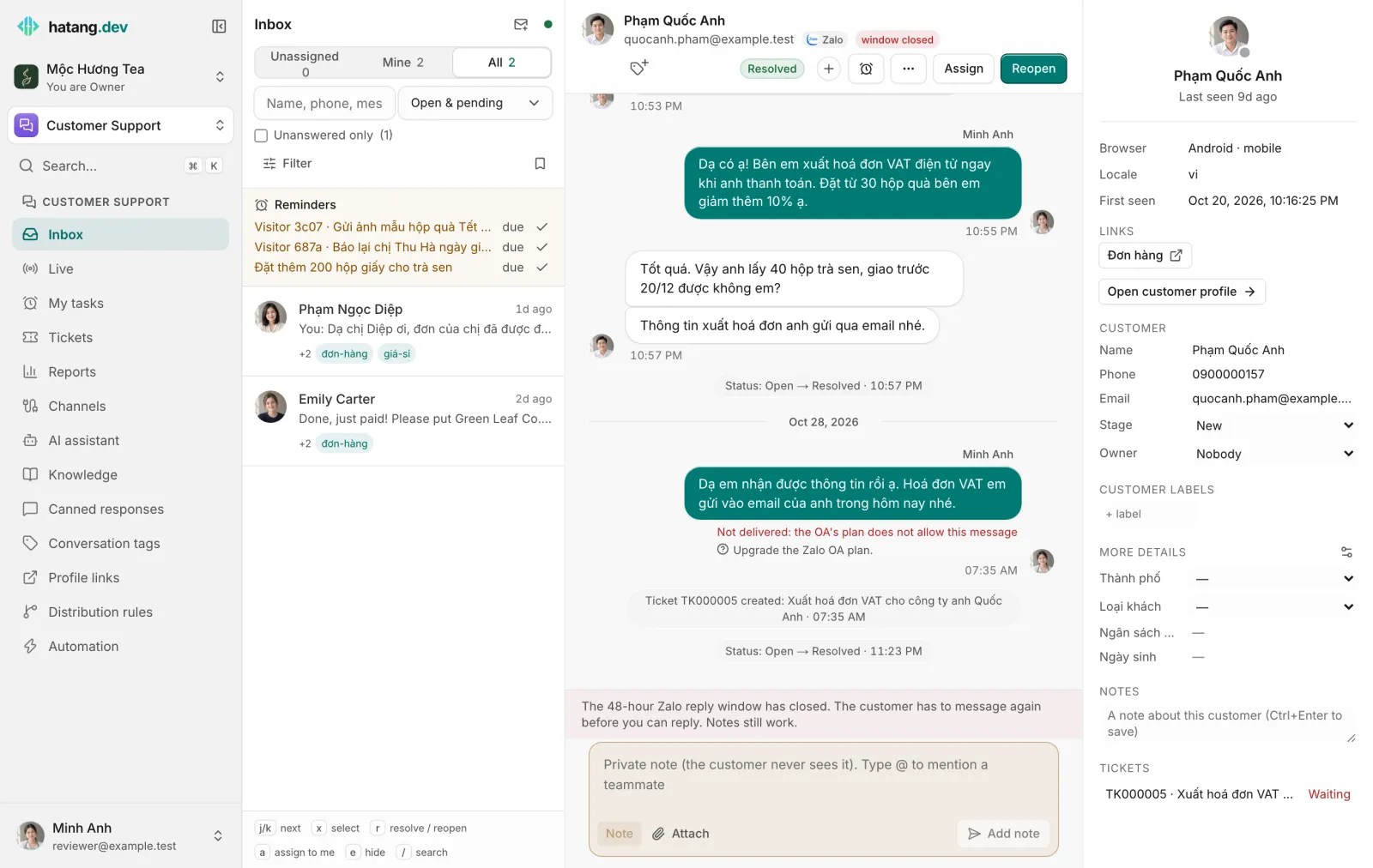
When a reply does not reach the customer, the inbox says so under the message, in red, with the cause and what to do. There are two kinds of problems.
"Not sent" with Retry
Your message never left your browser: the connection to Ha Tang dropped (for example on unstable Wi-Fi). The message stays in place, faded.
- Check your connection. The dot next to Inbox turns green again when you are back online.
- Click Retry to send it, or Cancel to drop it.
"Not delivered:" and a reason
Ha Tang passed your message to the channel and the platform refused it. Below the reason, a line with a question-mark icon says what to do.
Reply windows
| Inbox shows | What to do |
|---|---|
| outside the channel's reply window | Wait for the customer to write again, or leave an internal note to follow up |
| outside Messenger's 24-hour window, or another app controls the thread | Turn on the HUMAN_AGENT tag (7 days) in Channels, or wait for the customer to write again |
| more than 24 hours have passed since the customer's last WhatsApp message | Send an approved template, or wait for the customer to write again |
| past Zalo OA's reply window | Send a ZNS message (CRM → Customers → Send ZNS, or from the customer's order page), or wait for the customer to write again |
The conversation header shows the window before you write: a green window open chip, or a red window closed one. See Reply windows.
Zalo
| Inbox shows | What to do |
|---|---|
| the customer has never interacted with the OA | You can only message after they write to the OA; use ZNS if you have their phone number |
| the customer blocked the OA | Reach the customer on another channel |
| the OA's plan does not allow this message | Upgrade the Zalo OA plan |
| the Zalo Cloud account is out of balance | Top up the OA's Zalo Cloud Account |
| the OA access token expired | Reconnect the Zalo OA in Channels |
| the personal Zalo session is disconnected | Scan the QR code again in Channels. Don't log into Zalo Web with this account |
| the customer blocks strangers or blocked you | Send a friend request, or reach them on another channel |
Facebook Messenger and Instagram
| Inbox shows | What to do |
|---|---|
| this person can't receive messages right now (blocked the Page or deactivated) | Reach the customer on another channel |
| Meta has restricted messaging for this Page | Check the Page in Meta Business Suite → Account quality |
| the Page's access token expired | Reconnect the Page in Channels |
| the app lacks permission to message for this Page | Reconnect the Page with an admin account and grant every permission |
| Inbox shows | What to do |
|---|---|
| WhatsApp could not deliver to this number (not on WhatsApp, has not accepted the latest terms, or limited by Meta to protect users) | Check the number, or reach the customer on another channel |
| Meta refused the template (paused, wrong language or missing variables) | Check the template's status in WhatsApp Manager and pick another |
| the WhatsApp number is sending too fast | Wait a moment and send again |
TikTok
| Inbox shows | What to do |
|---|---|
| a TikTok Business account is required | Switch the account to Business and reconnect it |
| the customer hasn't messaged you first | TikTok only allows replies after the customer writes; turn on private replies to comments |
| the TikTok access token expired | Reconnect the TikTok account in Channels |
Telegram, LINE and X
| Inbox shows | What to do |
|---|---|
| the customer blocked the Telegram bot (or deleted their account) | Reach the customer on another channel; once they unblock and write again, sending works |
| the Telegram bot's token is no longer valid (it was changed in @BotFather) | Get a new token from @BotFather and connect the bot again in Channels |
| the Telegram bot is sending too fast | Wait a few seconds and send again |
| the LINE Official Account used up this month's free messages | Upgrade the plan in LINE Official Account Manager, or reply right after the customer writes (free within about a minute) |
| the LINE channel access token is no longer valid | Issue a new token in LINE Developers and reconnect LINE in Channels |
| this person does not accept direct messages from your X account (not following, blocked, or DMs off) | Reply publicly on X or reach them on another channel |
| the X session expired or the app's access was revoked | Reconnect the X account in Channels |
| the X app hit its API limit or ran out of credits | Wait a moment; check the credits at developer.x.com |
Any channel
| Inbox shows | What to do |
|---|---|
| the channel is disconnected | Reconnect it in Channels |
If the reason is not in these tables, the inbox shows the platform's own error text instead. For a known reason, hover the help line to see that original text.
Email replies
Under an email reply you see Email bounced (the address does not exist or the mailbox refused it), Marked as spam (the customer reported it) or Email failed (it could not be sent). Check the address in the customer panel, or reach the customer on another channel. See Bounces and suppressions.
Channels that need reconnecting
When a channel's connection expires, the conversation header shows channel needs reconnecting and replies fail until you reconnect it. Someone with Manage access goes to Customer Support → Channels, opens the channel and clicks Reconnect. See Reconnect a channel.
Messages that failed are not sent again on their own after you fix the cause. Send them again: copy the text into a new reply.
Was this article helpful?
Related articles
- Reply to customersWrite replies, use canned responses and quick commands, quote a message, recall one, and understand reply windows and delivery ticks.
- Reconnect a channelWhen a channel shows Needs reconnecting, messages stop arriving and replies fail. Here is why it happens and how to fix it for each channel.
- Send Zalo ZNS notificationsSend approved Zalo template messages, such as order confirmations and payment reminders, to customers' phone numbers through your Official Account.
- Send and receive filesAttach images, documents and short videos to a reply, and what each channel does with them.
Not finding what you are looking for?
Our team answers in the chat, in English or Vietnamese.