Suppressions and bounces
Why Ha Tang stops sending to some addresses (hard bounces, spam complaints, unsubscribes, manual blocks), what happens when you send to them, and when to remove one.
Updated on
On this page
Sending again to an address that does not exist, or to someone who marked your email as spam, is the fastest way to damage your sender reputation. So Ha Tang keeps a suppression list for your business and stops sending to those addresses automatically. The list applies to everything you send: from your website or app, the SMTP relay, broadcasts and automations.
You find it under Email → Audiences, in the Suppressions tab. Everyone with access to Email can see it; adding and removing addresses needs the Manage level.
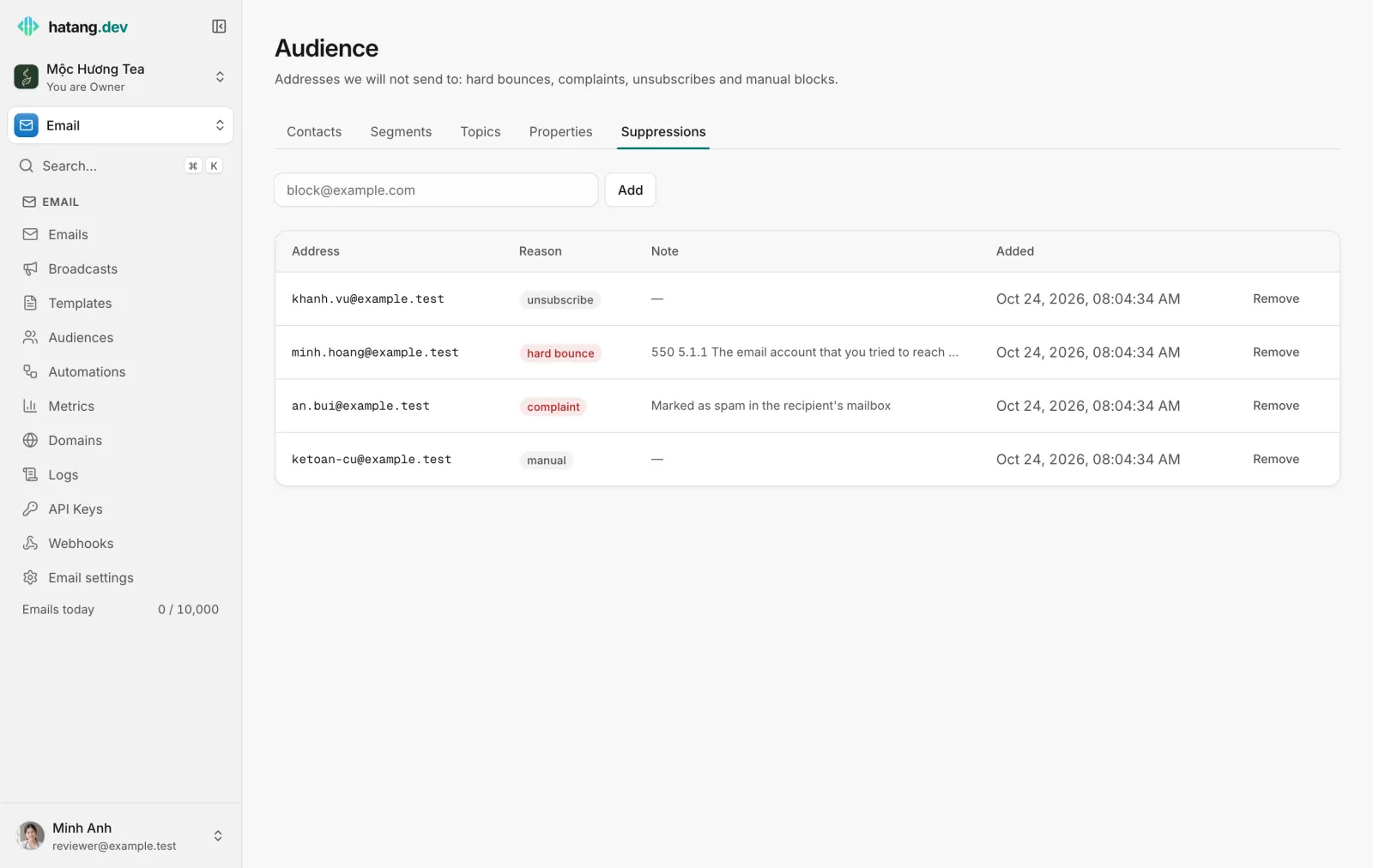
Why an address is on the list
| Reason | Added when |
|---|---|
| hard bounce | An email bounced permanently because the mailbox does not exist, for example 550 5.1.1 User unknown. The Note column shows the receiving server's message |
| complaint | The recipient pressed "Report spam" in their mail app |
| unsubscribe | The contact unsubscribed from everything: on your unsubscribe page, with a one-click unsubscribe from a broadcast without a topic, by an automation, from a CSV import, or because someone on your team clicked Unsubscribe on the contact |
| manual | Someone on your team added the address |
Addresses are compared without regard to capitals.
Bounces that do not put an address on the list
Not every bounce means the address is bad. These are recorded on the email but do not suppress:
- Soft bounces: a full mailbox, a server that is temporarily down, a message too large. Ha Tang retries delivery for a while before giving up.
- Rejections about the message, not the address: the receiving server refused the content or your reputation (policy or content blocks). The address is fine; the email was not.
A rise in the second kind is a warning sign: see Keep your email out of spam.
What happens when you send to a suppressed address
Ha Tang accepts the send, then skips that recipient:
- Nothing is sent to the address, and the recipient shows as Suppressed on the email.
- When every recipient of an email is suppressed, the email's status is Bounced right away.
- The email still counts toward your daily quota.
- In Metrics, these recipients count as bounced. A list full of old addresses therefore inflates your bounce rate even though nothing is actually sent: clean your lists.
Block an address yourself
- Open Email → Audiences → Suppressions.
- Type the address in the field at the top and click Add.
The address is listed with the reason manual. Use this for addresses that must never receive email from you, such as an old accounting mailbox or a customer who asked by phone to be left alone.
Remove an address
Click Remove next to the address. Do it only when you are sure:
| Reason | Remove when |
|---|---|
| hard bounce | The address has been fixed or the mailbox now exists, for example after a customer corrected a typo in their account |
| complaint | The person asked in writing to receive your email again. Sending to people who complained is the quickest way to get your domain blocked |
| unsubscribe | Do not remove it here. Open the contact under Email → Audiences and click Resubscribe, which removes the entry and keeps the contact's consent consistent |
| manual | Whenever the reason no longer applies |
Common questions
A customer says they never got their order confirmation. Search for their address under Email → Emails. If the recipient shows Suppressed, check the reason on the Suppressions tab: a typo in the address (hard bounce), an earlier spam report or an unsubscribe. Correct the address in your shop, or remove the entry if the customer asks for your email again.
Our bounce rate jumped after a broadcast. The segment probably contained old or mistyped addresses. They are now suppressed and will not bounce again; check how the list was collected before the next send.
Can I import a list of addresses to block? Not in bulk from this tab. Import them as contacts with unsubscribed set to true (see Contacts and audiences); each one is then suppressed with the reason unsubscribe.
Developers can follow bounces and complaints with the email.bounced and email.complained webhooks; see the suppressions guide in the developer hub.
Was this article helpful?
Related articles
- Keep your email out of spamWhy email lands in spam or Promotions and how to fix it, with SPF, DKIM and DMARC, a careful start on a new domain, clean lists and the numbers to watch.
- Contacts and audiencesAdd the people you email one by one, from a CSV file or from your CRM, store custom properties on them and keep their consent.
- Email history, metrics and logsFind out what happened to any email, read delivery, open, click, bounce and complaint rates, and see the API calls your website made.
Not finding what you are looking for?
Our team answers in the chat, in English or Vietnamese.