Email history, metrics and logs
Find out what happened to any email, read delivery, open, click, bounce and complaint rates, and see the API calls your website made.
Updated on
On this page
Ha Tang keeps three views of your email. Emails answers "what happened to this one message?", Metrics answers "how is our email doing overall?", and Logs shows what your website or app asked Ha Tang to do, for when something does not go out at all.
Emails: the history of every message
Email → Emails lists every email sent from your business, newest first: from your website or app, the SMTP relay, broadcasts and automations. Search by recipient, subject or sender, and filter by status and by source (API, SMTP, Broadcast).
| Status | Meaning |
|---|---|
| Queued | Accepted, about to be sent |
| Scheduled | Waiting for the time it was scheduled for |
| Sent | Handed to the delivery service, waiting for the receiving server's answer |
| Delivered | The receiving server accepted it |
| Delivery delayed | The receiving server is not accepting it yet; delivery is retried |
| Bounced | Rejected for good, or every recipient was on the suppression list |
| Complained | The recipient reported it as spam |
| Canceled | A scheduled email was canceled before it went out |
| Failed | It could not be sent |
Open an email to see its content (HTML, text and source), each recipient's status, and every event with its time. When open or click tracking is on for the domain, Engagement shows unique and total opens and the clicks on each link.
"My customer did not get the email"
- Search for the customer's address under Email → Emails.
- No email at all: your website or app never sent it. Check Logs below, or the app's own settings for the SMTP relay.
- Bounced: open it and read the reason. If the recipient shows Suppressed, the address is on the suppression list; see Suppressions and bounces. Otherwise the address is probably mistyped.
- Delivered: the email reached their mail server. Ask the customer to check the spam folder and the Promotions tab, and to add your address to their contacts.
- Delivery delayed: their server is refusing for now; Ha Tang keeps retrying.
Metrics: how your email performs
Email → Metrics shows the last 7 days, 14 days or 30 days, for all domains or one. Days follow Vietnam time.
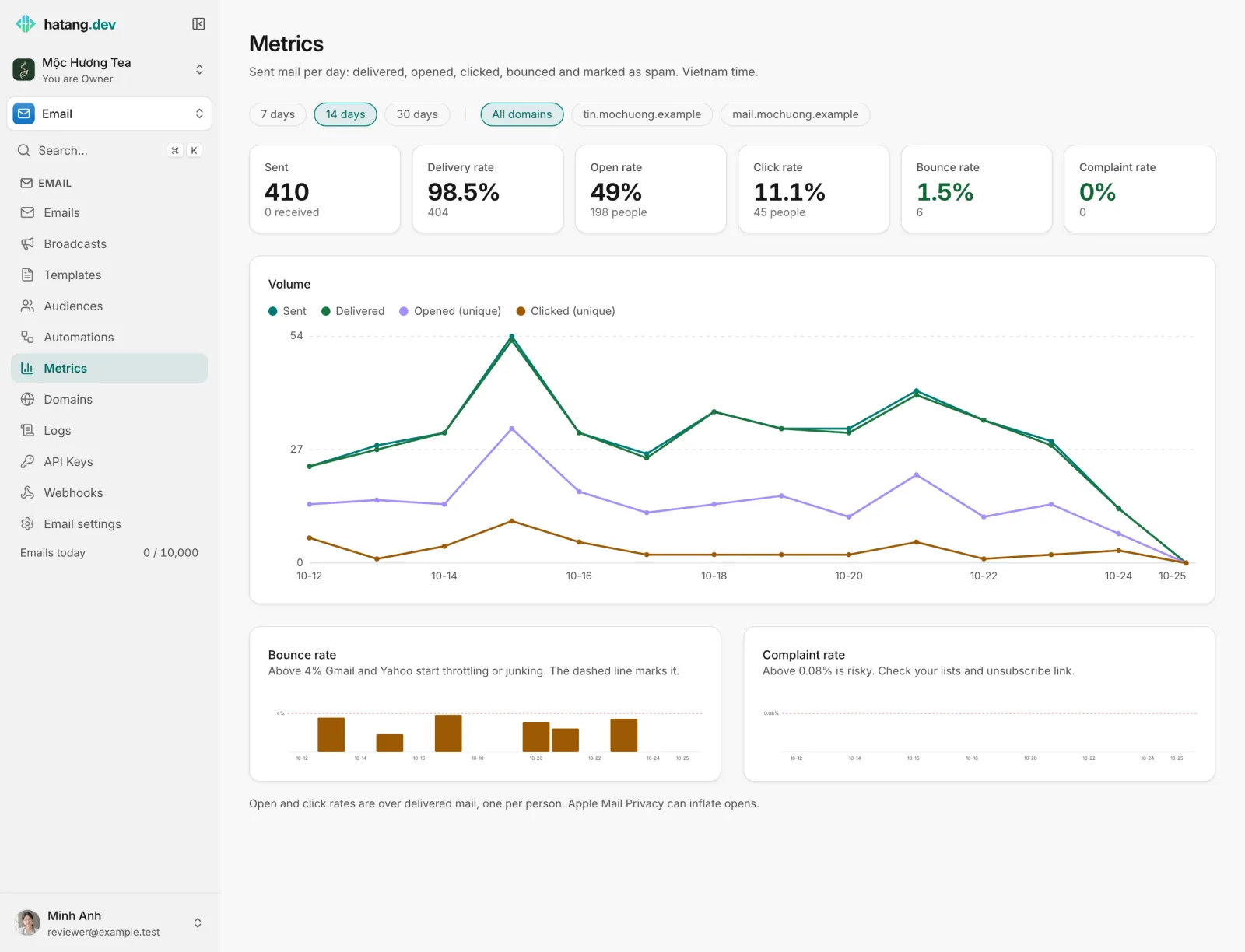
| Number | What it counts |
|---|---|
| Sent | Recipients Ha Tang sent to, without suppressed and canceled ones |
| Delivery rate | Delivered out of sent |
| Open rate | People who opened at least once, out of delivered mail |
| Click rate | People who clicked at least once, out of delivered mail |
| Bounce rate | Bounces out of sent, including recipients skipped because they were suppressed |
| Complaint rate | Spam reports out of delivered mail |
The bounce chart draws a dashed line at 4% and the complaint chart at 0.08%. Above them, Gmail and Yahoo start throttling your email or sending it to spam. If you cross a line, stop and find the cause before your next large send.
Open rates are estimates. Apple Mail Privacy Protection and some security scanners load images without anyone reading, which pushes opens up; mail apps that block images push them down. Compare open rates between your own emails rather than against other businesses. Opens and clicks are only recorded when Open tracking and Click tracking are on for the sending domain (Email → Domains, then the domain).
Logs: what your website asked for
Email → Logs records every call made to Ha Tang's API with your business's API keys during the last 30 days, newest first: the endpoint, the result, the duration, which key made it and which tool (the SDK and its version). Viewing logs needs the Developer access in the business.

- Filter by status, method, API key, path or user agent. All statuses includes successful calls; filtering on errors finds problems quickly.
- Open a call to see what was sent and what Ha Tang answered. Passwords, tokens and API keys in them are replaced with
[redacted], and attachments with their size. - On a failed call, Copy for AI copies the request, the answer and a link to the documentation, ready to paste into an AI assistant or send to your developer.
- Calls made by the dashboard itself are not logged, and neither are messages sent through the SMTP relay: look for those under Emails.
Common answers you will see:
| Answer | Meaning |
|---|---|
200 or 202 |
Done |
401 |
The API key is wrong, revoked, or not allowed for this domain |
403 "domain is not verified" |
The sender address is not on a verified domain of the business, or sending is paused |
404 |
The template, contact or email asked for does not exist |
422 |
Something in the request is missing or invalid; the message says what |
429 |
Too many calls at once; the website should retry a little later |
Your developer will find the same numbers through the API, and every error code, in the metrics and logs guide of the developer hub.
Was this article helpful?
Related articles
- Keep your email out of spamWhy email lands in spam or Promotions and how to fix it, with SPF, DKIM and DMARC, a careful start on a new domain, clean lists and the numbers to watch.
- Suppressions and bouncesWhy Ha Tang stops sending to some addresses (hard bounces, spam complaints, unsubscribes, manual blocks), what happens when you send to them, and when to remove one.
- Send through the SMTP relayConnect WordPress, your shop software or any app that sends email over SMTP to Ha Tang with smtp.hatang.dev, port 5870 and an API key.
Not finding what you are looking for?
Our team answers in the chat, in English or Vietnamese.