Connect a Zalo Official Account
Messages customers send to your Zalo OA land in the inbox, and your team replies from Ha Tang within Zalo's 48-hour window.
Updated on
On this page
Connect your Zalo Official Account (OA) and the messages customers send it arrive in the Inbox, next to the website widget, Facebook and every other channel. Your team, flows and the AI assistant reply from Ha Tang, and the customer receives the reply from your OA in Zalo as usual.
To send templated notifications such as order confirmations or payment receipts to a phone number, even without a conversation, use Zalo ZNS. It works through the same connected OA.
What it supports
| Direction | Supported |
|---|---|
| Incoming | Text, images, files (files up to 10 MB are copied into Ha Tang), stickers and GIFs (shown as [Sticker] and [GIF]), locations (as a Google Maps link) and links |
| Outgoing | Text, images up to 1 MB, PDF, DOC and DOCX files up to 5 MB; other files (videos included, since Zalo OA takes no video) and larger ones go out as a download link. Product cards go out as a Zalo list (up to 5 products, each with an image). Quick replies go out as a numbered list |
| Receipts | Your message is marked delivered when Zalo confirms it, and read when the customer sees it |
| Replies from Zalo's own tools | Messages your staff send from the Zalo OA app or website appear in the conversation as agent messages |
| Followers | Follow and unfollow events are recorded on the conversation and on the customer |
Before you start
- You are an admin of the Zalo OA and can sign in to Zalo with that account.
- You have the Manage level on the Customer Support module.
- The business has at least one website under Customer Support → Channels. Conversations belong to a website, which decides their reports, distribution rules and automation. See How channels work.
- Check your OA package. Zalo only lets apps send messages and read customer profiles for OAs on a paid package. A free OA still delivers incoming messages to the inbox, but replies fail and customers show without a name until the OA is upgraded. See Zalo's OA pricing.
Connect the OA
- Go to Customer Support → Channels and click Add channel.
- Under Messaging apps, pick Zalo OA.
- If the business has several websites, choose one under Attach new connections to site.
- Click Connect OA. Zalo opens its permission page.
- Sign in as the OA admin, choose the OA and allow access.
- Zalo sends you back to Customer Support → Channels, which shows "Connected OA name. Messages sent to it now land in the inbox."
The OA appears under Messaging apps with the status Active. Send a message to the OA from a personal Zalo account to check that it arrives in the Inbox.
The OA's page
Click the OA under Customer Support → Channels to open its page.
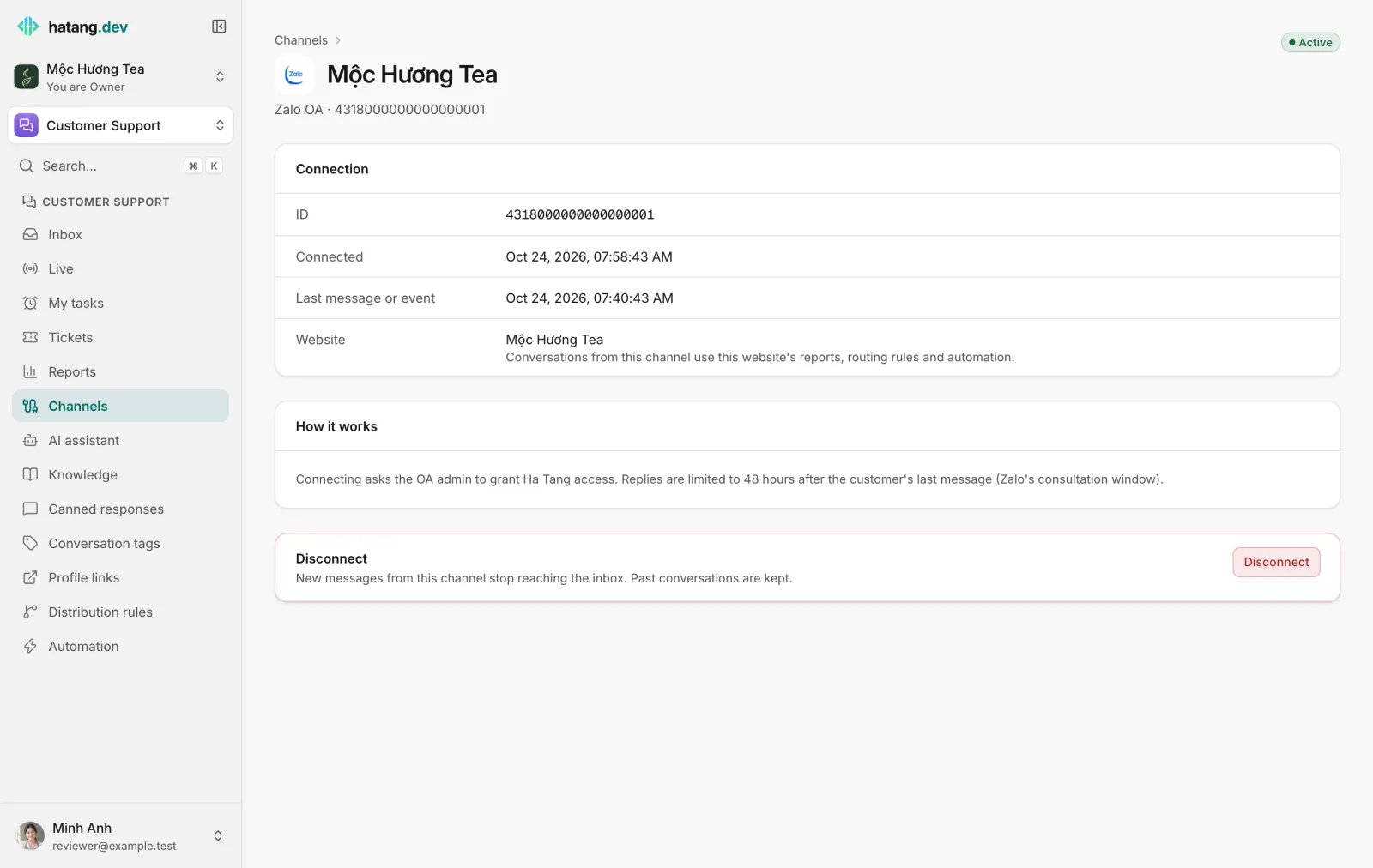
- Connection shows the OA ID, when it was connected, the last message or event received, and the Website it belongs to.
- How it works sums up how the channel behaves, including the 48-hour reply window.
- Disconnect stops new messages from reaching the inbox. Past conversations are kept.
To move the OA to another website, connect it again from Add channel with that website selected. Connecting the same OA again in the same business keeps its conversations and settings. An OA can belong to only one business at a time: to move it to another business, disconnect it in the first one.
The 48-hour reply window
Zalo only allows consultation messages within 48 hours of the customer's last message. The conversation header shows when the reply window closes. After that, the composer shows "The 48-hour Zalo reply window has closed" and public replies are turned off. Internal notes still work.
To reach the customer after the window closes:
- wait for them to write again, which reopens the window, or
- send a ZNS template to their phone number.
Access and customer names
Zalo's access for the OA expires after about a day. Ha Tang renews it on its own every hour and before every send, so you do not need to do anything. If renewal fails, for example because an admin removed the app's access in Zalo, the OA's status changes to Needs reconnecting. See Reconnect a channel.
Ha Tang asks Zalo for the customer's name and avatar on each incoming message until it gets them. If your OA was on a free package, names fill in by themselves after you upgrade.
Distribution and automation
Zalo OA conversations work with everything the inbox offers: distribution rules, flows, the AI assistant, canned responses and reports. To send them to one team, tick Zalo OA under the rule's Channels (none ticked = any).
Troubleshooting
When a reply cannot be delivered, the message shows Not delivered with the cause and a fix:
| The Inbox says | Cause | What to do |
|---|---|---|
| past Zalo OA's reply window | More than 48 hours since the customer's last message | Send a ZNS message (CRM → Customers → Send ZNS, or from the customer's order page), or wait for the customer to write again |
| the customer has never interacted with the OA | The customer never wrote to the OA | You can only message after they write first; use ZNS if you have their phone number |
| the customer blocked the OA | The customer blocked your OA | Reach them on another channel |
| the OA's plan does not allow this message | Your OA package does not include API messaging | Upgrade the Zalo OA package |
| the Zalo Cloud account is out of balance | The OA's Zalo Cloud Account has no credit left | Top up the Zalo Cloud Account |
| the OA access token expired | Access was removed or could not be renewed | Click Reconnect on the OA's page |
Other problems:
- No messages arrive. Open the OA's page and check Last message or event. If it says "None yet" after a test message, connect the OA again. If the status is Needs reconnecting, click Reconnect.
- Customers show without a name. The OA is on a free package; see Before you start.
Useful next steps
Was this article helpful?
Related articles
- Connect a personal Zalo accountScan a QR code to bring a personal Zalo account's chats, groups and friend requests into the inbox, so several agents answer on one number.
- Send Zalo ZNS notificationsSend approved Zalo template messages, such as order confirmations and payment reminders, to customers' phone numbers through your Official Account.
- Reconnect a channelWhen a channel shows Needs reconnecting, messages stop arriving and replies fail. Here is why it happens and how to fix it for each channel.
Not finding what you are looking for?
Our team answers in the chat, in English or Vietnamese.