Distribute conversations with rules
Decide automatically who gets each new conversation, by channel, keywords, tags and office hours, with round robin or the least busy agent.
Updated on
Distribution rules decide who gets a new conversation, so customers do not wait in an unassigned queue while everyone assumes someone else will answer. Rules also route the conversations the AI assistant and flows hand to your team.
How rules are applied
Rules run from top to bottom. For each rule whose conditions match, Ha Tang looks for an available agent among the people the rule names:
- If it finds one, that person gets the conversation and Ha Tang stops.
- If the rule matches but nobody is available (for example, nobody in its list is online), Ha Tang tries the next rule.
- If no rule assigns anyone, the conversation stays unassigned until someone picks it up.
A rule set to Leave unassigned (stop here) stops the search on purpose: conversations it matches stay unassigned.
Rules never take a conversation away from someone who already has it.
Add a rule
- Go to Customer Support → Distribution rules.
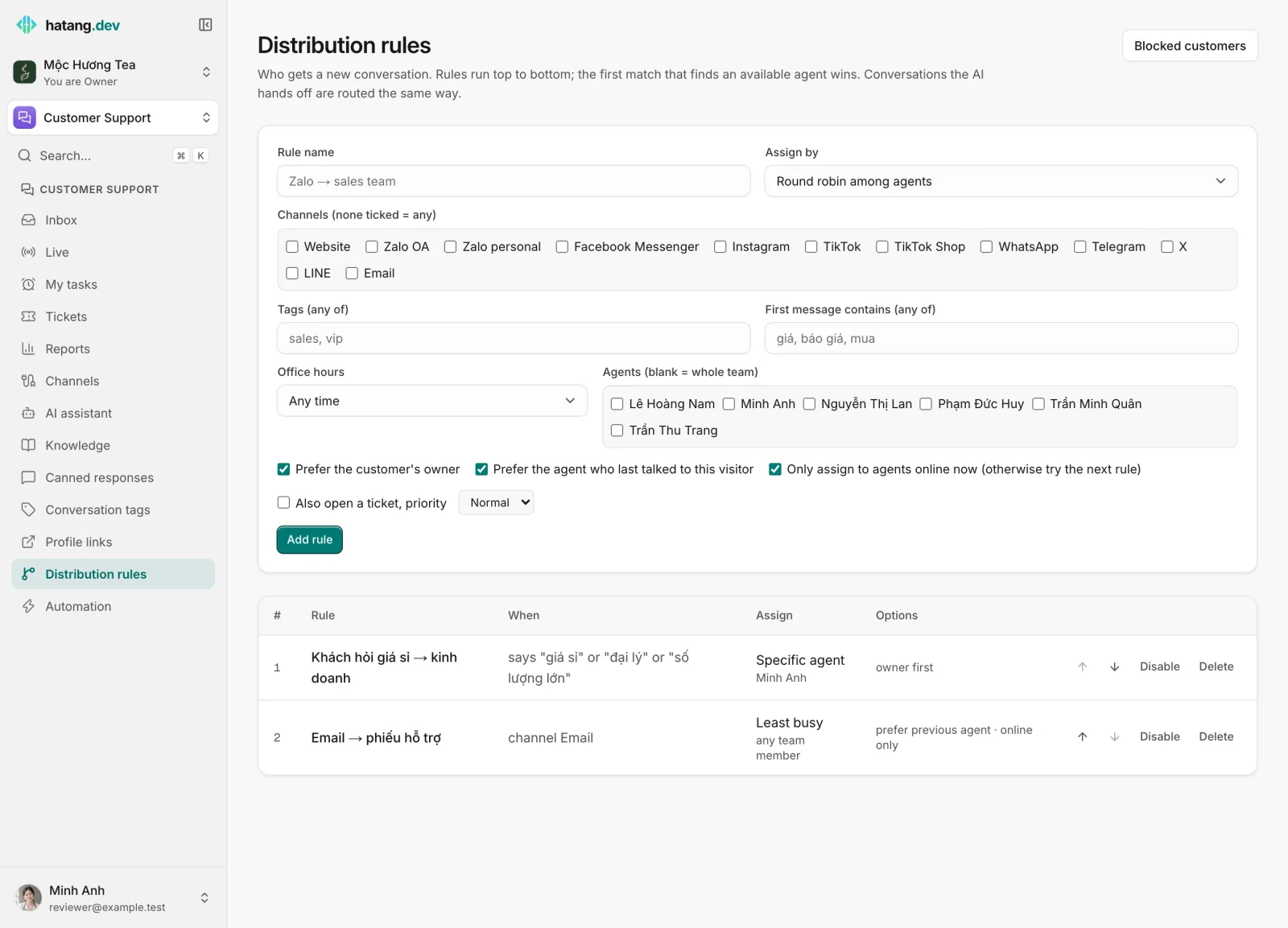
- Enter a Rule name, for example "Zalo → sales team".
- Choose how to Assign by (see below).
- Set the conditions. Every condition you fill in must hold; leave a field empty to ignore it:
- Channels (none ticked = any): tick the channels the rule applies to, for example Zalo OA and Facebook Messenger. The choices are Website, Zalo OA, Zalo personal, Facebook Messenger, Instagram, TikTok, TikTok Shop, WhatsApp, Telegram, X, LINE and Email.
- Tags (any of): the conversation has at least one of these tags.
- First message contains (any of): the customer's first message contains one of these words.
- Office hours: Any time, Within office hours or Outside office hours.
- Under Agents (blank = whole team), tick the people this rule may assign. Only people who can reply in Customer Support count.
- Set the options and click Add rule.
Assign by
| Option | Who gets the conversation |
|---|---|
| Round robin among agents | The agents take turns |
| Agent with fewest open conversations | The agent with the fewest open and pending conversations |
| A specific agent | The one agent you pick |
| Leave unassigned (stop here) | Nobody; rule evaluation stops |
Options
- Prefer the customer's owner: a returning customer goes to the person set as their owner on the customer profile, if that person is among the rule's agents. See Stages and owners.
- Prefer the agent who last talked to this visitor: keeps a returning customer with the same agent.
- Only assign to agents online now (otherwise try the next rule): offline agents are skipped.
- Also open a ticket, priority: creates a ticket for each conversation this rule assigns, with the priority you pick, so it gets SLA deadlines. Useful for email.
The first three options are on for a new rule, also for rules your developers create through the API without setting them.
Manage rules
The table lists your rules in the order they run, with their conditions (When), who they Assign, and their Options.
- Use the arrows to move a rule up or down. Put narrow rules (a keyword, one channel) above broad ones.
- Disable turns a rule off without deleting it; Enable turns it back on.
- To change a rule, add the new version and delete the old one.
Rules apply to every website of the business. Your developers can limit a rule to some websites or connected accounts through the API.
In the inbox
The conversation's information panel shows which rule placed it, why and when (Distribution rule, Routed at). If the rules changed or the agent is away, click Re-route: Ha Tang removes the assignee and members and runs the current rules again.
Example setup
- "Khách hỏi giá sỉ → kinh doanh": First message contains
giá sỉ, đại lý, số lượng lớn, A specific agent: your sales lead. - "Email → phiếu hỗ trợ": Channels
email, Agent with fewest open conversations, Also open a ticket, priority Normal. - "Everyone else": no conditions, Round robin among agents, Only assign to agents online now.
Useful next steps
Was this article helpful?
Related articles
- Assign and transfer conversationsGive a conversation an owner, take one yourself, hand it to a teammate, or send it back through the distribution rules.
- Set SLA targetsDecide how fast tickets must get a first reply and be resolved, per priority, with an option to count only your business hours.
- When the AI hands off to your teamWhy the assistant passes a conversation to a person, what the customer and your agents see, and how to take over or give it back.
Not finding what you are looking for?
Our team answers in the chat, in English or Vietnamese.