Set SLA targets
Decide how fast tickets must get a first reply and be resolved, per priority, with an option to count only your business hours.
Updated on
An SLA policy is your promise on speed: how long a ticket may wait for its first reply, and how long until it is resolved. Ha Tang puts both deadlines on every ticket, warns the assignee when one passes, and shows what is overdue, so urgent requests do not sit behind routine ones.
The policy
Go to Customer Support → Tickets and click SLA policy. You need the Manage access level for Customer Support.
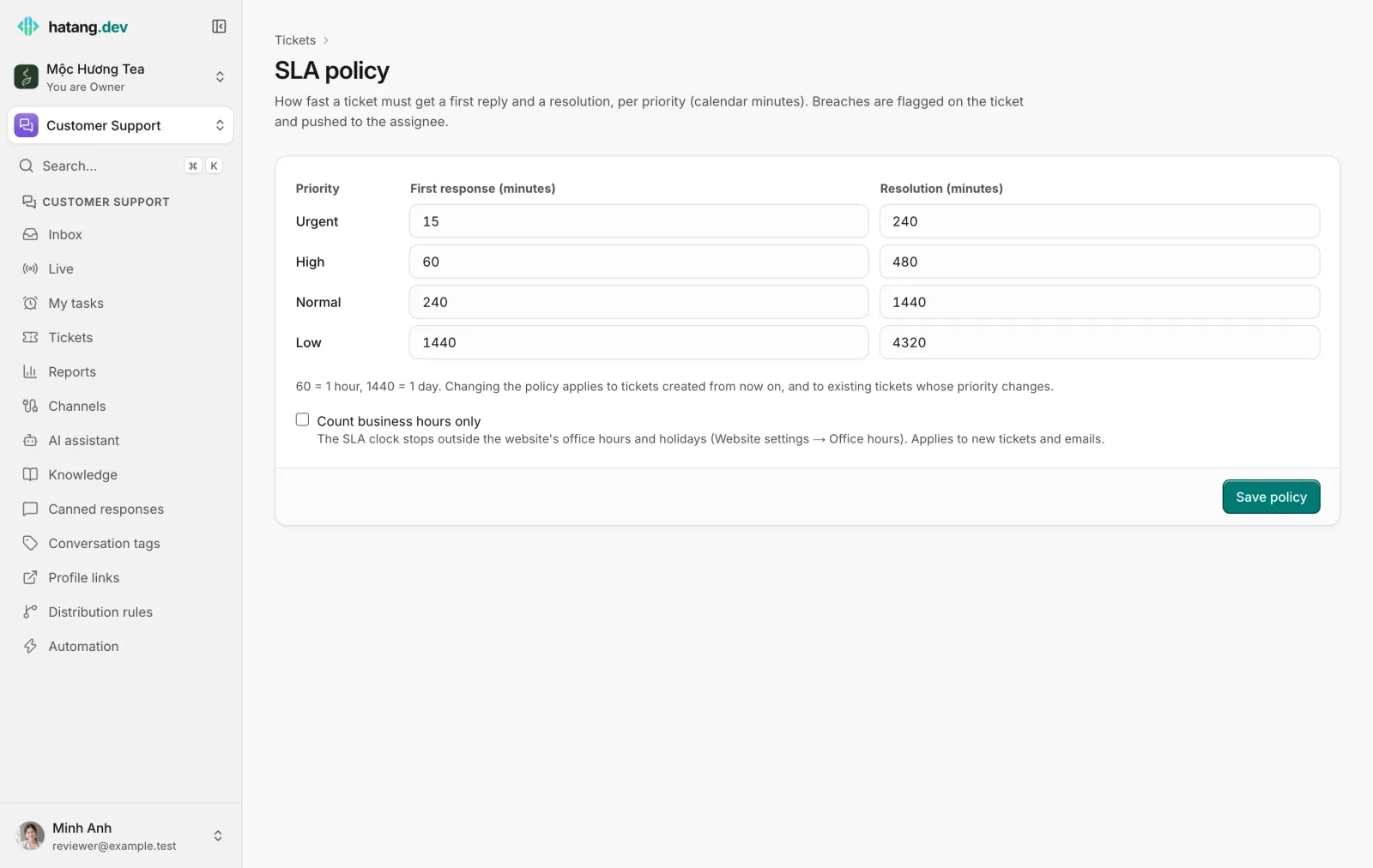
For each priority, set First response (minutes) and Resolution (minutes). The defaults suit a small team:
| Priority | First response | Resolution |
|---|---|---|
| Urgent | 15 minutes | 240 minutes (4 hours) |
| High | 60 minutes | 480 minutes (8 hours) |
| Normal | 240 minutes (4 hours) | 1,440 minutes (1 day) |
| Low | 1,440 minutes (1 day) | 4,320 minutes (3 days) |
60 minutes is one hour and 1,440 minutes is one day. Click Save policy.
Calendar time or business hours
By default the clocks run in calendar minutes, nights and weekends included. Tick Count business hours only to stop the clock outside the website's office hours and on its holidays: a Normal ticket created on Friday evening is then due on Monday, not on Saturday. Office hours are set per website in Website settings → Office hours. See Set your office hours.
When the policy applies
- A changed policy applies to tickets created from then on, and to existing tickets when their priority changes. Tickets already open keep their deadlines.
- New email conversations get a first-reply deadline from the Normal first response target. The inbox shows "Reply by …" on them, then "Reply overdue".
- To give every incoming email a ticket with both clocks, add a distribution rule for the
emailchannel with Also open a ticket, priority.
When a deadline passes
- The ticket is marked as breached and shows as overdue in the ticket list (Overdue only filters them).
- The assignee gets a push notification.
- A webhook event is sent, if your developers use them.
- The Tickets page counts breaches over the last seven days (SLA breached (7d)).
See Handle SLA breaches.
Useful next steps
Was this article helpful?
Related articles
- SLA deadlines and breachesSet how fast tickets must get a first response and be resolved per priority, and what happens when a deadline is missed.
- What tickets are forTickets track requests that take longer than one conversation, such as a return, a wholesale order or a bug, with an owner, a priority and SLA deadlines.
- Distribute conversations with rulesDecide automatically who gets each new conversation, by channel, keywords, tags and office hours, with round robin or the least busy agent.
- Office hours and offline messagesDecide when the widget shows as online, what visitors see when your team is away, and how you hear about messages that arrive after hours.
Not finding what you are looking for?
Our team answers in the chat, in English or Vietnamese.