SLA deadlines and breaches
Set how fast tickets must get a first response and be resolved per priority, and what happens when a deadline is missed.
Updated on
On this page
An SLA (service level agreement) is your promise of speed: "urgent problems get an answer within 15 minutes and are fixed within 4 hours". Ha Tang puts two clocks on every ticket, First response and Resolution, warns when a ticket is late, and tells its owner when a deadline is missed.
Set the SLA policy
You need Manage access to Customer Support.
- Go to Customer Support → Tickets and click SLA policy.
- For each priority, enter First response (minutes) and Resolution (minutes). 60 = 1 hour, 1440 = 1 day.
- Tick Count business hours only if the clocks should stop outside your office hours.
- Click Save policy.
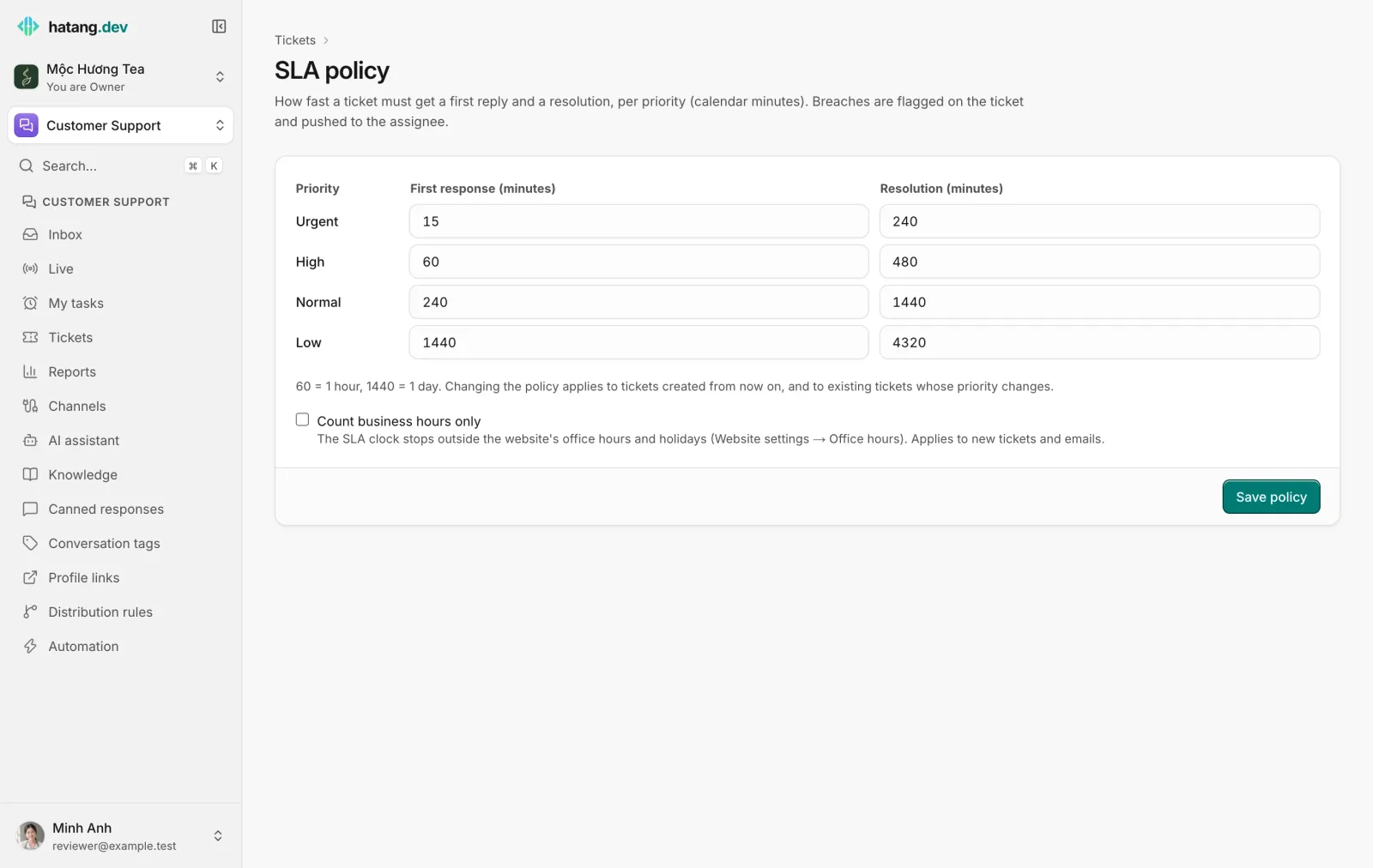
The default policy:
| Priority | First response | Resolution |
|---|---|---|
| Urgent | 15 minutes | 240 minutes (4 hours) |
| High | 60 minutes (1 hour) | 480 minutes (8 hours) |
| Normal | 240 minutes (4 hours) | 1440 minutes (1 day) |
| Low | 1440 minutes (1 day) | 4320 minutes (3 days) |
A new policy applies to tickets created from then on, and to existing tickets whose priority you change. Other tickets keep their deadlines.
Business hours only
With Count business hours only, the clocks only run during the office hours and outside the holidays of the website the ticket's conversation came from (set in the website's settings under Customer Support → Channels, see Office hours). A ticket raised at 17:50 with a 60-minute first response, when you close at 18:00, is due 50 minutes after you open the next working day. Tickets without a conversation always use calendar time. The setting also applies to the first-reply deadline of new email conversations.
When the clocks stop
| Clock | Stops when |
|---|---|
| First response | Someone on your team sends a public reply in the linked conversation after the ticket was created, or moves the ticket to In progress |
| Resolution | The ticket is set to Resolved or Closed |
Internal notes do not stop the first-response clock.
What happens at the deadline
At each deadline Ha Tang checks the ticket. If the clock has not stopped and the ticket is still open:
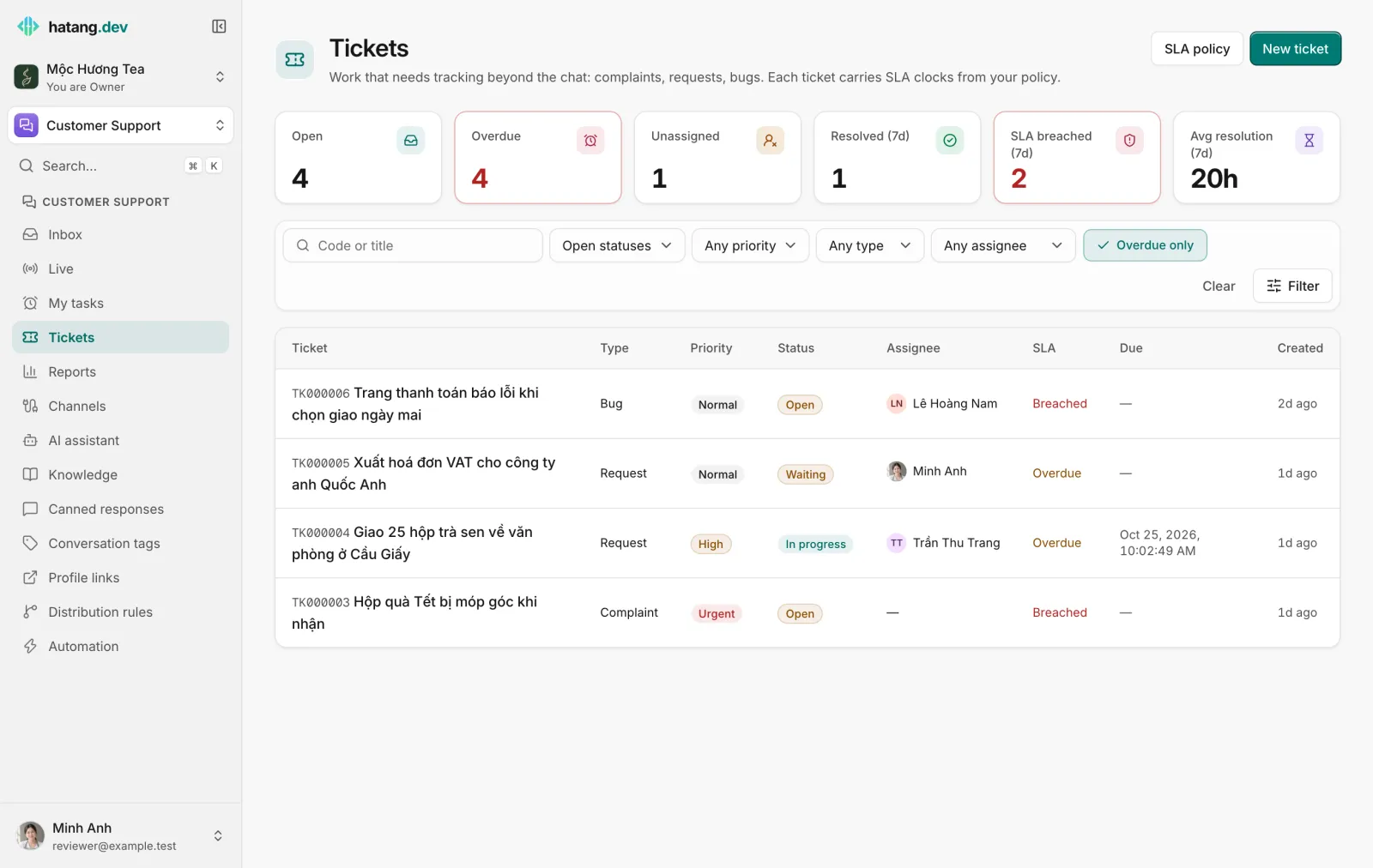
- the clock is marked Breached on the ticket page ("Breached (due …)" in red) and in the list's SLA column;
- the assignee gets a notification, "SLA breached · TK000003", saying "No first response yet" or "Not resolved in time" (in Vietnamese unless they chose English as their notification language), in their browser (if push is on) and in the Ha Tang apps (if SLA breaches is on in the app);
- the breach counts in SLA breached (7d) on the Tickets page and in Support reports;
- a
chat.ticket.breachedevent goes to your webhooks.
Unassigned tickets are marked breached but nobody is notified, so assign urgent tickets as soon as they come in.
A breach stays recorded even after you resolve the ticket: it is the history of the promise, not the current state.
Overdue and breached
| In the SLA column | Meaning |
|---|---|
| Breached (red) | A deadline was missed and recorded |
| Overdue (amber) | An open ticket is past a deadline or past its own Due date, but no breach is recorded (for example only the due date passed) |
| Met (green) | Resolved in time |
| resolve in 3 hours | Still running: time left to resolve |
Overdue only in the filters, and the Overdue counter, list every open ticket that is breached or past a deadline or due date.
Getting back on track
- Sort out the Overdue list first thing each day, oldest first.
- Answer the customer even if you cannot fix the problem yet: a public reply stops the first-response clock.
- If a ticket is waiting on the customer, set Waiting on customer and tell them what you need. The resolution clock keeps running, so set a realistic priority.
- If deadlines are missed often, adjust the policy to what the team can keep, or count business hours only.
See also SLA in the Automation guide.
Was this article helpful?
Related articles
- Set SLA targetsDecide how fast tickets must get a first reply and be resolved, per priority, with an option to count only your business hours.
- Ticket statusesOpen, in progress, waiting on the customer, resolved and closed, and what each one does to the SLA clocks.
- Office hours and offline messagesDecide when the widget shows as online, what visitors see when your team is away, and how you hear about messages that arrive after hours.
- Support reportsSee how many conversations your team handled, how fast it answered, what the AI did, how satisfied customers were and what it sold, for any period.
Not finding what you are looking for?
Our team answers in the chat, in English or Vietnamese.