Webhooks for Zapier, Make and n8n
Send Ha Tang events, such as a new order, a paid payment or a new conversation, to Zapier, Make, n8n or your own server the moment they happen.
Updated on
On this page
A webhook tells another tool that something happened in Ha Tang, within seconds. Each time a subscribed event occurs (an order is paid, a customer starts a conversation, a bank transfer arrives), Ha Tang sends its details to an address you choose.
With a no-code tool such as Zapier, Make or n8n, that is enough to build useful automations without a developer:
- Add every paid order as a row in Google Sheets.
- Post a message in your team's chat when a customer gives a 1-star rating.
- Create a contact in your sales CRM when a new conversation starts.
- Tell your accountant's tool about every bank transfer received.
You need the Developer (API keys, webhooks) access, which owners and admins always have.
Add a webhook
- In your no-code tool, create a trigger that receives webhooks and copy its URL:
- Zapier: Webhooks by Zapier → Catch Hook.
- Make: Webhooks → Custom webhook.
- n8n: a Webhook node with the method set to POST (use the production URL once the workflow is active).
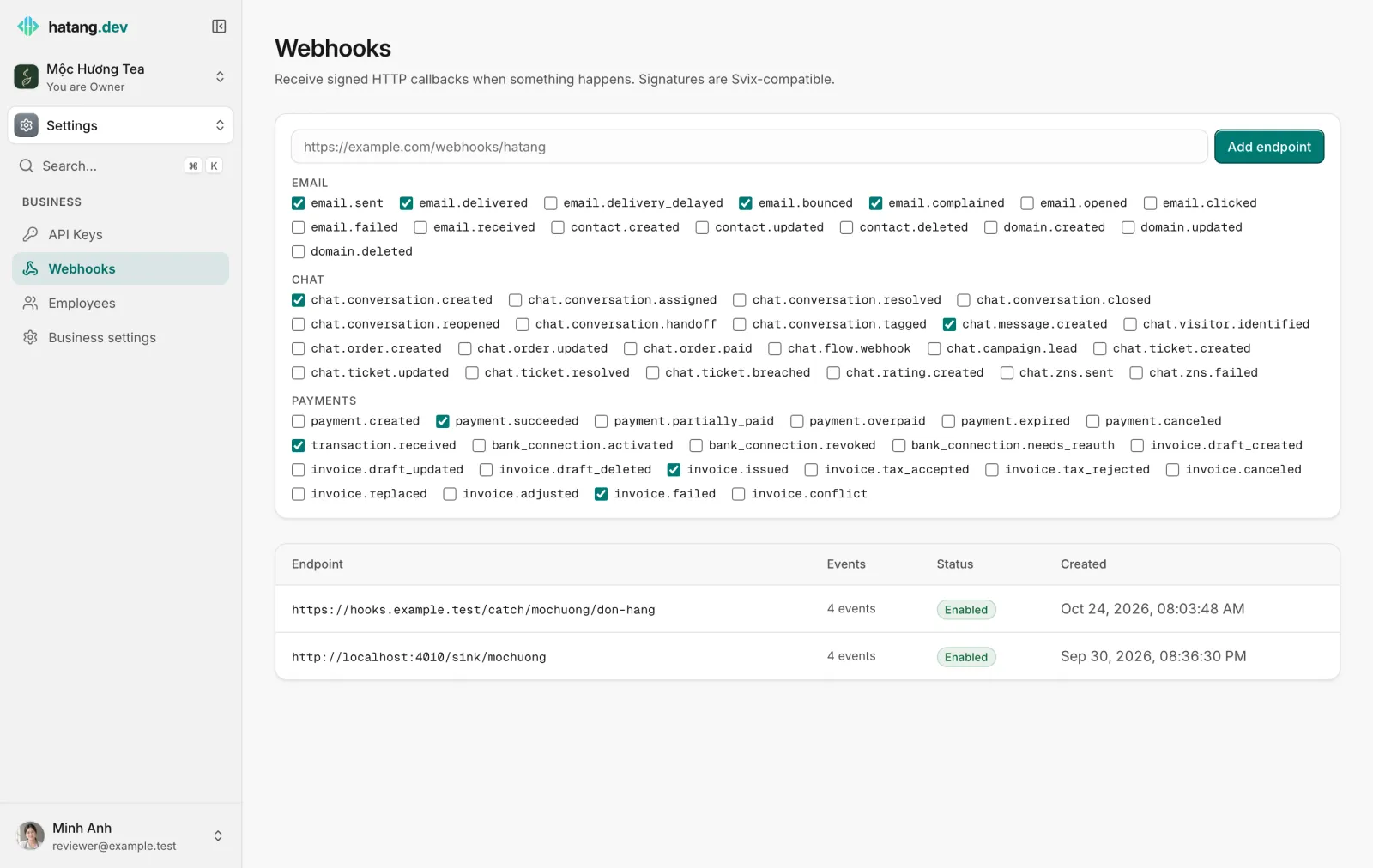
- In Ha Tang, go to Settings → Webhooks.
- Paste the URL in the box at the top.
- Tick the events you want, and untick the others. A few common ones are ticked for you.
- Click Add endpoint.
The endpoint's page opens and shows its Signing secret (shown once). Copy it if a developer will verify signatures; it is not shown again.
To check that it works, trigger the event once (for example create a test order in a conversation), then look at Deliveries on the endpoint's page and at the incoming data in your tool.
Which events to choose
Subscribe only to what your automation needs: each event is one request, and many tools count requests against your plan.
| Event | Sent when |
|---|---|
chat.conversation.created |
A customer starts a new conversation, on any channel |
chat.message.created |
A message is posted in a conversation (by the customer, an agent or a bot) |
chat.conversation.resolved |
A conversation is resolved |
chat.order.created, chat.order.paid |
An order is created; an order's payment arrives |
chat.rating.created |
A customer rates a conversation |
chat.ticket.created, chat.ticket.breached |
A ticket is opened; a ticket misses its SLA |
payment.succeeded, transaction.received |
A payment is completed; money arrives in a linked bank account |
invoice.issued, invoice.failed |
An e-invoice is issued, or fails |
email.delivered, email.bounced |
An email reaches the inbox, or bounces |
The full list, with what each event contains, is in the webhook events reference.
What Ha Tang sends
Each event is an HTTP POST with a JSON body:
{
  "type": "chat.order.paid",
  "created_at": "2026-10-24T08:15:00.000Z",
  "data": { "code": "DH000014", "total": 2530000, "payment_status": "paid", "...": "..." }
}
In Zapier, Make or n8n, data shows up as fields you map into the next step: the order code, the total, the recipient's name and phone, and so on.
Every request also carries signature headers (webhook-id, webhook-timestamp, webhook-signature, and the same values as svix-*). Your developers use them and the signing secret to prove a request really comes from Ha Tang. No-code tools usually skip this check, so keep the webhook URL private: anyone who has it can send fake data to it. For how to verify signatures, see the webhooks guide in the developer hub.
Deliveries, retries and replays
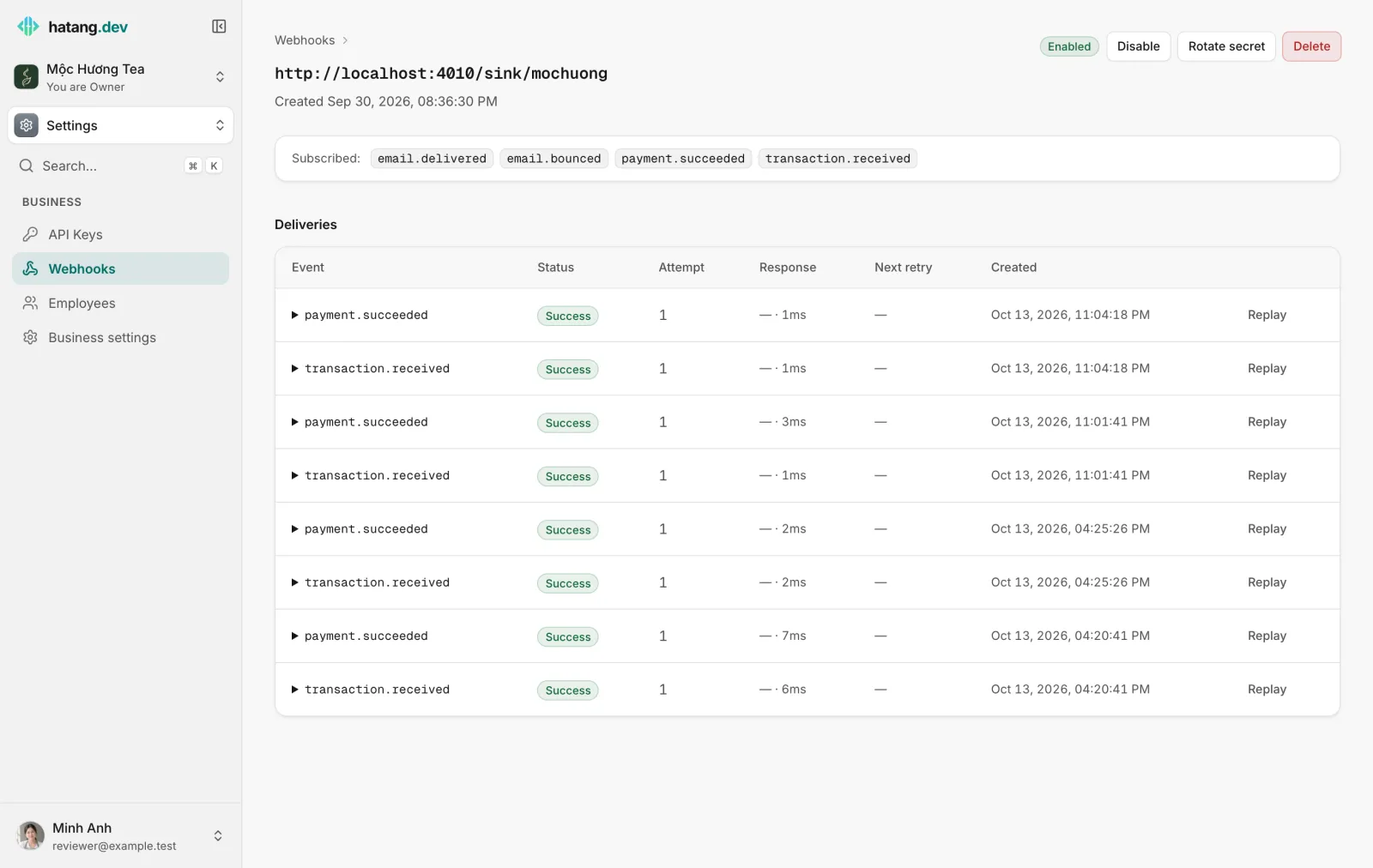
The endpoint's page lists every Delivery: the event, its Status, the Attempt number, the Response your tool gave and how long it took, and the Next retry. Click an event's name to see the data that was sent and the answer received.
- Your tool must answer with a 2xx status within 15 seconds.
- If it does not, Ha Tang tries again after 5 seconds, 5 minutes, 30 minutes, 2 hours, 5 hours, 10 hours and 10 hours. After that the delivery is Exhausted.
- Replay sends a delivery again, with the same
webhook-id, so your tool can recognize a repeat.
Manage an endpoint
On the endpoint's page:
- Disable stops it: nothing more is sent, and deliveries waiting for a retry are dropped. Enable turns it back on for new events.
- Rotate secret creates a new signing secret, shown once. For the next 24 hours requests are signed with both the old and new secret, so your developers have time to switch.
- Delete removes the endpoint and stops all its deliveries.
To change the events, add a new endpoint with the right events and delete the old one.
Troubleshooting
| Symptom | Cause | What to do |
|---|---|---|
| "endpoint: Internal hosts are not allowed" | The URL points to localhost or a private network |
Use a public address. To test on your own computer, use a tunnel service |
| Deliveries show Failed with HTTP 404 or 410 | The no-code workflow is off, or the URL changed | Turn the workflow on, or add the new URL as an endpoint |
| Deliveries time out | Your tool takes more than 15 seconds to answer | Answer first, then do the slow work in the next step |
| Nothing arrives | The event is not ticked, or the endpoint is disabled | Check Subscribed at the top of the endpoint's page and its status |
| The same event arrives twice | A retry or a replay after a slow answer | De-duplicate on the webhook-id header |
Was this article helpful?
Related articles
- API keysCreate keys that let your developers' software use Ha Tang, give each one only the permissions it needs, and revoke a key that leaked.
- Apps and integrationsFind every Ha Tang app on the Apps page, and see the ways to connect Ha Tang to your website, your shop, your app and the tools you already use.
- Create and manage ordersBuild an order inside the conversation, send it to the customer as a card, and follow every order from new to delivered in one list.
- Transactions and automatic matchingHow Ha Tang reads each transfer's description to find the payment or order it pays, what happens when the customer forgets the code, and how to handle unmatched money.
Not finding what you are looking for?
Our team answers in the chat, in English or Vietnamese.