Transactions and automatic matching
How Ha Tang reads each transfer's description to find the payment or order it pays, what happens when the customer forgets the code, and how to handle unmatched money.
Updated on
On this page
Every balance change the bank reports for your linked accounts is listed under Payments → Transactions, whether or not it paid one of your payments. This article explains how Ha Tang decides which payment or order a transfer belongs to, and what to do with the ones it cannot place.
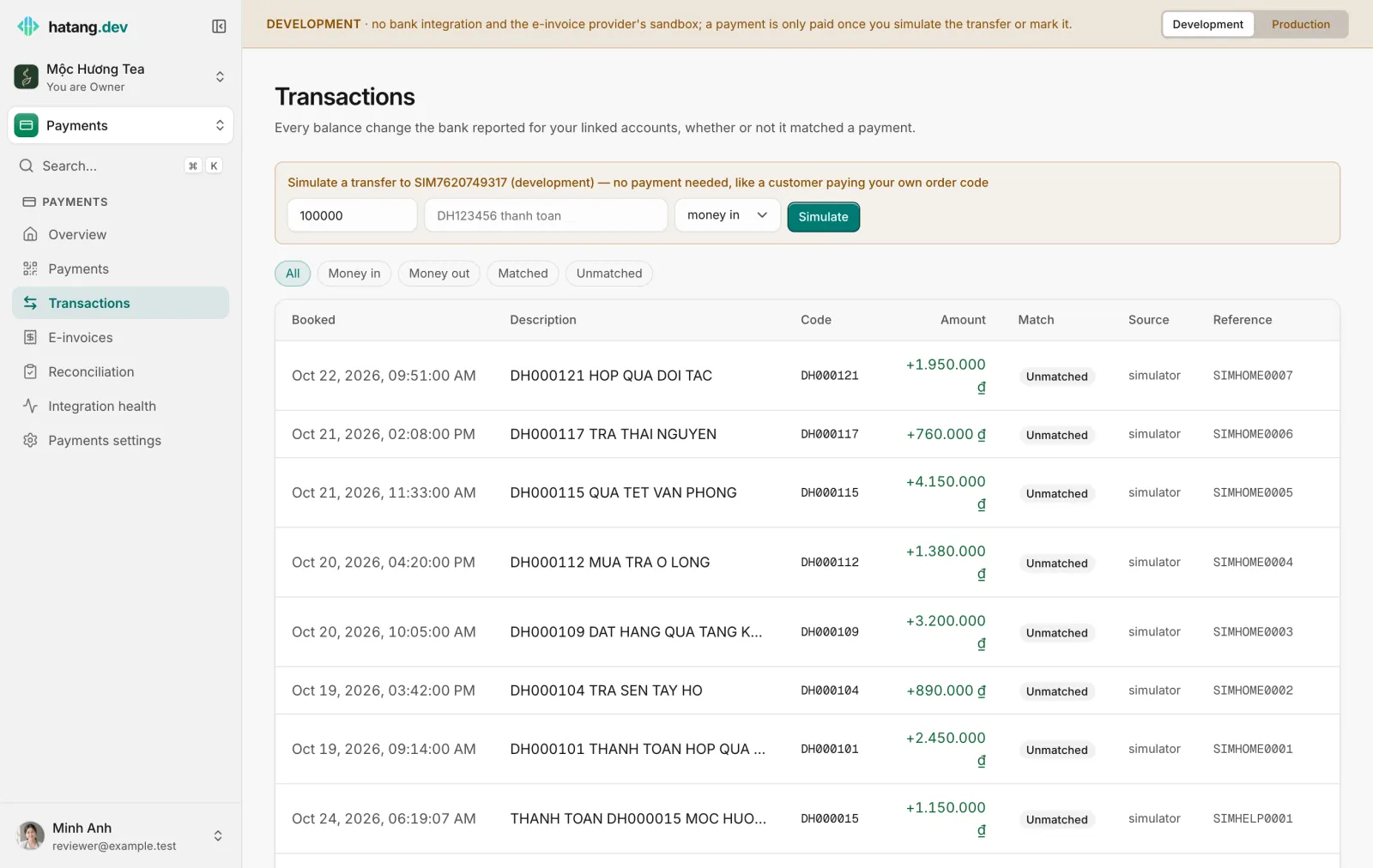
What the list shows
| Column | Meaning |
|---|---|
| Booked | When the bank booked the transfer |
| Description | The transfer description as the bank reported it |
| Code | The payment code or your own order code found in the description |
| Amount | + for money in, - for money out |
| Match | Matched when it paid one of your payments; Unmatched otherwise |
| Source | How Ha Tang learned about it: push (the bank notified it), reconcile (read from the account history), import (a statement you imported) or simulator (development) |
| Reference | The bank's own reference number |
Filter with Money in, Money out, Matched and Unmatched.
How a transfer is matched
When a transfer arrives, Ha Tang reads its description in this order:
- Clean the description. Accents are removed,
đbecomesD, everything is put in capitals and every space and punctuation mark is dropped.ck htbf7rdgvq - cảm ơnbecomesCKHTBF7RDGVQCAMON. - Look for a payment code. A generated code is your prefix (
HTby default) followed by 8 letters and digits that never include0,O,1orI, so a customer copying it by hand cannot confuse them. If the cleaned description contains the code of one of your open payments on that account, the transfer pays it. - Look for your own codes. If you gave a payment your own transfer code (for example
DH000016), Ha Tang finds it anywhere in the description. When one code is part of another (DH1002andDH10024), the longer one wins. - Look for your order code format. If the account has Your own order code set (for example
DHfollowed by 6 digits), Ha Tang notes the order code it finds, even when there is no payment for it, and passes it to your systems.
What follows:
- The transfer paid a payment: it is Matched, the payment becomes Paid, Partially paid or Overpaid, and your website is notified.
- No payment matched: it is Unmatched, with any order code that was found in Code. Your systems are still told about it, so a shop that works with order codes only can confirm the order.
- A transfer is never counted twice: if the bank reports the same transfer again (same reference and amount on the account), it is ignored.
When the customer forgot the code
The transfer arrives Unmatched with an empty Code. To settle it:
- Find the order: compare the amount, the time and the sender's name (shown on Reconciliation under From). Ask the customer if needed.
- Open the payment under Payments → Payments and click Mark paid, with a note such as
CK thiếu mã, ref FT2610....
The payment is then Paid, and your website is notified as usual.
| Situation | What you see | What to do |
|---|---|---|
| Customer forgot the code | Unmatched, no code | Find the order and Mark paid |
| Wrong amount | The payment is Partially paid or Overpaid | Ask for the rest, or refund the difference from your bank |
| Paid twice | Two transactions; the payment is Overpaid | Refund from your bank |
| Paid after the payment expired | The payment becomes Paid anyway | Decide whether to deliver |
| Paid into another account | Nothing: Ha Tang only sees linked accounts | Check with the customer |
| Transfer in your bank app, missing here | The bank did not report it | Import the statement for that day |
Shops that only use their own order codes
A shop with a printed QR at the counter, or a system that already has order numbers, does not need to create a payment per order. Set Your own order code on the account (for example prefix DH, 6 digits) under Payments settings → Bank accounts → Matching and notifications. Every transfer carrying such a code is then reported to your systems with the code found, ready to be matched to the order on your side. Your developer can generate a VietQR with the order code already in the description; see Receive transfers without orders.
Test it in development
In development, Simulate a transfer at the top of Transactions sends a transfer into the simulated account with any amount and description, without a payment, like a customer paying your own order code. Try DH123456 thanh toan with an order code format set, or a description with no code at all.
Useful next steps
Was this article helpful?
Related articles
- Create and follow paymentsCreate a payment with its own VietQR and transfer code, share it with the customer, and follow it until it is paid, partly paid, overpaid or expired.
- Link your bank accountConnect the bank account your customers pay into (MB Bank, BIDV, ACB or through Pay2S) so Ha Tang sees each transfer, and recover missed transfers from a statement.
- Reconcile money in against invoicesSee which transfers into your accounts still have no e-invoice, issue the missing ones, and mark refunds or internal transfers as needing none.
Not finding what you are looking for?
Our team answers in the chat, in English or Vietnamese.