Reconcile money in against invoices
See which transfers into your accounts still have no e-invoice, issue the missing ones, and mark refunds or internal transfers as needing none.
Updated on
On this page
Every sale paid by bank transfer should end up with an e-invoice. Payments → Reconciliation checks the money that arrived in your linked accounts against the invoices issued, so your accountant sees at a glance what is still missing before the tax deadline, instead of comparing a bank statement with an invoice list line by line.
What counts as invoiced
A transfer into your account is:
- Invoiced when an invoice in force points at it, either directly or through the payment it paid. Invoices that failed, were deleted, canceled or rejected by the tax office do not count.
- Missing an invoice otherwise.
- Needs no invoice when someone marked it that way, for example a refund from a supplier or money moved between your own accounts.
Only money in counts; money going out is left out.
Read the report
- Open Payments → Reconciliation.
- Choose By week or By month, and move with Previous and Next. Days follow Vietnam time.
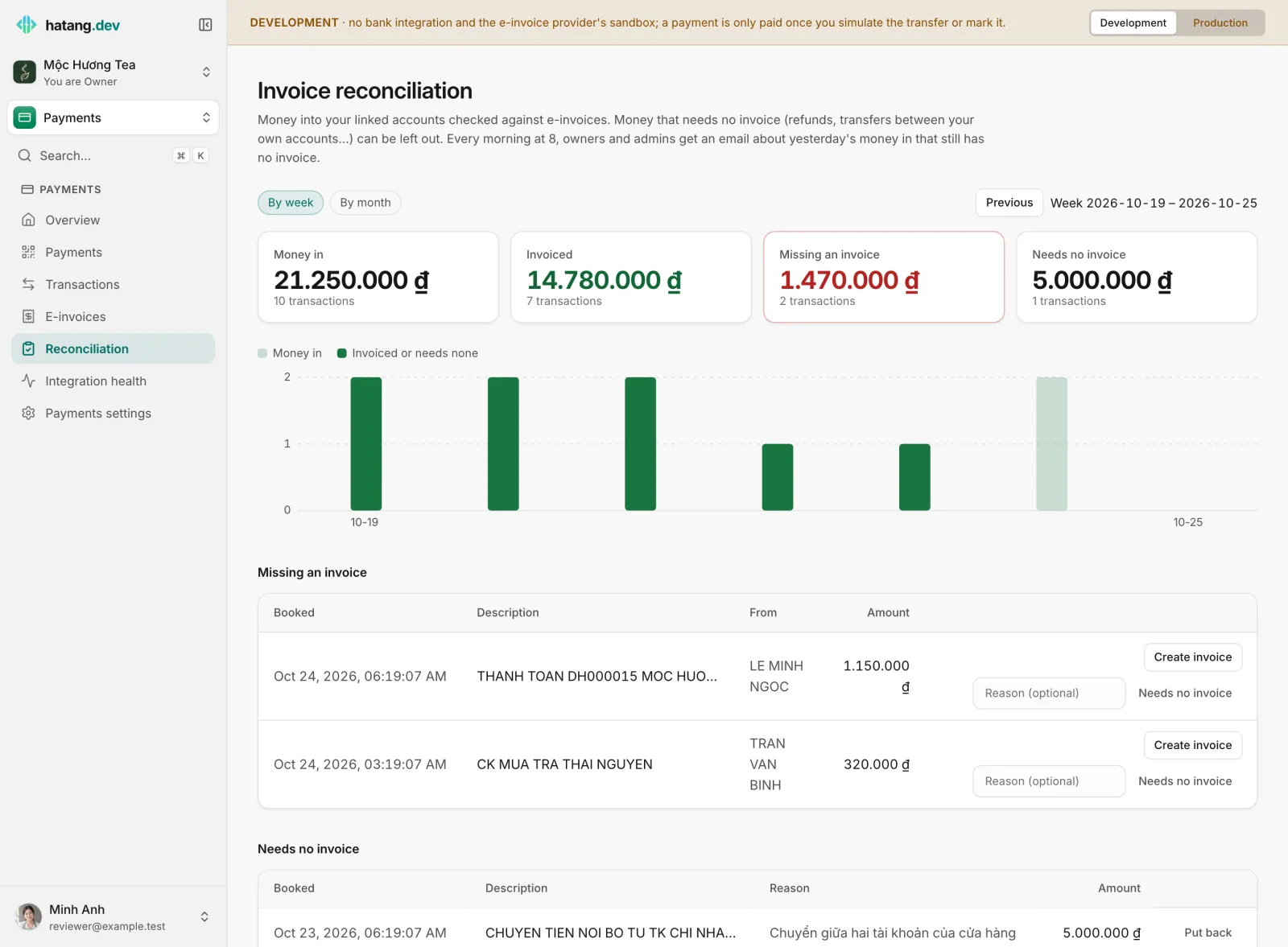
- The four totals show Money in, Invoiced, Missing an invoice and Needs no invoice, each with its amount and number of transactions.
- The chart shows money in per day, and how much of it is invoiced or needs none. Hover a bar to see that day's figures.
Below, Missing an invoice lists each transfer still to deal with: when it was booked, its description, who sent it (From) and the amount.
Deal with a missing invoice
For each transfer in the list, either:
- Create invoice: opens the new invoice form linked to that transfer, with a unit price worked out from the amount at 10% VAT. Add the buyer, check the item and VAT rate, then create it. This needs an e-invoice provider connected. See Issue e-invoices.
- or Needs no invoice: type a Reason (optional) such as
Chuyển giữa hai tài khoản của cửa hàngand click Needs no invoice. The transfer moves to the Needs no invoice list.
A transfer marked by mistake can be brought back with Put back in the Needs no invoice list.
Creating invoices and marking transfers needs the Work level on the Payments module.
The daily email
When the business has an e-invoice provider connected, owners and admins receive an email every morning at 8:00 (Vietnam time) listing the previous day's money in that still has no invoice. They also get an email when an invoice fails, is rejected by the tax office, is in conflict with the provider, or has not reached the tax office 5 hours after it was created.
Good practice
- Look at the report at least once a week, and before every tax filing.
- Mark internal transfers and refunds as needing no invoice as soon as you see them, with a reason your accountant will understand later.
- If many transfers are missing invoices every day, consider asking for an invoice on every payment: when a payment is created with Issue an e-invoice once paid, the invoice is created automatically the moment it is paid.
Developers can read the same report through the API; see E-invoices in the developer hub.
Useful next steps
Was this article helpful?
Related articles
- Issue e-invoicesIssue an e-invoice automatically when a payment is paid, or by hand for any payment or transfer, follow it until the tax office accepts it, and fix the ones that fail.
- Transactions and automatic matchingHow Ha Tang reads each transfer's description to find the payment or order it pays, what happens when the customer forgets the code, and how to handle unmatched money.
- Connect your e-invoice providerConnect your own Mắt Bão e-invoice account so Ha Tang can issue invoices under your tax code, choose the template and series, and keep both sides in sync.
Not finding what you are looking for?
Our team answers in the chat, in English or Vietnamese.