Connect a personal Zalo account
Scan a QR code to bring a personal Zalo account's chats, groups and friend requests into the inbox, so several agents answer on one number.
Updated on
On this page
Many shops sell through a personal Zalo account: the shop's phone number or a salesperson's. Connect it by scanning a QR code, and its 1-1 chats, Zalo groups and friend requests land in the Inbox, where several agents can answer on the same number. Distribution rules, flows and the AI assistant work as on every other channel.
Unlike a Zalo OA, a personal account has no reply window and no paid package: you can answer customers at any time.
What it supports
| Area | Supported |
|---|---|
| Incoming | Text, images, GIFs, videos, voice messages, files (up to 25 MB are copied into Ha Tang), stickers (as [Sticker]), links and locations |
| Outgoing | Text, images, videos and files up to 25 MB; larger files go out as a download link. An MP4 video shows as a video sent from the phone, with a preview, and plays on tap |
| Quoted replies | Reply under a message: the customer sees your answer quoting it in Zalo |
| Forwarding | Forward a message to one or more other Zalo conversations of the same account |
| Recall | Recall a message you sent. When a customer recalls one, an internal note keeps what they recalled |
| Messages from the phone | Messages typed on the phone or in Zalo PC appear in the conversation as agent messages |
| Groups | Each Zalo group is one conversation. Create groups, add or remove members and rename them from Ha Tang |
| Friends | Accept or decline friend requests, send friend requests, and sync the friend list into Customers |
Before you start
- A phone with the Zalo app, signed in to the account you want to connect.
- The Manage level on the Customer Support module.
- At least one website under Customer Support → Channels. Conversations belong to a website, which decides their reports, distribution rules and automation.
Connect the account
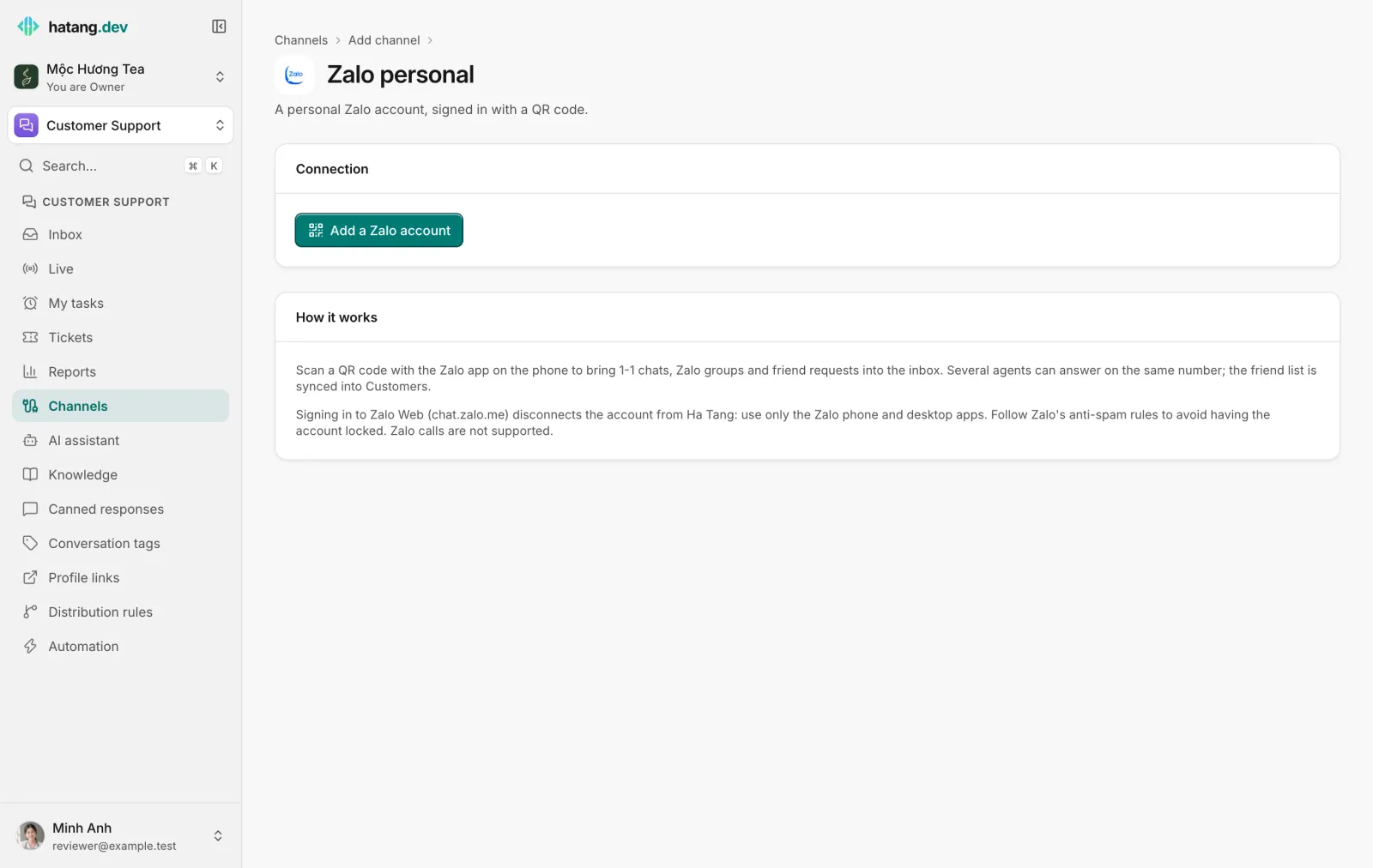
- Go to Customer Support → Channels, click Add channel and pick Zalo personal under Messaging apps.
- If the business has several websites, choose one under Attach new connections to site.
- Click Add a Zalo account. A QR code appears.
- On the phone, open Zalo and tap the QR scanner icon at the top.
- Scan the code, then confirm the sign-in on the phone.
The dialog says "Name is connected. New messages will land in the inbox." and opens the account's page. The account appears under Messaging apps with the status Active, its phone number and its number of friends.
If the code expires, click New code. If you decline on the phone, the dialog says so and you can start again. A Zalo account can belong to only one business at a time.
In the inbox
- Reply to a specific message. Click Reply under it; the customer sees your message quoting it.
- Forward. Click Forward under a message, search the account's other Zalo conversations, pick one or more and send.
- Recall. Recall a message you sent from the message menu. When the customer recalls a message, the conversation gets an internal note with the recalled text.
- No window. There is no 24-hour or 48-hour limit; reply whenever you like.
Zalo groups
Every Zalo group the account is in becomes one conversation, and each message shows who sent it. The Zalo button in the conversation header gives you:
- in a 1-1 conversation: Create a Zalo group with this customer and people you pick from the account's contacts;
- in a group conversation: the member list, Add members from contacts, remove a member, and rename the group. If Zalo refuses a change, for example because only the group's admins may make it, Ha Tang shows Zalo's error.
The conversation also records when someone joins, leaves or is removed, and when the group is renamed.
Friends and customers
- Incoming friend requests show in the conversation with Accept and Decline.
- Send a friend request from the Zalo button of a 1-1 conversation, with an optional message.
- Contact sync. The friend list is copied into Customers when you connect and then once a day, so you can filter, tag and follow up friends like customers from any other channel.
Distribution and automation
To send these conversations to one team, tick Zalo personal under a distribution rule's Channels (none ticked = any). Flows and the AI assistant apply as on other channels.
Limits
- Ha Tang sends one account's messages one at a time, with a short gap between them, to stay within Zalo's anti-spam limits.
- Follow Zalo's anti-spam rules: do not message strangers in bulk, or Zalo may restrict or lock the account.
- Zalo calls are not supported; use the phone or Zalo PC.
- The maximum number of friends is set by Zalo for each account.
When the session ends
The Zalo session ends when someone signs in to Zalo Web, the account signs out on the phone, or Zalo asks to sign in again. The account's status changes to Needs reconnecting, its page shows the reason (or Interrupted), and sends fail. Click Scan the QR code again on the account's page and scan with the phone; conversations and settings are kept.
Click Disconnect at the bottom of the account's page to stop receiving messages. Past conversations are kept, and connecting the same account again later brings its history back.
Troubleshooting
| The Inbox says | Cause | What to do |
|---|---|---|
| the personal Zalo session is disconnected | The session ended | Scan the QR code again under Customer Support → Channels. Do not sign in to Zalo Web with this account |
| the customer blocks strangers or blocked you | The customer only accepts messages from friends, or blocked the account | Send a friend request, or reach them on another channel |
| "This account is already connected to another business" (when connecting) | The account is connected in another business | Disconnect it there first |
Useful next steps
Was this article helpful?
Related articles
- Connect a Zalo Official AccountMessages customers send to your Zalo OA land in the inbox, and your team replies from Ha Tang within Zalo's 48-hour window.
- Reconnect a channelWhen a channel shows Needs reconnecting, messages stop arriving and replies fail. Here is why it happens and how to fix it for each channel.
- Customer profilesEvery person who writes to you gets one profile across all channels, with contact details, stage, owner, labels, notes and history.
Not finding what you are looking for?
Our team answers in the chat, in English or Vietnamese.