Customer profiles
Every person who writes to you gets one profile across all channels, with contact details, stage, owner, labels, notes and history.
Updated on
On this page
A customer profile is one record per person, whatever channel they use. When someone writes to you for the first time on the chat widget, Zalo, Messenger, Instagram, TikTok, WhatsApp, Telegram, LINE, X or email, Ha Tang creates a profile for them. Later conversations from the same person, on any channel, land on the same profile, so your team always sees the whole relationship.
Profiles live in the CRM app. You need at least View access to CRM to see them and Work access to change them (see Module access).
How Ha Tang recognizes the same person
Each way a person reaches you (a browser session, a Zalo account, a Messenger user, an email address) is an identity. Identities join a profile by email address or phone number:
- An identity whose email or phone matches an existing profile joins that profile.
- Two profiles that end up with the same email address are merged automatically. The older profile is kept.
- Two profiles that share only a phone number are not merged automatically. They are suggested to you as possible duplicates (see Merge duplicate customers).
- A phone number or email address a customer types into a chat is saved on their profile when the profile has none yet. If it belongs to someone else, the inbox asks the agent whether they are the same person instead of merging on its own.
Details a website visitor types into the chat widget are only a claim. They never join a profile of someone who signed in on your website or app with a verified identity, so typing a known customer's email address does not give anyone access to that customer's history.
Find a customer
Go to CRM → Customers. The list shows everyone, most recently seen first, with their channels, stage, owner, labels and when they were last seen.
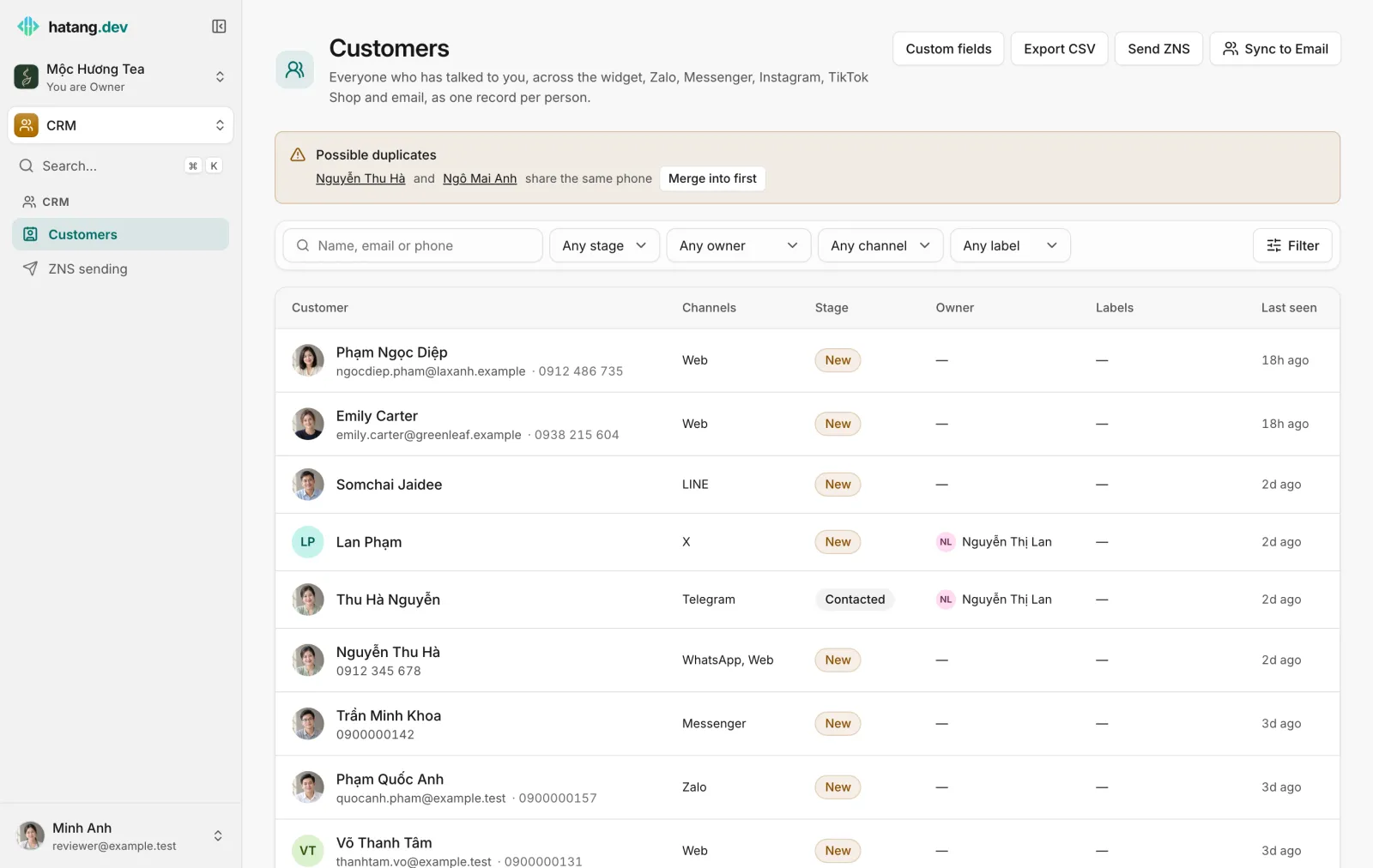
- Search by name, email or phone number. Phone search ignores spaces, so
0912345678finds "0912 345 678". - Filter by Stage, Owner (including No owner), Channel and Label, then click Filter. Clear removes the filters.
- The filters you set also apply to Export CSV, Send ZNS and Sync to Email, so you can act on exactly the group you see.
You can also find a customer from any page: open the search with ⌘K (Ctrl+K on Windows), type a name and pick Search customers for "…".
What a profile shows
Click a customer to open the profile.
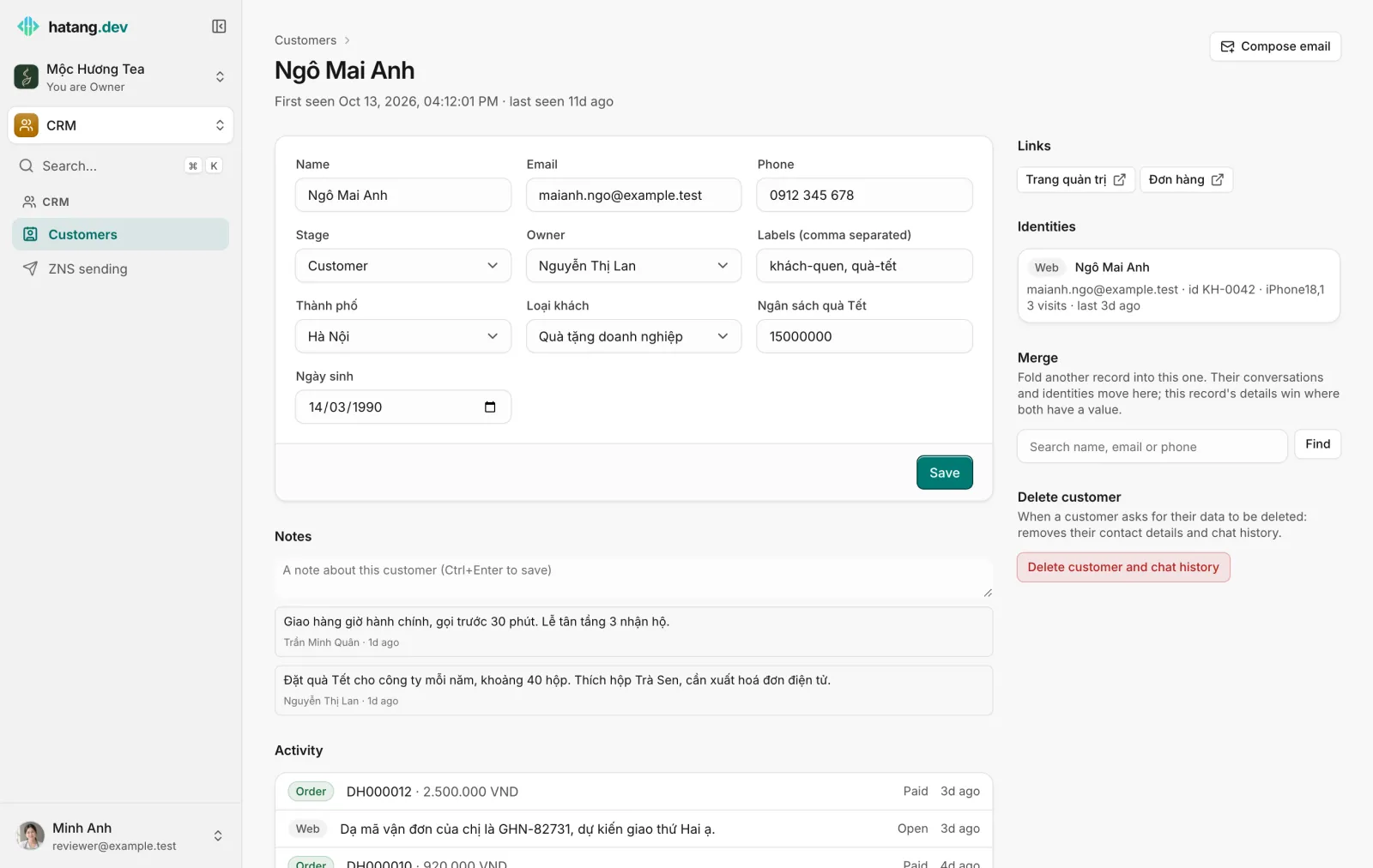
- Contact details: Name, Email and Phone. Changing the email to one that another profile already has merges the two.
- Stage, Owner and Labels (comma separated). See Stages, owners and labels.
- Custom fields your business added, such as city or customer type. See Custom fields.
- Click Save to keep your changes. The page shows "Saved."
- Notes: short notes for the team, newest first, with who wrote them. Only the author can delete a note.
- Activity: the customer's timeline on every channel: conversations, emails in and out, email broadcasts, orders, ZNS messages and ratings. Click an entry to open it.
- Identities (on the right): each way the person reached you, with channel, email or phone, device, city, number of visits and the campaign (UTM) that brought them.
When the customer has an email address, you can reply in Customer Support and the business has a support mailbox, Compose email at the top writes them an email from that mailbox. If email cannot reach them (the address bounced, they marked an email as spam or unsubscribed), the profile says so in a yellow box.
Profiles in the inbox
Agents rarely need to leave the conversation: the panel on the right of the Inbox shows the same profile, where they can change stage, owner, labels and fields and add notes. See The customer panel.
Good to know
| Question | Answer |
|---|---|
| Can I create a profile by hand? | No. A profile is created the first time someone writes to you, on any channel. |
| Can I delete a customer? | Yes, with Manage access to CRM: Delete customer and chat history at the bottom right of the profile removes their contact details and conversations; orders and tickets stay. See Handle data requests. |
| Why is there a profile called "Customer 1a2b"? | The person has not given a name, email or phone yet. The last characters of the profile's id stand in for the name. |
| Who can see profiles? | Everyone with View access to CRM. Owners and admins always can. |
Useful next steps
Was this article helpful?
Related articles
- Stages, owners and labelsTrack where each customer is in your sales flow, who looks after them, and group them with labels you can filter, export and message.
- Merge duplicate customersFold two profiles of the same person into one, from the duplicate suggestions, the profile page or the inbox, and undo a merge if it was a mistake.
- Custom fieldsAdd your own fields to every customer profile, such as city, customer type or budget, and let the AI assistant fill them in from the conversation.
- The customer panelEverything about the customer beside the conversation: contact details, what they did before writing, attributes, CRM fields, notes, tickets and orders.
Not finding what you are looking for?
Our team answers in the chat, in English or Vietnamese.