Resolve, snooze, close and reopen conversations
Mark a conversation done, park it until later, close it for good, and what happens when the customer writes again.
Updated on
On this page
Keeping the list short is how a team stays fast. When you have answered a customer, resolve the conversation; it leaves the list until the customer writes again. If you are waiting for something, snooze it instead.
You need Work access to Customer Support for everything on this page.
Resolve a conversation
Click Resolve in the conversation header. You can also:
- type
@cin the reply box, - press
rwhile the conversation is open (not while typing), - tick several conversations in the list and click Resolve in the bar above it.
The status changes to Resolved, the timeline records "Status: Open → Resolved", and the conversation leaves Open & pending. Choose Resolved in the status menu to see it again.
When you resolve a conversation, Ha Tang can also:
- ask the customer to rate the conversation, if ratings are turned on for the website (see Satisfaction ratings),
- email the customer a transcript, if Email the visitor a transcript when a conversation is resolved is on in the website's settings,
- let the AI tag the conversation, for tags set to AI applies it (see Conversation tags).
When the customer writes again
As soon as the customer writes again, the conversation is back in the list as Open:
- on email, Telegram, TikTok, TikTok Shop and personal-Zalo groups, the same conversation reopens;
- on the website chat, Zalo OA, personal Zalo, Messenger, Instagram, WhatsApp, LINE and X, a new conversation starts. The earlier ones stay listed in the customer panel.
If the conversation had been resolved automatically, or its assignee has left the business, it is placed again by your distribution rules rather than going back to the previous owner.
Reopen a conversation
Open a resolved or closed conversation (status menu → Resolved or Closed) and click Reopen in the header. It becomes Open again. On a resolved conversation, pressing r does the same.
Close a conversation for good
Click ⋯ (More) in the header and choose Close. A Closed conversation takes no more messages: the reply box says "This conversation is closed". If the customer writes again, a new conversation starts. Use Close for spam-like or finished threads you never want to continue; for everyday work Resolve is enough.
Snooze until later
Snoozing hides a conversation from the list until a time you choose or until the customer writes, whichever comes first. Use it when you are waiting for something, such as stock or a delivery date.
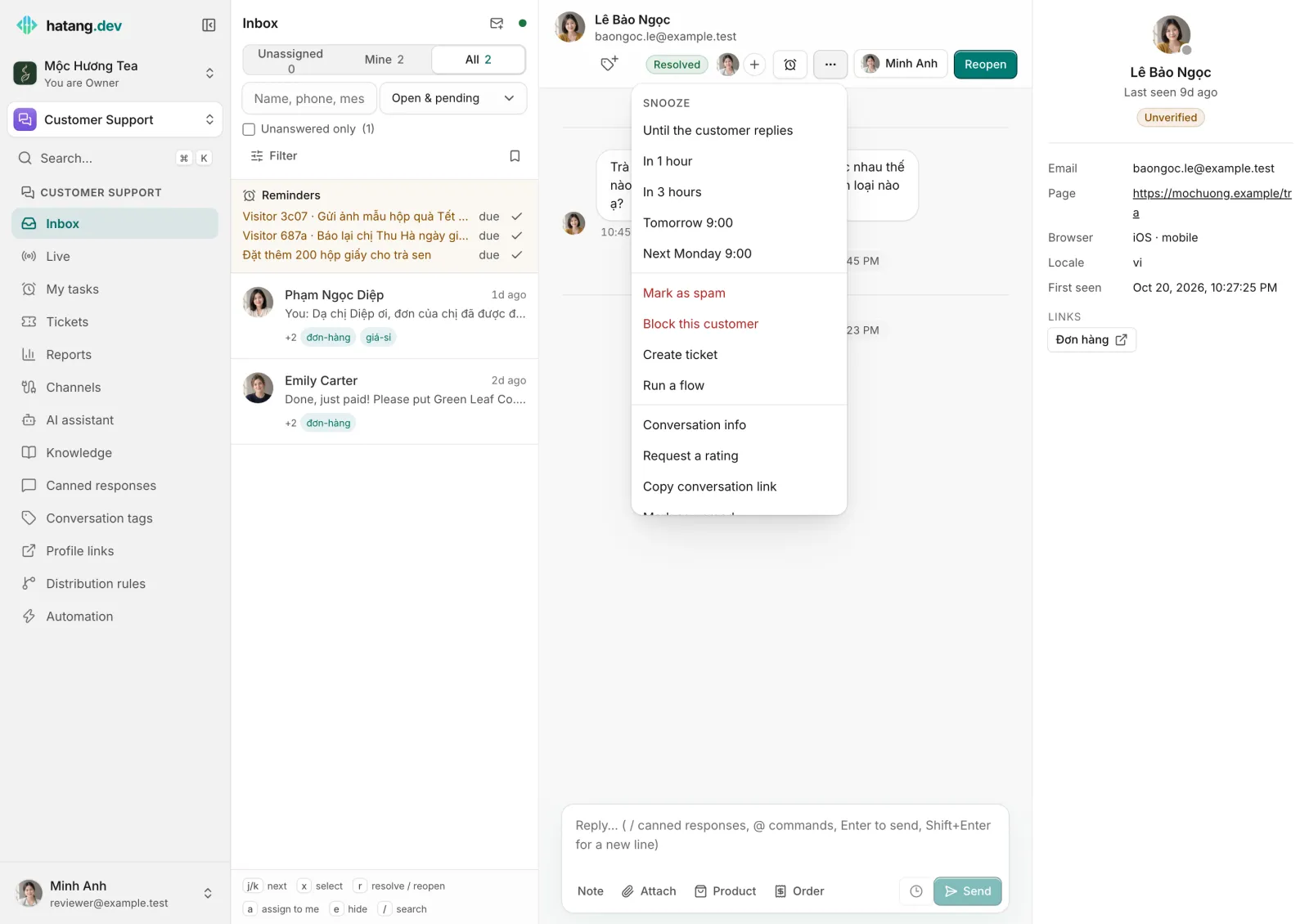
- Click ⋯ (More) in the conversation header.
- Under Snooze, choose Until the customer replies, In 1 hour, In 3 hours, Tomorrow 9:00 or Next Monday 9:00.
The conversation moves to Hidden (status menu), shows "Snoozed until …" at the top, and comes back on its own with an event "Snooze ended" or "Back because the customer wrote". Click Restore to inbox to bring it back earlier. Pressing e hides the open conversation until the customer replies.
To be reminded about a conversation without hiding it, use a reminder instead.
Handled without a reply
Some messages need no answer, such as "OK, thanks". Type @ok in the reply box to mark the conversation handled: it leaves Unanswered only, its unread count is cleared and the timeline shows "… marked this handled without replying". It stays open; resolve it if you are done.
Automatic resolve
Open conversations with no new messages for a few days are resolved automatically: after 3 days unless you change it. To change it, go to Customer Support → Channels, open your website and set Auto-resolve idle conversations after (days, 0 = never) on its Settings tab. It applies to every channel of that website except personal-Zalo groups. Conversations resolved this way do not ask the customer for a rating.
Useful next steps
Was this article helpful?
Related articles
- Get to know the inboxOne list for every conversation from your website, Zalo, Facebook, TikTok, email and the other channels, with filters, statuses and team views.
- Reminders and My tasksGet reminded to follow up on a conversation, set a to-do for yourself or a teammate, and see everything due in My tasks.
- Satisfaction ratings (CSAT)Ask customers to rate each resolved conversation, with stars on your website and quick replies on Zalo, Messenger and Instagram, and read the results.
- Keyboard shortcutsMove through the inbox, resolve, assign and reply without the mouse.
Not finding what you are looking for?
Our team answers in the chat, in English or Vietnamese.