Satisfaction ratings (CSAT)
Ask customers to rate each resolved conversation, with stars on your website and quick replies on Zalo, Messenger and Instagram, and read the results.
Updated on
On this page
CSAT (customer satisfaction) is the simplest measure of how your support feels to customers: after a conversation, they rate it from 1 to 5. Ha Tang asks for the rating at the right moment, collects it on every channel, and shows the results per period and per agent.
Turn on automatic ratings
Ratings are set per website, and apply to the conversations of that website and the channels attached to it. You need Manage access to Customer Support.
- Go to Customer Support → Channels and click your website.
- Open the Automation tab.
- Under Satisfaction rating (CSAT), tick Ask visitors to rate the conversation when it is resolved.
- Change the question if you like, in Question (Vietnamese) and Question (English). The customer sees the one in their language.
- Click Save.

From then on, when an agent resolves a conversation, Ha Tang posts the question once in that conversation. Conversations closed automatically are not asked, and a conversation is asked only once, even if it is reopened and resolved again.
Ask for a rating yourself
In a conversation, open the ⋯ menu and choose Request a rating. This works even when automatic ratings are off, and you can ask again if the customer did not answer. It is not sent once the customer has rated.
What the customer sees
| Channel | How they rate |
|---|---|
| Website chat widget and your app | Five stars, then an optional comment and Send rating |
| Messenger and Instagram | Quick-reply buttons: "😞 Unhappy", "😐 Okay", "😊 Happy", "🤩 Delighted" (in Vietnamese for Vietnamese customers) |
| Zalo OA | The same four answers as a numbered list |
| Other channels | The question as text |
On every channel, a customer can also answer with a number from 1 to 5. The four quick replies count as 1, 3, 4 and 5 stars. After rating, the customer gets a short thank-you message. If they rate again, the new score replaces the old one.
Read the results
- Customer Support → Reports shows the average CSAT out of 5 and the number of ratings for the period, the Latest ratings with comments, and each agent's average in the Agents table. The AI assistant part compares conversations the AI handled alone with those a person answered.
- The Recent ratings widget puts the latest scores and comments on any dashboard. See Custom dashboards and reports.
- Each rating appears in the conversation ("Visitor rated 4/5") and in the customer's Activity.
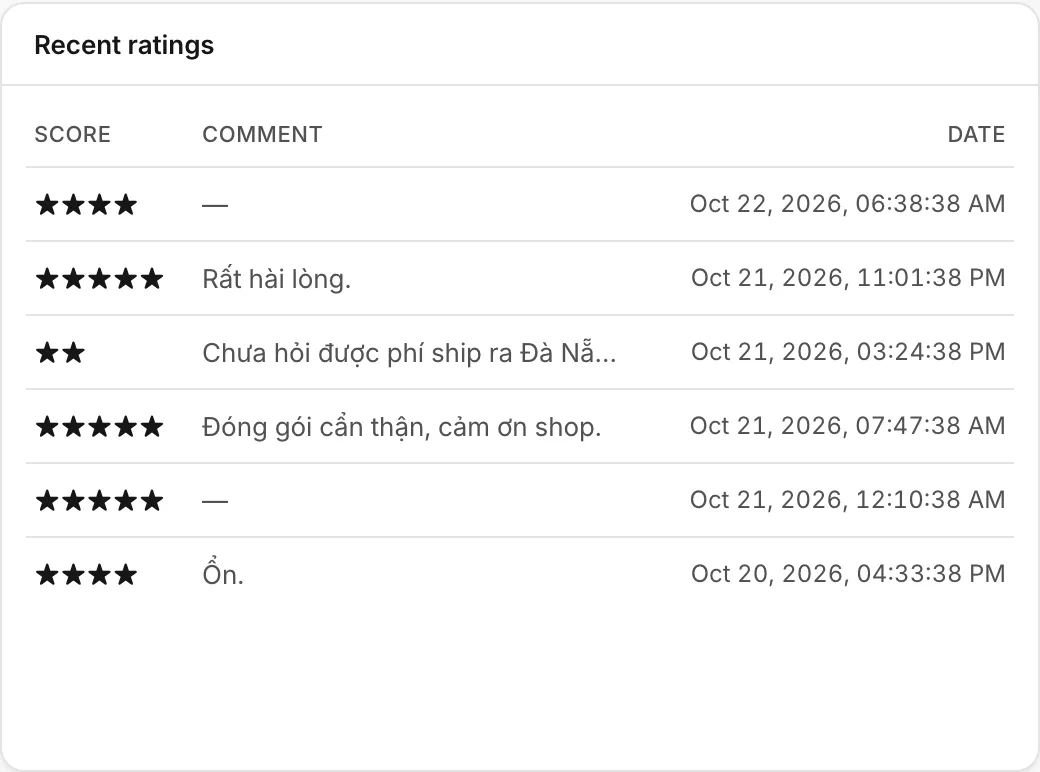
A rating counts for the employee the conversation was assigned to when the customer rated it.
Use ratings to improve
- Read every rating of 1 or 2 stars, and open the conversation. The comment usually says what went wrong: a slow answer, a missing piece of information, a delivery problem.
- Watch the trend, not one week. A small business gets few ratings, and a single angry customer moves the average.
- Ratings are voluntary, so happy and very unhappy customers answer most. Compare periods with each other rather than with an ideal number.
- To act on a bad rating straight away, send
chat.rating.createdto your own tools with a webhook (see Webhooks).
Was this article helpful?
Related articles
- Support reportsSee how many conversations your team handled, how fast it answered, what the AI did, how satisfied customers were and what it sold, for any period.
- Agent performanceCompare how many conversations each employee handled, how fast they answered, how customers rated them and what they sold.
- Resolve, snooze, close and reopen conversationsMark a conversation done, park it until later, close it for good, and what happens when the customer writes again.
- Webhooks for Zapier, Make and n8nSend Ha Tang events, such as a new order, a paid payment or a new conversation, to Zapier, Make, n8n or your own server the moment they happen.
Not finding what you are looking for?
Our team answers in the chat, in English or Vietnamese.