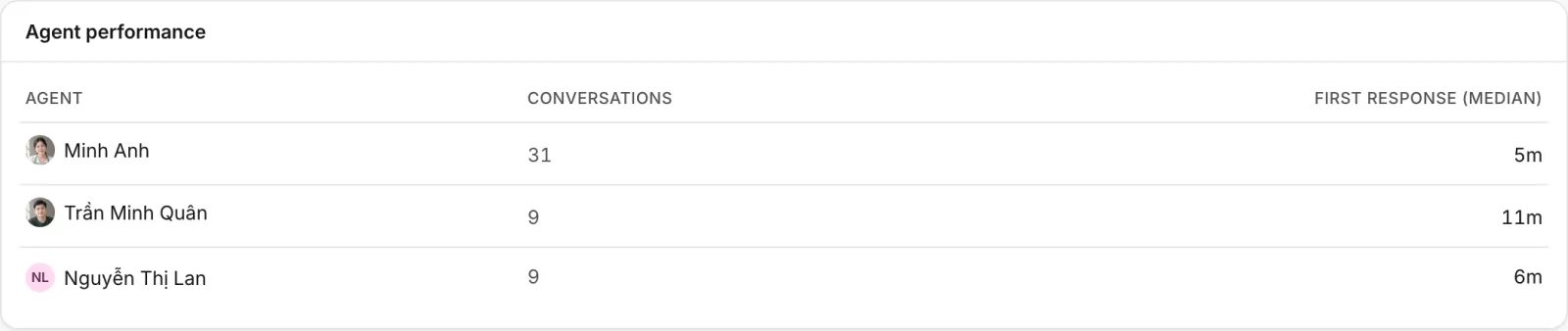
Agent performance
Compare how many conversations each employee handled, how fast they answered, how customers rated them and what they sold.
Updated on
The agent numbers show who carried the work and how it went: conversations, speed, satisfaction and sales, per employee. Use them to spread the load fairly, to spot who needs help at busy hours, and to thank the people customers love.
Where to find them
- Customer Support → Reports, the Agents table near the bottom, for any period. Its CSV link downloads it.
- The Agent performance widget, which you can put on any dashboard or report: conversations and median first response per agent.
To see one employee's whole report, choose them in All agents at the top of Customer Support → Reports: every key number then covers only the conversations assigned to them.
What each column means
| Column | What it counts |
|---|---|
| Agent | The employee, by name. Someone who has since left the business or lost access to Customer Support still shows by name, here, in Latest ratings and in the widget |
| Conversations | Conversations started in the period that the employee was assigned, or replied to publicly, whichever is more |
| Messages | Public replies they sent. Internal notes are not counted |
| Resolved | Conversations assigned to them that are resolved |
| First response | The median time to the first answer, in the conversations assigned to them |
| CSAT | Their average rating out of 5, with the number of ratings |
| Orders | Orders attributed to them in the period (drafts not counted) |
| Revenue | The total of those orders that are paid |
How Ha Tang attributes the work:
- Assignment counts for the employee the conversation is assigned to now. If a conversation was transferred, it counts for the last person.
- A rating counts for the employee the conversation was assigned to when the customer rated it.
- An order counts for the employee who created it in the conversation. For an order created by the API or the AI assistant, the first employee who works on it gets it.
- Replies from the AI assistant, flows and API keys are never counted for an employee. They appear in the AI assistant part of the report.
Using the numbers fairly
- Compare people over the same period and the same kind of work. Someone who handles wholesale buyers on Zalo will have fewer, longer conversations than someone answering delivery questions on the website.
- Look at First response together with when people work. Night shifts and weekends are slower everywhere.
- A handful of ratings says little. Wait for twenty or more before drawing conclusions from CSAT.
- Revenue follows who created the order, not who did the selling. If your team splits the work (one person consults, another closes), agree on who creates the order.
- Talk to people about their numbers before acting on them. The numbers say what happened, not why.
Who can see them
There is no separate permission for reports: everyone with View access to Customer Support, which every agent has, can open the report and the agent table. A dashboard with the Agent performance widget shows it to the same people. Keep that in mind when you discuss the numbers, and see Module access for what each level allows.
Was this article helpful?
Related articles
- Support reportsSee how many conversations your team handled, how fast it answered, what the AI did, how satisfied customers were and what it sold, for any period.
- Satisfaction ratings (CSAT)Ask customers to rate each resolved conversation, with stars on your website and quick replies on Zalo, Messenger and Instagram, and read the results.
- Assign and transfer conversationsGive a conversation an owner, take one yourself, hand it to a teammate, or send it back through the distribution rules.
- Custom dashboards and reportsBuild pages of widgets from every module, such as sales, support, payments and email, for your team's daily view and for period reports you can print.
Not finding what you are looking for?
Our team answers in the chat, in English or Vietnamese.