Change how the widget looks
Set the widget's colour, theme, position, launcher button, header, language and the pages it shows on, and check every change in the live preview.
Updated on
On this page
Make the widget match your brand: your colour and logo, a button with a word on it, a dark theme for a dark website. Every setting is on the website's page in Ha Tang, and the preview next to the form shows the real widget as you change things.
You need the Manage access level for Customer Support.
Where the settings are
- Go to Customer Support → Channels.
- Click your website in the Websites & apps group.
The website's page has three tabs:
| Tab | What it holds |
|---|---|
| Settings | The install code, every widget setting in this article and the next ones, the identity secret, and deleting the site. |
| Automation | Follow-up messages (not sent once a channel's reply window has closed: 48 hours after the customer's last message on Zalo OA and TikTok, 24 hours on Messenger, Instagram and WhatsApp), social proof, satisfaction rating (CSAT), conversion tracking, and the flows and campaigns running on this website. See Campaigns and Satisfaction (CSAT). |
| Apps | Mobile apps that use this website's widget settings. These are set up by a developer; see the SDK guides. |
When you are done, click Save settings at the bottom of the form. "Saved. Widgets pick up changes within a minute." confirms it; visitors see the change within a minute, without you touching your website.
The preview
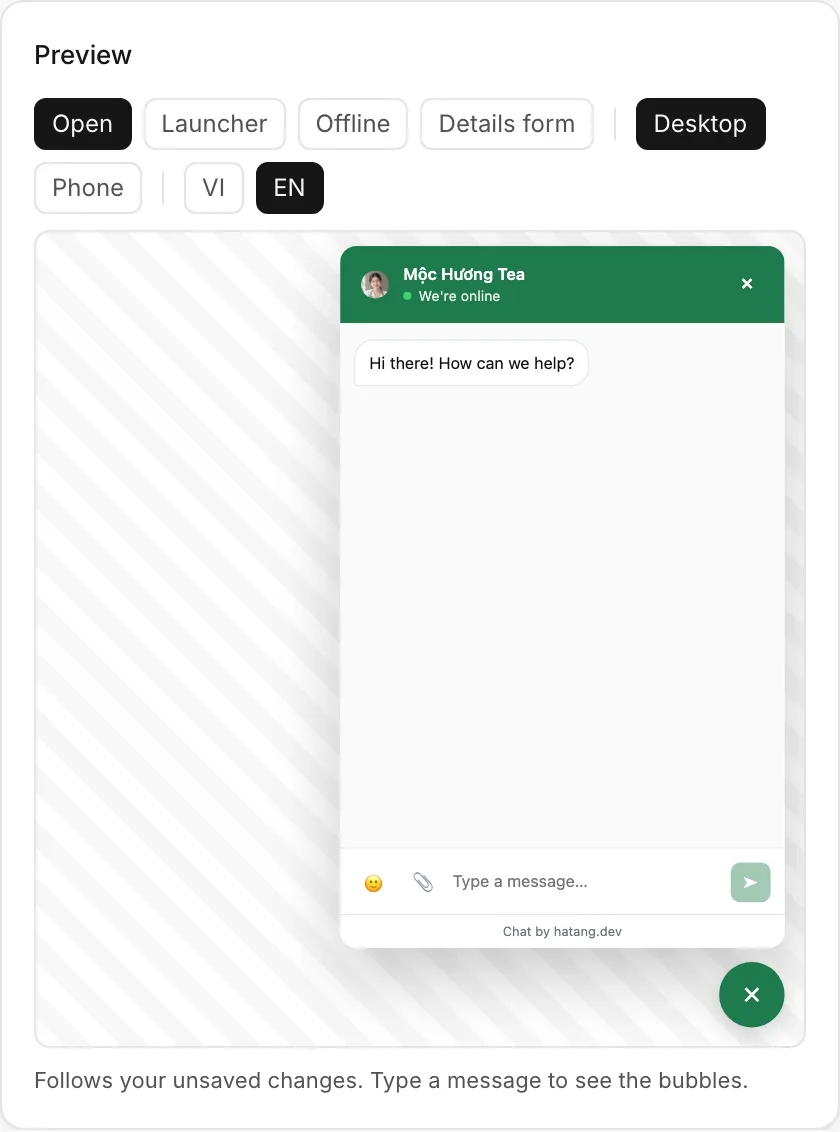
The Preview pane (to the right of the form on a wide screen, below it on a narrow one) runs the real widget with your unsaved changes. Use the buttons above it to switch between:
- Open and Launcher: the open chat, or only the button in the corner.
- Offline: how the widget looks when nobody is available.
- Details form: the form that asks for the visitor's details when they send their first message.
- Desktop and Phone, and VI and EN for the language.
Type a message in the preview to see what the bubbles look like. Nothing typed in the preview is sent.
Colour, theme and position
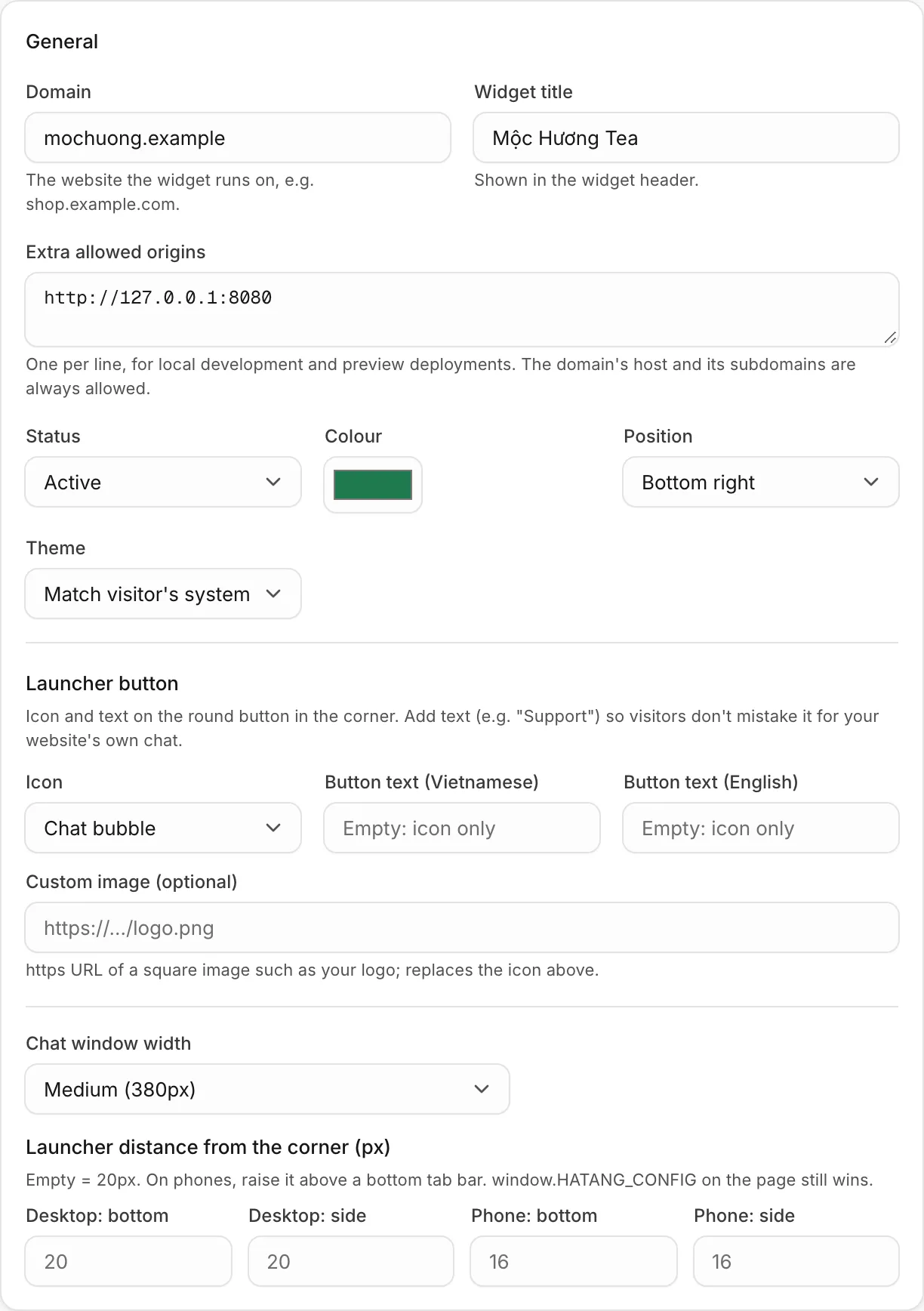
The General card holds the basics.
| Setting | What it does |
|---|---|
| Widget title | The name at the top of the widget. It is also the website's name in Ha Tang. |
| Colour | The colour of the launcher button, the header and the visitor's messages. Click the swatch to pick one. |
| Position | Bottom right (default) or Bottom left. |
| Theme | Light (default), Dark, or Match visitor's system, which follows the visitor's light or dark mode and switches with it. |
| Status | Active, or Disabled (widget hidden) to hide the widget everywhere while keeping its history. |
The launcher button
The round button in the corner opens the chat.
- Icon: Chat bubble, Support headset, Question mark or Round message, in your colour.
- Button text (Vietnamese) and Button text (English): up to 24 characters each, such as "Tư vấn" or "Chat with us". The round button becomes a wider button with the text. Leave both empty for the icon only. Text helps when your website already has another chat or a "Contact" button.
- Custom image (optional): the
https://address of a square image, such as your logo, to use instead of the icon.
While the chat is closed, the button shows a red badge with the number of replies the visitor has not read yet.
Size and distance from the corner
- Chat window width: Narrow (340px), Medium (380px) (default) or Wide (440px). On phones, the open chat always fills the whole screen.
- Launcher distance from the corner (px): Desktop: bottom and Desktop: side (empty means 20 px), Phone: bottom and Phone: side (empty means 16 px). If your mobile site has a bar fixed at the bottom of the screen, such as "Add to cart" or a menu, raise Phone: bottom so the button sits above it. When you leave both phone fields empty, phones use the desktop values.
The chat header
The Chat header card sets the top of the open chat.
- Show: Online agents' photos (default) shows up to three agents who are online right now. Online agents' photos, or the logo when nobody is online does the same and shows the logo when nobody is online. One chosen member's photo always shows the person you pick in Member shown, for example the owner, online or not. Business logo shows the logo from Logo (https URL, square image), or the first letter of the widget title if there is none.
- Intro line (Vietnamese) and Intro line (English): up to 120 characters, such as "Thường trả lời trong vài phút".
Under the intro line, the header says "We're online", or "We're away right now" followed by when you are back if you use office hours. See Office hours and offline messages.
Language
The widget speaks Vietnamese or English. Under Messages, Default language chooses which:
- Auto (browser) (default): Vietnamese for visitors whose browser is set to Vietnamese, English for everyone else.
- Tiếng Việt or English: always that language.
Texts you write, such as the greeting and the button text, have a Vietnamese and an English field. Fill in both if you have foreign customers. A developer can also switch the language per page; the WordPress plugin does it for you.
Where the widget shows
The Where the widget shows card limits the widget to some pages or devices:
- Devices: All devices, Desktop only or Phones only (screens 640 px wide or less).
- Only on URLs containing: one piece of address per line, for example
/san-pham. The widget shows only on pages whose address contains one of them. Leave it empty for every page. - Hide on URLs containing: for example
/checkoutto keep the widget off the checkout page. - Play a sound for new messages and Flash the tab title while the visitor is on another tab: both on by default, so visitors notice your replies.
A chat the visitor already has open stays visible even on a page you excluded.
Useful next steps
Was this article helpful?
Related articles
- Greeting and contact buttonsWelcome visitors with a greeting, pop it over the chat button after a few seconds, and offer Zalo, Messenger, call and email buttons in the widget.
- Office hours and offline messagesDecide when the widget shows as online, what visitors see when your team is away, and how you hear about messages that arrive after hours.
- Ask for contact details with the first messageTurn on the contact details form to collect a visitor's name, phone number or email when they send their first message, so you can reach them even after they leave.
Not finding what you are looking for?
Our team answers in the chat, in English or Vietnamese.