How Ha Tang Payments works
Customers pay by VietQR bank transfer straight into your own account; Ha Tang reads the transfers, matches them to orders and can issue the e-invoice.
Updated on
On this page
Ha Tang Payments lets your customers pay by bank transfer with a VietQR code, straight into your own bank account. Ha Tang reads the account's incoming transfers, recognises which order each one pays, tells your shop or website at once, and can issue the e-invoice (hoá đơn điện tử) when the order is paid.
Ha Tang never holds your money. There is no wallet, no payout delay and no intermediary account: the customer's bank sends the money to yours, and Ha Tang only reads the balance changes.
How a payment flows
- You link the bank account your customers pay into, once. See Link your bank account.
- For each order you create a payment, in the dashboard or from your website. It gets a transfer code such as
HTBF7RDGVQ, a VietQR code and a checkout page. - The customer scans the QR with any Vietnamese banking app. The amount and the transfer code are already filled in; they only confirm.
- The bank reports the transfer to Ha Tang. Ha Tang finds the transfer code in the description and marks the payment Paid (or Partially paid, Overpaid).
- Your website is notified, and if you asked for one, the e-invoice is created at your provider and sent for signing.
Transfers that carry no transfer code are recorded too, under Payments → Transactions, so you can match them yourself. See Transactions and matching.
What you will find in the dashboard
| Page | What it is for |
|---|---|
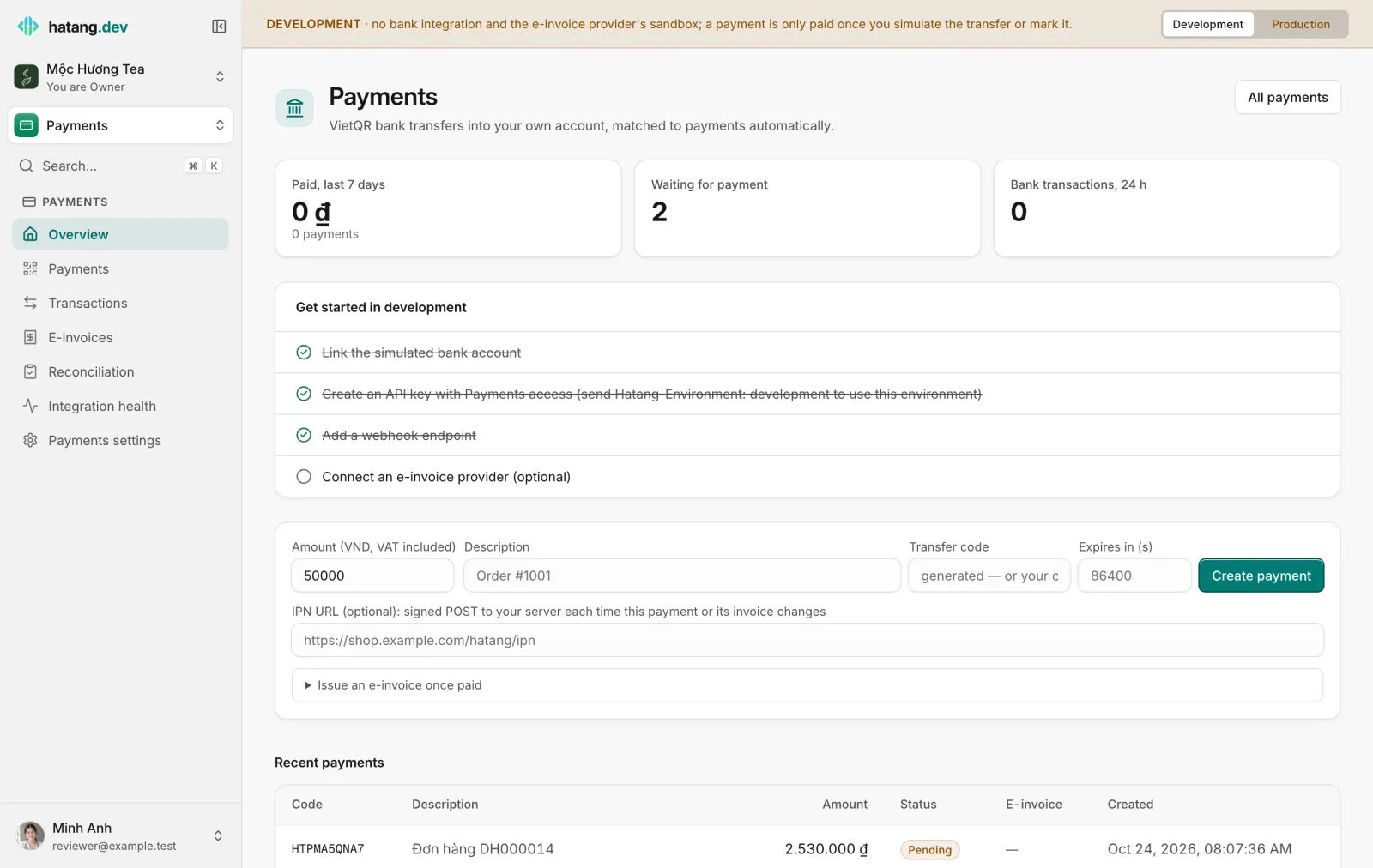
| Overview | Money paid in the last 7 days, payments waiting, today's bank transactions and the latest payments |
| Payments | Create payments and follow each one: QR, status, transfers, e-invoice, history |
| Transactions | Every balance change the bank reported, matched or not |
| E-invoices | Invoices issued through your own e-invoice provider account |
| Reconciliation | Money in checked against invoices: what still needs one |
| Integration health | Calls to and from your bank and e-invoice provider, and anything stuck |
| Payments settings | Bank accounts, invoice providers and the keys that sign notifications |
Two environments: development and production
Payments is the only Ha Tang module with two separate environments. The coloured bar at the top of every Payments page shows which one you are in and switches between them.
| Development | Production | |
|---|---|---|
| Bank | A simulated bank: confirmation code 000000, transfers simulated with a button |
Your real bank account |
| Money | None moves; a payment is only paid when you simulate the transfer or mark it paid | Real transfers into your account |
| E-invoices | The provider's sandbox; nothing reaches the tax office | Real invoices under your tax code |
| Bar colour | Amber | Red |
Everything is separate between the two: bank accounts, payments, transactions, invoice providers, invoices and integration keys. Try the whole flow in development first, then set it up again in production. See Go live with real payments.
Who can do what
| Module access | Can |
|---|---|
| View | See payments, transactions, invoices and reconciliation |
| Work | Also create and cancel payments, mark them paid, create and send e-invoices, mark transfers as needing no invoice |
| Manage | Also link and unlink bank accounts, change matching settings, import statements, connect invoice providers and manage integration keys |
Owners and admins can do everything. See Module access.
Banks and providers
- Banks: MB Bank, BIDV and ACB link directly; accounts at Vietcombank, VietinBank, Techcombank, BIDV, ACB, MB and TPBank can also be linked through Pay2S. The banks available to you are listed when you add an account.
- Any bank: transfers the bank did not report can be recovered by importing a statement.
- E-invoices: Mắt Bão, through your own Mắt Bão account. See Connect your e-invoice provider.
Selling in chat
Orders taken in a conversation can be paid through Ha Tang Payments: the order page has Send payment link, and the order shows when it is paid. See Payment in chat.
Developers will find the API, SDK and notification details in the Payments section of the developer hub.
Useful next steps
Was this article helpful?
Related articles
- Link your bank accountConnect the bank account your customers pay into (MB Bank, BIDV, ACB or through Pay2S) so Ha Tang sees each transfer, and recover missed transfers from a statement.
- Transactions and automatic matchingHow Ha Tang reads each transfer's description to find the payment or order it pays, what happens when the customer forgets the code, and how to handle unmatched money.
- First steps with PaymentsTry VietQR payments safely in Development, link your bank account, then switch to Production and take your first real transfer.
Not finding what you are looking for?
Our team answers in the chat, in English or Vietnamese.