Export customers and sync them to email
Download your customers as a CSV file that opens in Excel, copy them into an email audience, and bring an existing contact list into Ha Tang.
Updated on
On this page
Your customer list is yours. You can download it at any time as a CSV file, copy the customers who have an email address into an email audience for broadcasts, and bring an existing list of contacts into Ha Tang.
Export to CSV
- Go to CRM → Customers.
- Optional: filter the list (search, stage, owner, channel, label) and click Filter. The export contains exactly the customers that match.
- Click Export CSV.
The file customers-<date>.csv downloads at once, with every matching customer (not only the first page). Anyone who can see the customer list can export it.
The file is UTF-8 with a byte order mark, so Excel and Google Sheets show Vietnamese names correctly when you open it directly.
| Column | What it holds |
|---|---|
id |
The profile's id in Ha Tang (cus_…) |
name, email, phone |
Contact details |
stage |
new, contacted, qualified, customer or lost |
owner_id |
The owner's user id (empty when nobody owns the customer) |
labels |
Labels, separated by | |
channels |
Channels the person used, separated by |, such as web|zalo |
first_seen_at, last_seen_at |
Date and time, in UTC |
note |
The newest note |
| One column per custom field | Named by the field's key, in the order of Custom fields |
Sync customers to an email audience
To send an email broadcast to your customers, copy them into an audience in the Email app. You need Manage access to CRM.
- On CRM → Customers, filter the list if you only want some customers, for example stage Customer or label
tet-gift. - Click Sync to Email.
- Pick an Existing audience, or type a name under Or create a new audience.
- Click Sync.
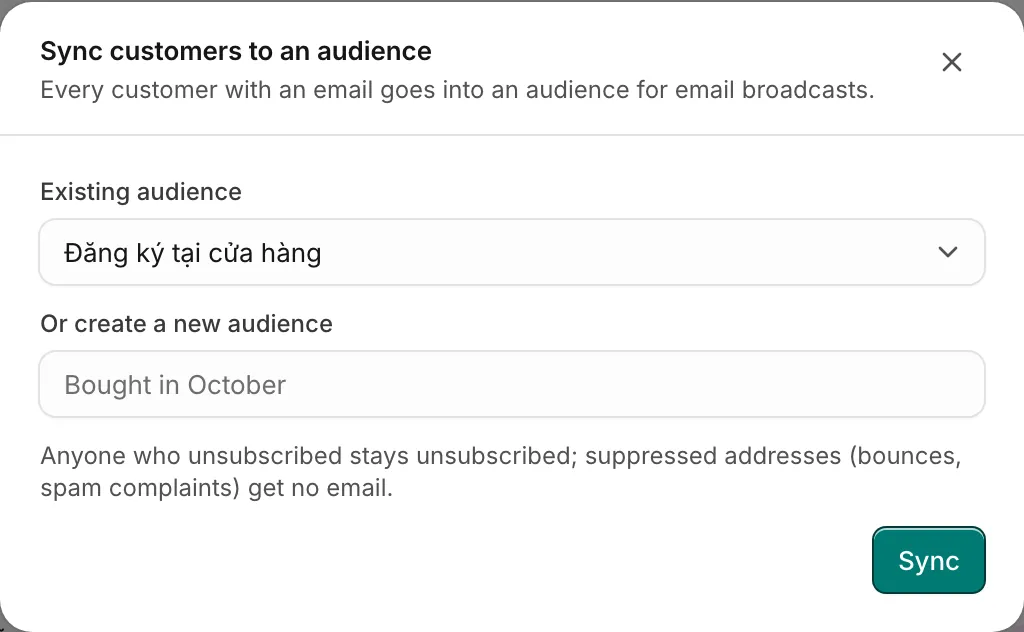
Ha Tang reports "Added … and updated … contacts in …". Only customers with an email address are copied, with their name as the contact's first name, up to 5,000 customers per sync.
Consent is kept: anyone who unsubscribed from that audience stays unsubscribed, and addresses on the suppression list (bounces, spam complaints) get no email. Syncing again later adds the new customers and updates the existing contacts; it does not remove anyone from the audience. Then write your broadcast as usual: see Send a broadcast.
Bring in an existing list
Ha Tang does not import customer profiles from a file. A profile is created when a person writes to you, so it always belongs to a real conversation. To use a list you already have:
- To email the people on it, import it into an email audience: see Contacts and audiences. When one of them later writes to you, their messages join the profile with the same email address.
- To send them Zalo notifications, use ZNS with their phone numbers: see Zalo ZNS.
- To update profiles that already exist from your own system (stage, owner, labels, fields), your developers can use the customers API. See Customers in the API reference.
Common questions
| Question | Answer |
|---|---|
| Vietnamese text looks garbled in Excel | Open the file directly by double-clicking. If you import it through Data → From Text/CSV, pick UTF-8 as the encoding. |
| The export has fewer people than the list | The export follows the filters and the search box. Click Clear first to export everyone. |
| The owner column shows an id, not a name | Owners are exported by id so the file stays correct when someone changes their name. Match them against your employee list. |
| Customers without an email are missing from the audience | An email audience can only hold email addresses. Reach those customers by Zalo or another channel. |
Was this article helpful?
Related articles
- Stages, owners and labelsTrack where each customer is in your sales flow, who looks after them, and group them with labels you can filter, export and message.
- Custom fieldsAdd your own fields to every customer profile, such as city, customer type or budget, and let the AI assistant fill them in from the conversation.
- Contacts and audiencesAdd the people you email one by one, from a CSV file or from your CRM, store custom properties on them and keep their consent.
- Send a broadcastWrite a newsletter or promotion once and send it to a segment, now or at a set time, with each contact's name filled in and unsubscribes handled for you.
Not finding what you are looking for?
Our team answers in the chat, in English or Vietnamese.