Turn modules on and off
Choose which parts of Ha Tang your business uses. A module that is off disappears for everyone, and its data is kept until you turn it back on.
Updated on
On this page
Ha Tang is made of five modules. Your business only needs the ones it uses: a shop that sells through Zalo and Facebook may only want Customer Support and Products, while another business only sends email. Owners and admins turn modules on and off; everyone else sees the result.
| Module | What it covers |
|---|---|
| Customer Support | The inbox and every chat channel, the website widget, tickets, the AI assistant and automation |
| Sending domains, email from your systems, templates, audiences, broadcasts and automations | |
| Payments | VietQR bank transfers, bank connections, matching, e-invoices |
| Products | Product catalogue and orders |
| CRM | Customer profiles, custom fields and Zalo ZNS |
Some features use two modules together. Sending a product card in a conversation, for example, needs both Customer Support and Products.
Turn a module on
- Open Settings → Business settings.
- In the Modules card, click the switch next to the module.
It turns on at once and appears in the app menu of every employee who has access to it.
Turn a module off
- In Settings → Business settings → Modules, click the switch of a module that is On.
- Read the confirmation and click Turn off module.
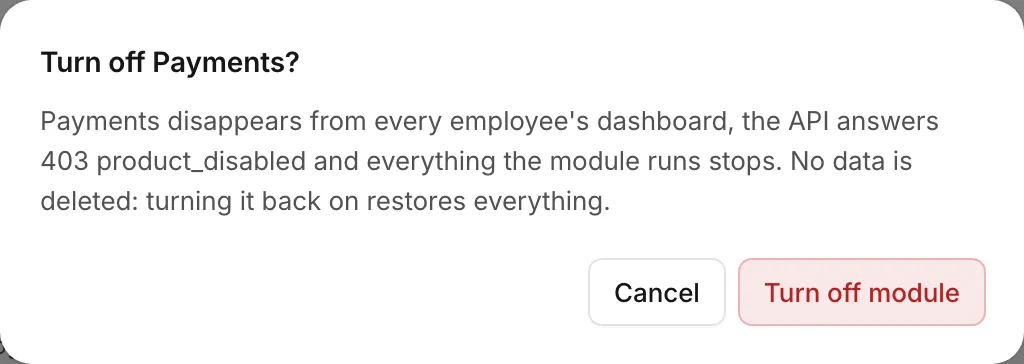
What happens when a module is off
- In the dashboard and the apps, the module disappears for every employee. An owner or admin who opens an old link sees Module is turned off, with a Turn on module button.
- Everything the module runs stops. For Customer Support, the chat widget stops showing on your website and messages from Zalo, Facebook, TikTok and your other channels are no longer taken into the inbox. For Email, broadcasts are not sent. For CRM, ZNS sends stop.
- Integrations get an error. Your developers' calls to that module are refused with the error
product_disabled(Errors in the developer hub). - Employees keep their access level for the module. It applies again as soon as the module is back on.
Your data is kept
Turning a module off deletes nothing: conversations, customers, domains, products and transactions stay. Turn the module back on and everything works as before, with no setup to redo.
To delete data for good, delete it inside the module (for example disconnect a channel or delete a domain) or delete the whole business (Leave or delete a business).
See all apps
In the dashboard every module is an app. Click the app menu below the business name and choose All apps to see them as tiles. Owners and admins also see the modules that are switched off there, under Switched off, and can open them to turn them on.

Who can do this
Only owners and admins. Members see Only owners and admins can turn modules on or off. above the list. If you need a module, ask an owner or admin of your business.
Useful next steps
Was this article helpful?
Related articles
- Business settingsChange your business's name, its address in dashboard links and its logo, and choose which modules are on.
- Set an employee's module accessChange an employee's role, or give a member None, View, Work or Manage in each module. Changes apply at once.
- What is Ha Tang?Ha Tang brings customer chat from Zalo, Facebook, TikTok and your website, email, payments and customer data into one place for your team.
Not finding what you are looking for?
Our team answers in the chat, in English or Vietnamese.