Show your team what customers did before writing
The inbox shows the pages, app screens and events that led a customer to write, plus details your website or app sends about them.
Updated on
On this page
When a customer opens the chat, your agents see what they did just before: the pages they read on your website, the screens they opened in your app and the actions your developer reports, such as a failed payment. Agents can then answer "I see your card was declined at checkout" instead of asking what happened.
What your team sees
- Before writing: a block at the start of the conversation listing the last steps, oldest first, with how long ago each happened. It shows the last three steps; click it to see them all. Steps whose name looks like a problem (an error, a failure, a declined payment, a timeout) are highlighted.
- Journey in the customer panel: the same steps, up to 20.
- Attributes in the customer panel: the details your website or app sends about the customer, such as their plan or last order, as a table.
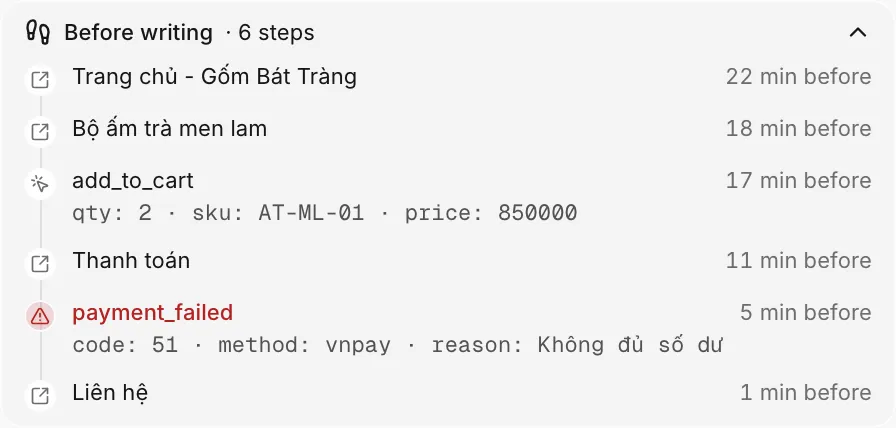
Only your team sees these. The customer does not see them in the chat.
In the Ha Tang app for phone, the conversation shows a line such as "Before writing: 5 steps"; tap it to see the steps. The conversation info lists Journey and Attributes. In the Mac app, the same line appears in the conversation, and the customer panel (⌥⌘I) lists Journey and Attributes.
What is captured on its own
| Where | Captured without extra work |
|---|---|
| Website with the chat widget | Each page the visitor opens, with its title and address, including page changes in single-page apps |
| Your mobile app | Nothing on its own. The app reports the screen the user is on with one line of code per screen change (see below) |
Social channels such as Zalo, Messenger or TikTok do not pass this information, so their conversations have no journey.
What your developer adds
Your developer can send three kinds of context. Each takes a line or two of code:
- Events: actions that matter to support, for example
payment_failedwith the order number and the reason, orviewed_pricing. They appear in Before writing and, during a chat, in the conversation. - Attributes: facts about the customer, for example their plan, cart value or customer number. New values replace old ones with the same name; the rest are kept.
- Screens (apps only): the name of the screen the user is on, so the journey reads like "Cart → Checkout → Payment".
Send the developer guide that matches your product:
- Website: JavaScript API (
pushEventandsetData). - Apps: the "Events and data" section of the iOS, Android, Flutter or React Native SDK (
pushEvent,setDataandsetScreen).
Privacy and limits
- Ha Tang keeps the steps for 24 hours, so a journey covers at most the day before the customer wrote.
- Only the last 20 steps are kept and shown.
- Values whose name looks secret, such as a password, token or card number, are hidden before they are stored.
- Attributes can carry up to 8 KB per call.
Ask your developer to send only what the team needs to help the customer, and never passwords, card numbers or personal documents.
Useful next steps
Was this article helpful?
Related articles
- The customer panelEverything about the customer beside the conversation: contact details, what they did before writing, attributes, CRM fields, notes, tickets and orders.
- Recognise logged-in usersLet your website tell the widget who a signed-in customer is, so your team sees their name and history and the inbox marks them as verified.
- Add the chat widget to your websiteCreate a website channel, paste its code on every page and check that visitors can chat with your team from the Inbox.
Not finding what you are looking for?
Our team answers in the chat, in English or Vietnamese.