Schedule a message
Write a reply now and have Ha Tang send it to the customer at the time you choose, like tomorrow morning when the shop opens.
Updated on
On this page
Schedule send lets you write a reply when you have time and have the customer receive it at the right moment: a delivery update at 9 in the morning, a payment nudge on Monday, or an answer to an evening question during working hours the next day. At that time the message goes out on the conversation's channel as if you had just typed it.
You need Work access to Customer Support.
Schedule a message
- Open the conversation and write your reply in the reply box.
- Pick when to send it:
- On the web: click the clock button next to Send.
- On the phone: press and hold the send button, or tap Attach → Schedule send.
- On the Mac: right-click the send button and choose Schedule send….
- Choose In 1 hour, In 3 hours, Tomorrow 9:00, Next Monday 9:00, or Pick a time… for a day and time.
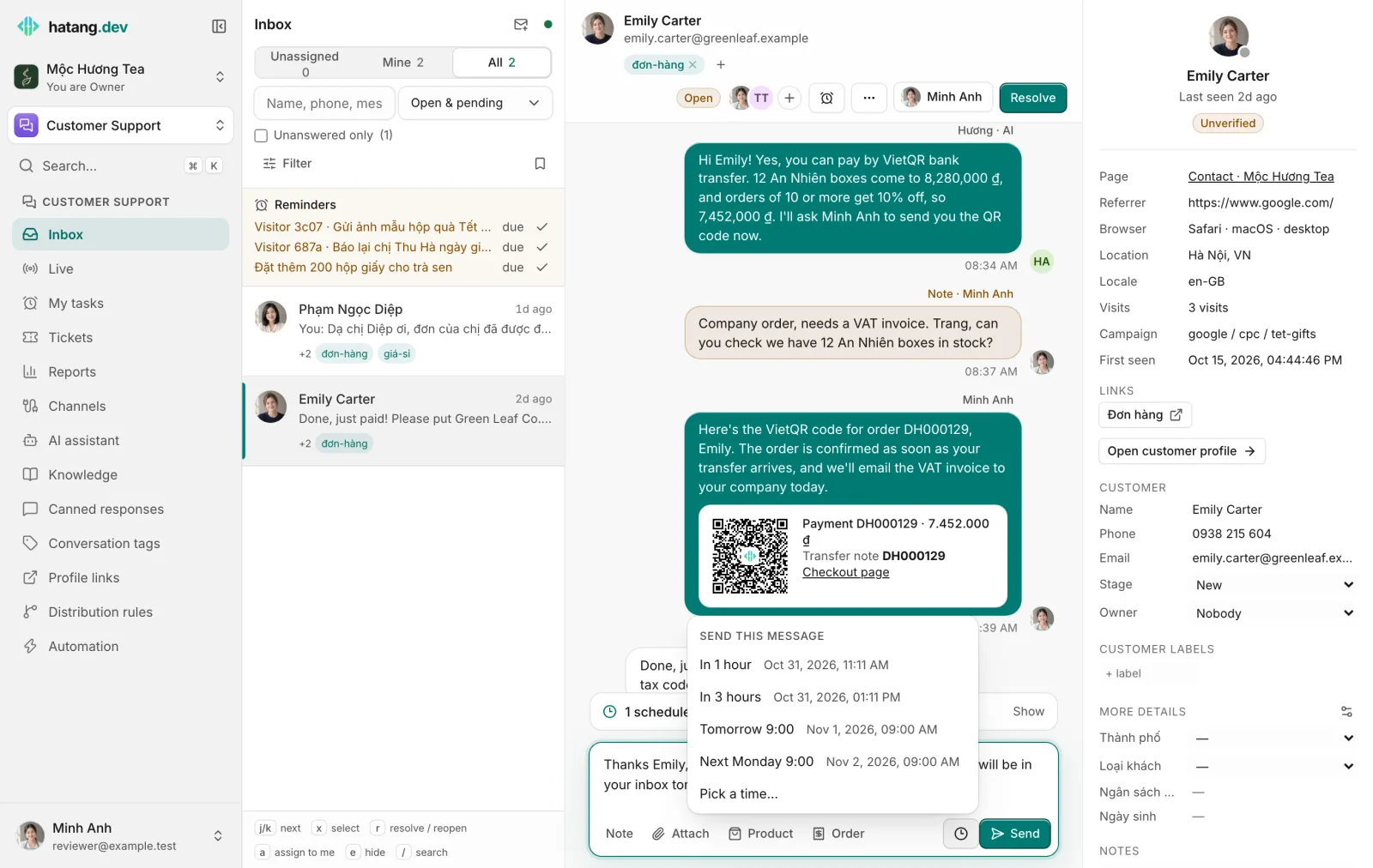
The message leaves the reply box and shows in the Scheduled messages line just above it. When it goes out, it carries your name with a Scheduled label, in its place in the conversation by the time it was sent.
Only replies to the customer can be scheduled. Internal notes, attachments and emails can't be scheduled yet.
See, change or cancel
Click the Scheduled messages line above the reply box to see every message waiting in the conversation, with its time and who scheduled it. For each one:
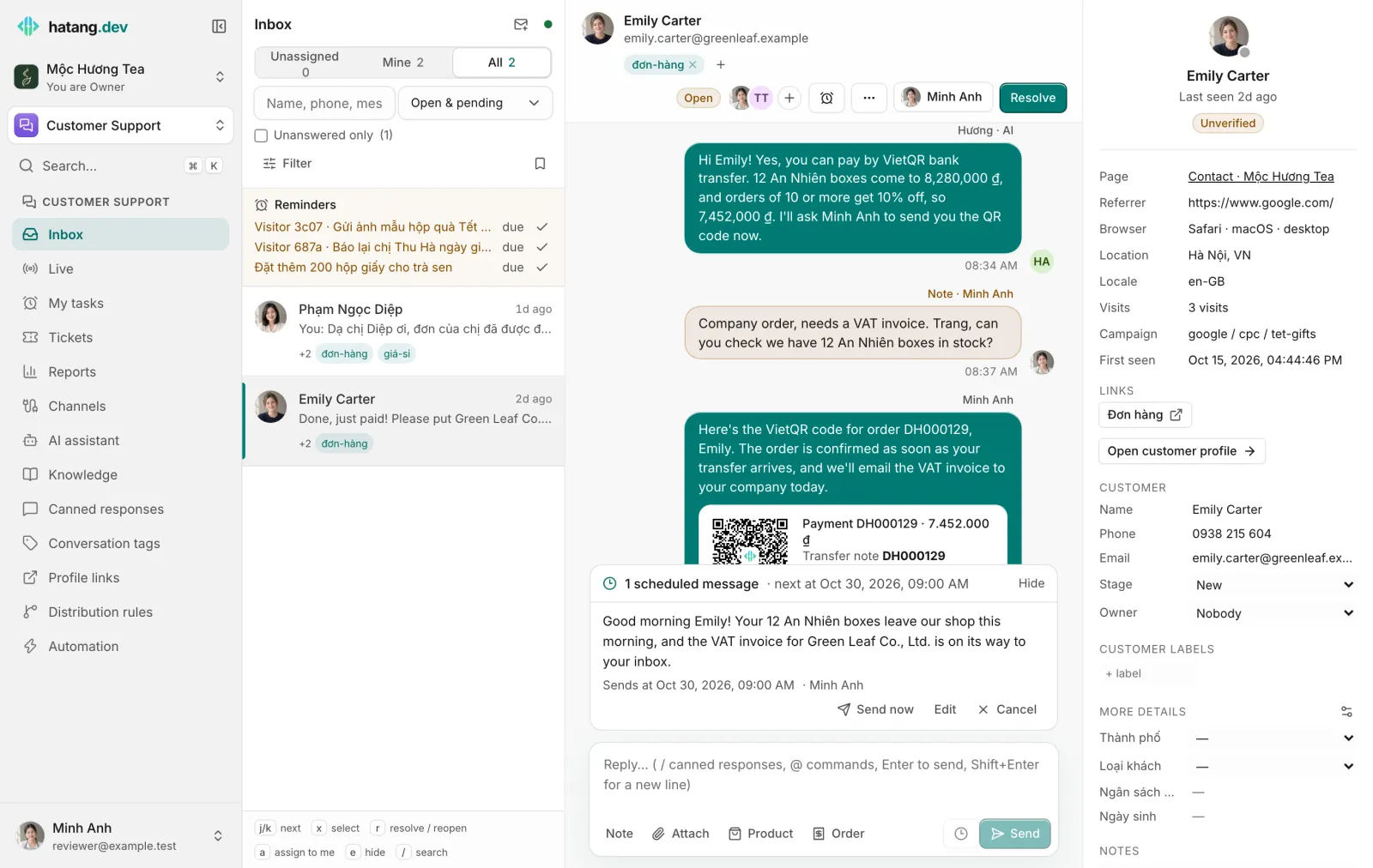
- Send now: send it right away.
- Edit (web), Change time (phone, Mac): change the text or the time.
- Edit text (phone, Mac): the message is canceled and its text comes back to the reply box, to edit and send or schedule again.
- Cancel: it won't be sent.
The whole team sees a conversation's scheduled messages, so a teammate handling it can send them now, change the time or cancel them too.
Limits
- The time must be at least a minute ahead and within 30 days. A conversation holds at most 20 waiting messages.
- Some channels only take replies for a while after the customer's last message: Zalo OA 48 hours; Messenger, Instagram and WhatsApp 24 hours. Ha Tang only offers times before that ends and shows until when the channel takes replies.
- If the conversation is closed when the time comes, the message isn't sent. The Scheduled messages line says Not sent: the conversation is closed; reopen the conversation and choose Send now, or change the time.
- A sent message that doesn't reach the customer shows Not delivered like any other. See Message not delivered.
Was this article helpful?
Related articles
- Reply to customersWrite replies, use canned responses and quick commands, quote a message, recall one, and understand reply windows and delivery ticks.
- Reminders and My tasksGet reminded to follow up on a conversation, set a to-do for yourself or a teammate, and see everything due in My tasks.
- A message was not deliveredWhat "Not sent" and "Not delivered" mean under a reply, every reason a channel gives, and how to fix it.
Not finding what you are looking for?
Our team answers in the chat, in English or Vietnamese.