See who is on your website and greet them
The Live board shows who is browsing your website right now, what they are reading and where they came from, and lets you start the chat.
Updated on
Live shows the people on your website (and in your mobile app) right now: the page they are reading, how they found you and how often they have been back. When someone lingers on a product page, you can say hello first, before they ask.
Go to Customer Support → Live. Everyone in the business can open it; greeting a visitor needs Work access to Customer Support.
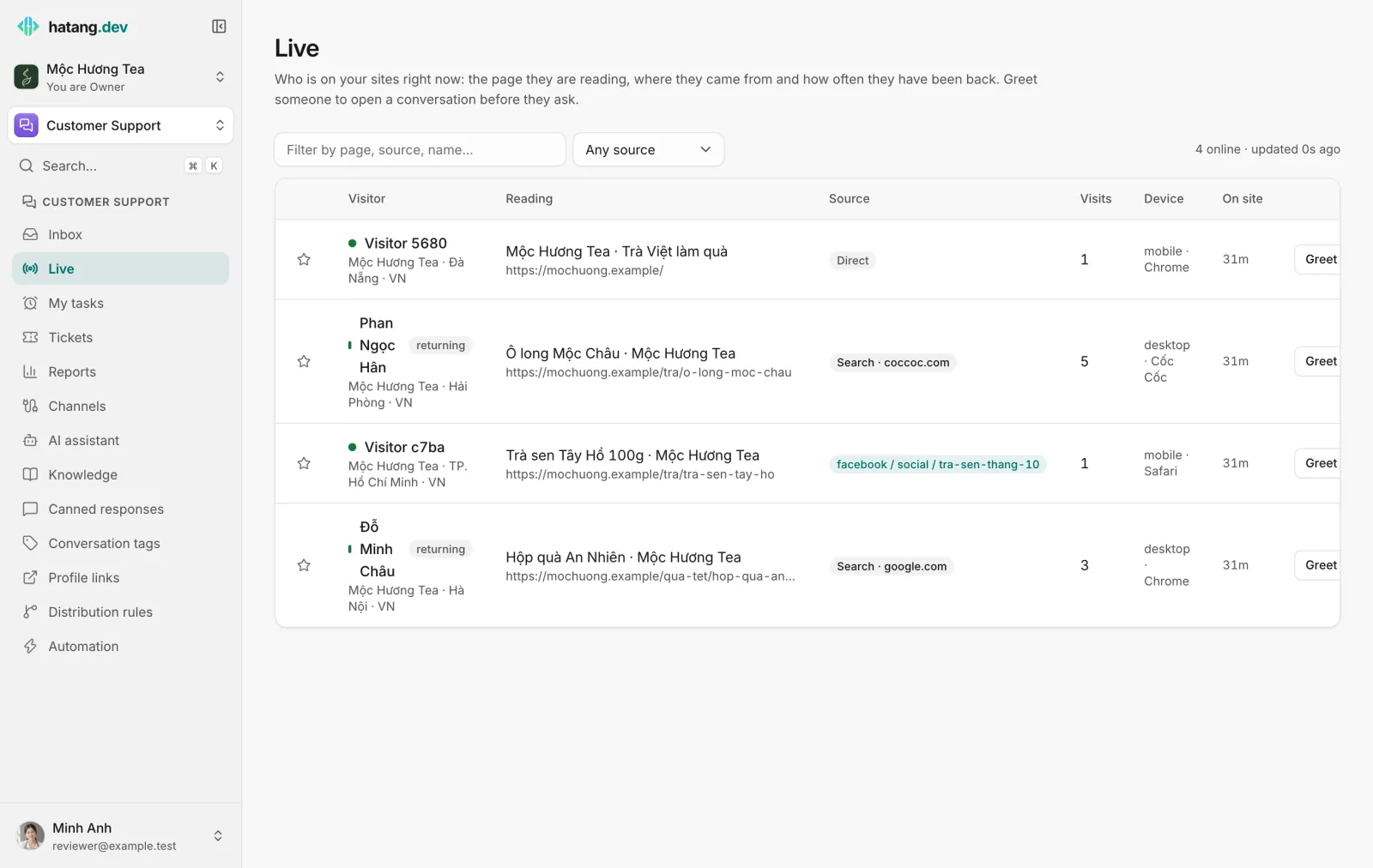
What the board shows
A visitor appears as soon as the chat widget loads on a page of your website, and disappears about a minute after they leave. The board refreshes every few seconds; the top right shows "4 online · updated 0s ago".
| Column | Shows |
|---|---|
| Visitor | Their name if they told you or your website identified them, otherwise "Visitor" and a short code. returning marks someone who has been before. Below: the website and their city. Profile opens their customer profile, when there is one |
| Reading | The title and address of the page they are on; for app users, App and the screen |
| Source | Direct, Search (Google, Bing, Cốc Cốc…), Social (Facebook, Zalo, TikTok…), another website, or the campaign from the link's UTM tags |
| Visits | How many times they have come |
| Device | Phone or computer, and the browser |
| On site | How long this visit has lasted |
Filter the board by page, source or name in the search box, or choose a source kind (Campaign (UTM), Search, Social, Other websites, Direct).
Click the star to Pin to top a visitor you want to watch. Pins are kept in this browser only.
Greet a visitor
- Click Greet on the visitor's row.
- Write your message, for example "Chào anh/chị, Mộc Hương Tea có thể giúp gì ạ? Hôm nay hộp quà An Nhiên đang giảm 10%."
- Click Send greeting.
The chat window opens on their screen with your message, and the conversation lands in your inbox assigned to you. The row then shows Open chat instead of Greet.
If the visitor already has an open conversation, the row shows Open chat straight away.
Greet sparingly and with something useful, such as an answer to what the page is about or a current offer. A greeting on every page view feels pushy.
Hear when someone arrives
In Settings → Business settings → Notifications, under Inbox sounds, When someone arrives on the website can play a sound for First-time visitors only or New and returning visitors. It is off by default and applies to you only.
Nobody shows up?
| Problem | What to check |
|---|---|
| "Nobody is on your sites right now" while you are on the site yourself | The chat widget must be installed on the page and load. See Install the widget |
| A visitor shows as "Visitor" with a code | They have not given their name. Identify signed-in customers from your website (Identify users) |
| Someone you blocked still shows | Blocking stops their messages reaching the inbox, not their visits. See Block customers |
Was this article helpful?
Related articles
- The customer panelEverything about the customer beside the conversation: contact details, what they did before writing, attributes, CRM fields, notes, tickets and orders.
- Add the chat widget to your websiteCreate a website channel, paste its code on every page and check that visitors can chat with your team from the Inbox.
- Recognise logged-in usersLet your website tell the widget who a signed-in customer is, so your team sees their name and history and the inbox marks them as verified.
- Block customers and handle spamStop a customer, phone number, email address or IP from reaching your inbox, and clean up spam.
Not finding what you are looking for?
Our team answers in the chat, in English or Vietnamese.