Language and theme
Use the dashboard in Vietnamese or English, in light or dark mode. Each person chooses for themselves.
Updated on
The dashboard speaks Vietnamese and English and comes in a light and a dark look. These are personal choices: changing them does not affect your colleagues, and it does not change what your customers see.
Change the language
- Click your name at the bottom of the sidebar.
- Under Language, click Tiếng Việt or English.
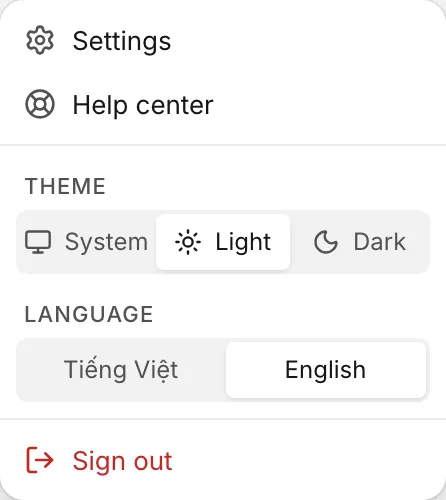
The page reloads in the new language. You can also press ⌘K (Ctrl+K on Windows), type language and pick Language: ….
Until you pick one, the dashboard is in Vietnamese.
Change the theme
- Click your name at the bottom of the sidebar.
- Under Theme, click System, Light or Dark.
System follows your computer's setting, and switches when your computer switches between light and dark mode. You can also use ⌘K and type theme.
Where the choice is saved
Language and theme are saved in this browser, for one year. On another computer, in another browser or after you clear your browser data, choose again.
Some languages are set elsewhere:
| What | Where to change it |
|---|---|
| The emails and push notifications Ha Tang sends you (waiting conversations, assignments, mentions, reminders, SLA breaches) | Notification language (emails and push) in your notification settings (Your notification settings) |
| The Ha Tang apps for iPhone, Android and Mac | Language and Appearance in the app's settings (Ha Tang apps for phone and Mac) |
| What your customers see (chat widget, emails to customers) | In each channel's and module's own settings |
Was this article helpful?
Related articles
- Find your way around the dashboardThe sidebar, the business and app menus, the search box (⌘K) and your account menu - where everything is in Ha Tang.
- Your notification settingsChoose how you hear about customer conversations - browser push, inbox sounds and email - in which language, and set your personal email signature.
- Ha Tang apps for phone and MacAnswer customers from your iPhone, Android phone or Mac, with push notifications, quiet hours and the same inbox as the dashboard.
Not finding what you are looking for?
Our team answers in the chat, in English or Vietnamese.