Teach the AI how to handle situations
Rules for specific cases, such as wholesale enquiries, angry customers or after-hours chats, that say what the AI says and what happens next.
Updated on
Your knowledge says what is true. Situations say how to behave in a particular case: when a customer asks for wholesale prices, bring in a salesperson; when a customer is angry, apologize and hand off; outside office hours, keep answering and take a phone number. You can have up to 10 situations.
Add a situation
- Go to Customer Support → AI assistant → Situations.
- Click Add situation, or click one of the templates next to it: Khách hỏi giá sỉ, Khách bực bội, Ngoài giờ làm việc, Hỗ trợ kỹ thuật, Hỏi tỉnh/thành để báo phí ship.
- Give it a name and fill in the fields below.
- Click Save.
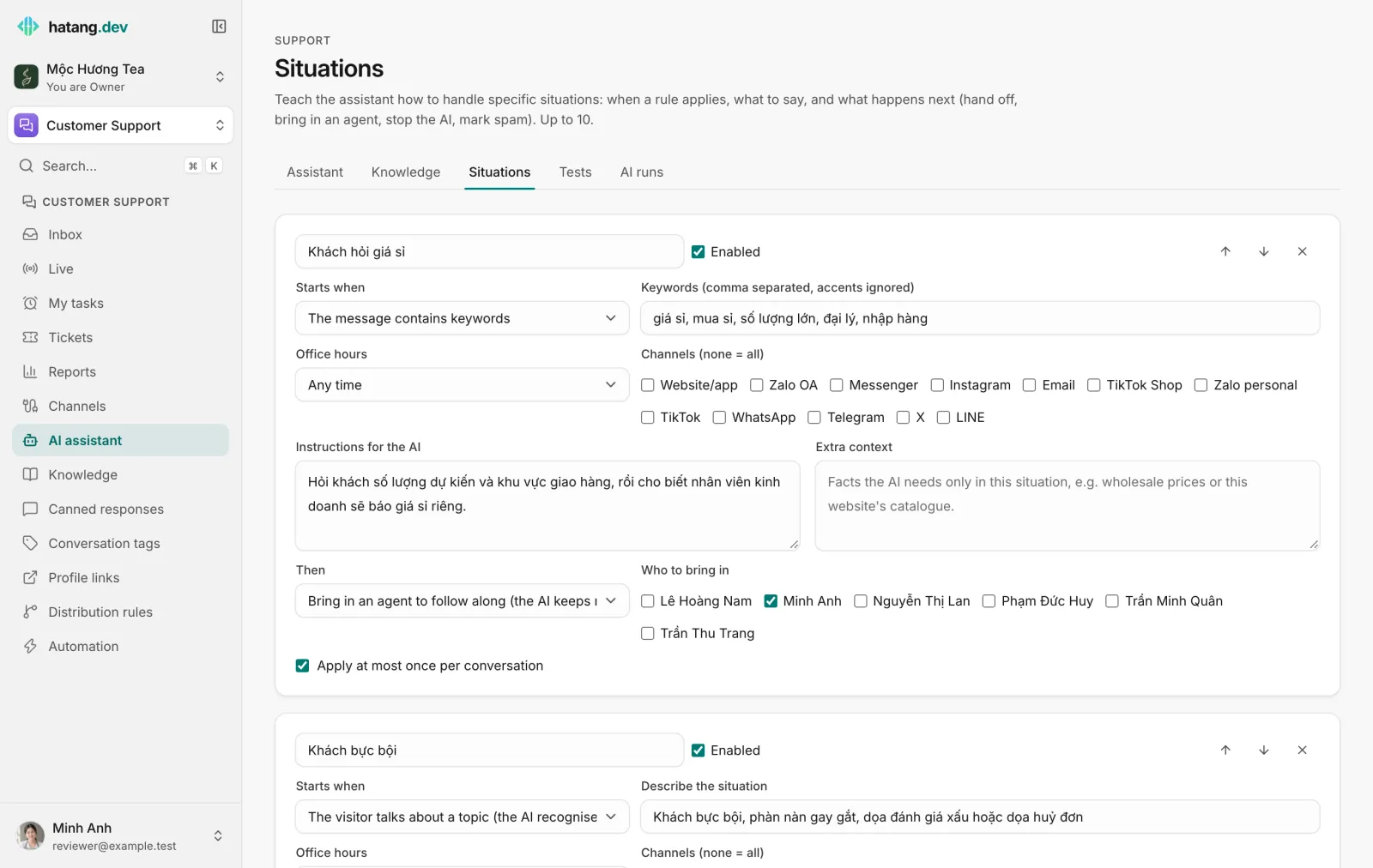
The fields
| Field | What it does |
|---|---|
| Starts when | The visitor talks about a topic (the AI recognises it): describe the case in Describe the situation and the AI decides when a message fits. The message contains keywords: a list of words, accents ignored. Every message: applies to every message that meets the conditions below, good for rules by time or channel. |
| Office hours | Any time, only within, or only outside your office hours. |
| Channels (none = all) and Websites (none = all) | Limit the rule to some channels or websites. |
| Instructions for the AI | How to reply in this case, up to 1,000 characters. An example of a good reply and one to avoid helps. |
| Extra context | Facts the AI needs only here, such as a wholesale price list, up to 2,000 characters. |
| Then | What happens after the reply (see below). |
| Apply at most once per conversation | On by default, so the rule does not fire on every message. |
What happens next
| Then | Effect |
|---|---|
| Just reply as instructed | The AI follows your instructions and keeps answering. |
| Bring in an agent to follow along (the AI keeps replying) | The agents you pick in Who to bring in are added to the conversation and notified; the AI keeps helping the customer. |
| Hand off to an agent | The conversation goes to your team: right after the AI's reply for a topic rule, or at once with your hand-off phrase for a keyword or every-message rule. Pick someone in Hand off to (none = routing rules) or leave it empty to use your distribution rules. |
| Stop the AI in this conversation | The AI stops answering in this conversation, as if an agent clicked Stop AI. |
| Mark as spam and stop the AI | The conversation is moved to spam and the AI stops. |
How situations are applied
- Keyword and every message rules are checked before the AI writes anything. If such a rule hands off, stops the AI or marks spam, that happens immediately and the AI does not answer.
- Topic rules are listed to the AI with your description. When the customer's message clearly fits one, the AI replies following that rule's instructions, then its Then action runs.
- Instructions in a situation take priority over the general instructions on the Assistant tab, but never over your knowledge: a situation cannot make the AI state a price that is not in your knowledge or in its extra context.
- When several rules apply, the one higher in the list wins. Use the arrows to reorder them.
Check a situation
On the Knowledge tab, use Chat with the AI and write a message that should trigger the rule. Each answer shows Situation: with the rule it applied. You can also pretend to be outside office hours or on another channel with the two selectors at the top of the panel.
Useful next steps
Was this article helpful?
Related articles
- When the AI hands off to your teamWhy the assistant passes a conversation to a person, what the customer and your agents see, and how to take over or give it back.
- Set up the AI assistantAdd knowledge, try the assistant, choose when it answers and give it a name and tone, in about fifteen minutes.
- Test the AI before customers doWrite the questions that matter, say what a good answer does, and let Ha Tang grade the assistant on them after every change.
Not finding what you are looking for?
Our team answers in the chat, in English or Vietnamese.