Add and verify a sending domain
Add the domain you send from, publish its DKIM, SPF, return-path and DMARC records, and get it verified so your email reaches the inbox.
Updated on
On this page
Ha Tang only sends from a domain you have added and verified. Verifying proves to Gmail, Outlook and other mailbox providers that your email really comes from you, which is the first thing they check before deciding between the inbox and the spam folder. Each domain gets its own DKIM key and its own return-path subdomain.
You need the Manage level on the Email module to add or change domains, and access to your domain's DNS settings (Cloudflare, Mắt Bão, P.A Việt Nam, GoDaddy or wherever your DNS is hosted).
Choose the domain
The domain in your sender address must match a verified domain exactly. To send as [email protected], add updates.mochuong.vn; adding mochuong.vn alone is not enough.
Add the domain
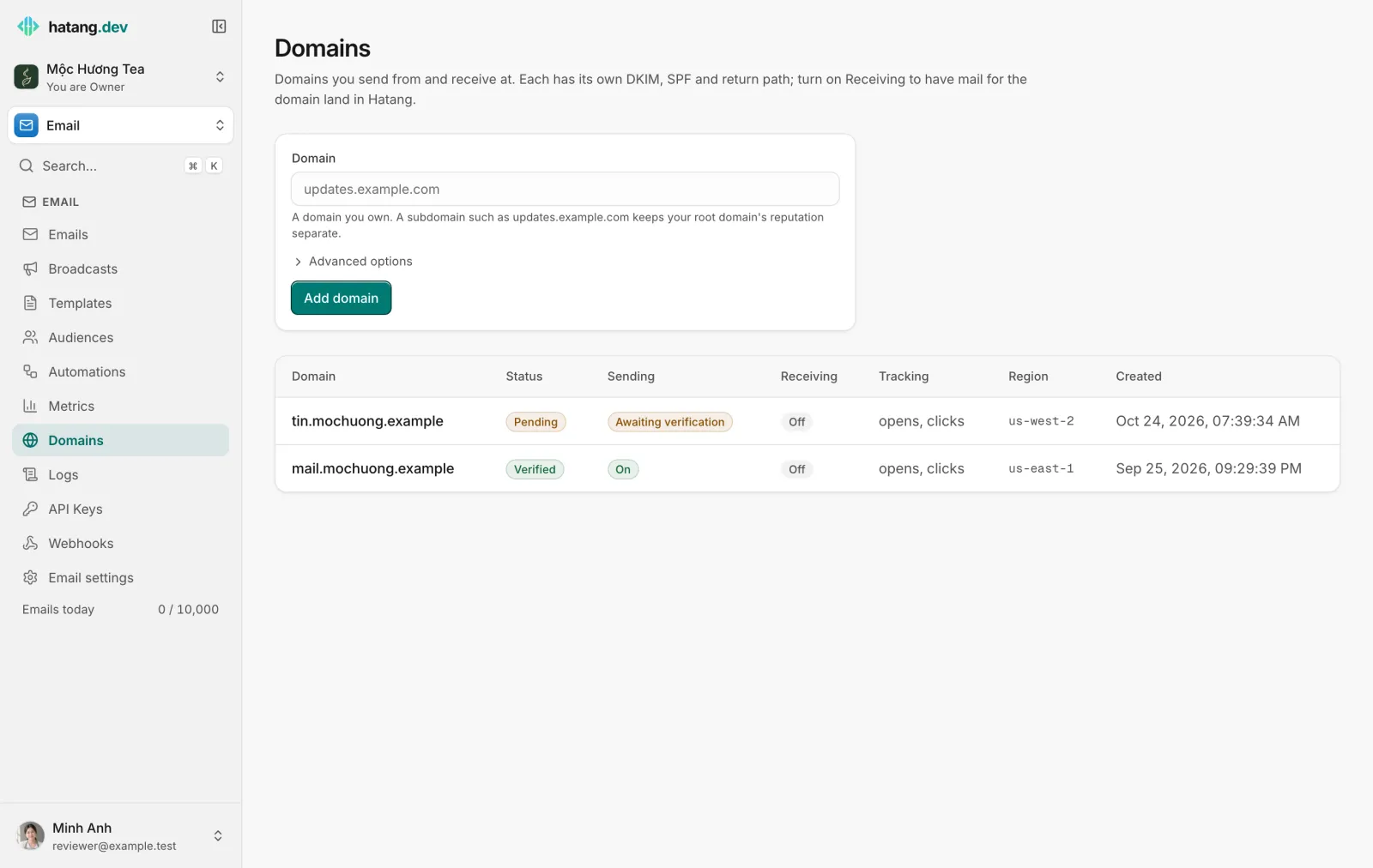
- Open Email → Domains.
- Type the domain or subdomain in Domain, for example
tin.mochuong.vn. - Optionally open Advanced options:
- Custom Return-Path: the subdomain for bounces,
sendby default. Change it only ifsend.is already used for something else. It cannot be changed later. - Tracking Subdomain: for example
links, so tracked links uselinks.tin.mochuong.vninstead of a Ha Tang address. - Tracking options: Enable click tracking (on by default) and Enable open tracking.
- Custom Return-Path: the subdomain for bounces,
- Click Add domain.
The domain appears in the list with the status Not started, and its page opens with the records to publish.
Publish the DNS records
The domain page groups the records the way you will use them. Copy each Name and Value with the copy button next to it; never type a DKIM key by hand.
| Record | Type | Name (example for tin.mochuong.vn) |
Value | Needed |
|---|---|---|---|---|
| DKIM | TXT | rs4k7mq2xd._domainkey.tin.mochuong.vn |
v=DKIM1; k=rsa; p=… (a long key) |
Yes |
| MX | MX, priority 10 | send.tin.mochuong.vn |
feedback-smtp.<region>.amazonses.com |
Yes |
| SPF | TXT | send.tin.mochuong.vn |
v=spf1 include:amazonses.com ~all |
Yes |
| DMARC | TXT | _dmarc.tin.mochuong.vn |
v=DMARC1; p=none; |
Recommended |
| Tracking | CNAME | links.tin.mochuong.vn |
The host shown on the page | Only with a tracking subdomain |
| Receiving | MX, priority 10 | tin.mochuong.vn |
The host shown on the page | Only when receiving is on |
What each one does:
- DKIM signs every email with your domain's key, so receivers can tell it was not changed or forged.
- MX and SPF on
send.handle bounces and authorize Ha Tang's mail servers to send for your domain. They sit on thesend.subdomain, so they never touch the SPF or MX records your main domain already has for Google Workspace, Microsoft 365 or your hosting. - DMARC tells receivers what to do with email that fails these checks. It does not block verification, but Gmail and Yahoo expect it from anyone sending in volume.
If your DNS host supports Domain Connect, the page shows a DNS Records panel with Auto configure with and your host's name. Click it, sign in at your DNS host and approve: the records are added for you and verification starts. If your DNS is on Cloudflare, the page links straight to your zone's DNS records instead.
Step-by-step instructions for common DNS hosts are in Add DNS records at your DNS host.
Verify
- After publishing the records, click Verify DNS records on the domain page.
- Ha Tang checks every record right away, then again every minute; the page refreshes by itself while the domain is pending.
- Most domains verify within minutes. DNS changes can take up to an hour to reach everyone.

A domain is Verified when DKIM, MX and SPF all match and Amazon SES, which delivers the email, has confirmed the DKIM signature. DMARC, tracking and receiving records never hold verification back. Once verified, the button becomes Re-check DNS and Send test email appears.
What the statuses mean
| Status | Meaning | What to do |
|---|---|---|
| Not started | The domain was added; nobody has asked to verify it yet | Publish the records, then click Verify DNS records |
| Pending | Ha Tang is checking; some records do not match yet, or Amazon SES has not confirmed DKIM yet | Wait, and check the records marked Pending or Failed |
| Verified | You can send from this domain | Nothing |
| Temporary failure | A DNS lookup timed out or failed for another reason than "not found" | Nothing; Ha Tang tries again |
| Failed | Verification failed, for example a DKIM record that does not match | Fix the record and click Verify DNS records again |
Each record has its own status. Under a record that does not match, a short note says what Ha Tang found instead: found: nothing means no record exists under that name yet.
Troubleshooting
| Symptom | Cause | What to do |
|---|---|---|
A record says found: nothing for a long time |
The record is missing, or the DNS host added your domain to the name twice (send.tin.mochuong.vn.mochuong.vn) |
Many DNS hosts add the domain for you: type only the part before your main domain, for example send.tin or rs4k7mq2xd._domainkey.tin in the zone mochuong.vn |
| DKIM stays Pending but the record exists | The key was cut or changed while pasting | Paste the whole value again with the copy button. Some hosts split long values into several quoted strings; that is fine |
SPF on send. fails |
That subdomain has two SPF records, or one without include:amazonses.com |
Keep a single v=spf1 record that contains include:amazonses.com |
| The MX record cannot be created | send. already has a CNAME record; a name with a CNAME cannot hold anything else |
Remove the CNAME, or delete the domain and add it again with another Custom Return-Path |
| All records are verified but the domain stays Pending | Amazon SES has not confirmed DKIM yet | Usually minutes; click Re-check DNS later |
| Sending fails with "domain is not verified" | The sender address uses another domain or subdomain than the one verified | Send from an address on exactly the verified domain, or add that domain too |
Deleting a domain (Delete on its page) stops all sending from it; emails still waiting to go out bounce.
For the API side (POST /domains, verification calls and webhooks), see the domains guide in the developer hub.
Useful next steps
Was this article helpful?
Related articles
- Add DNS records at your DNS hostWhere to add Ha Tang's DKIM, SPF, MX, DMARC and CNAME records at Cloudflare, GoDaddy, Namecheap, Hostinger, Mắt Bão, P.A Việt Nam and other DNS hosts.
- Keep your email out of spamWhy email lands in spam or Promotions and how to fix it, with SPF, DKIM and DMARC, a careful start on a new domain, clean lists and the numbers to watch.
- Send through the SMTP relayConnect WordPress, your shop software or any app that sends email over SMTP to Ha Tang with smtp.hatang.dev, port 5870 and an API key.
Not finding what you are looking for?
Our team answers in the chat, in English or Vietnamese.