Answer the questions the AI could not
Turn the questions the assistant handed off into new knowledge, and correct a reply straight from the inbox.
Updated on
On this page
Every time the assistant hands a conversation off because the answer was not in your knowledge, it keeps the question. The Unanswered questions list on the Knowledge tab is the shortest path to a better assistant: answer what customers really ask, once, and the assistant answers it from then on.
The list of unanswered questions
Open Customer Support → Knowledge. Unanswered questions sits at the top.
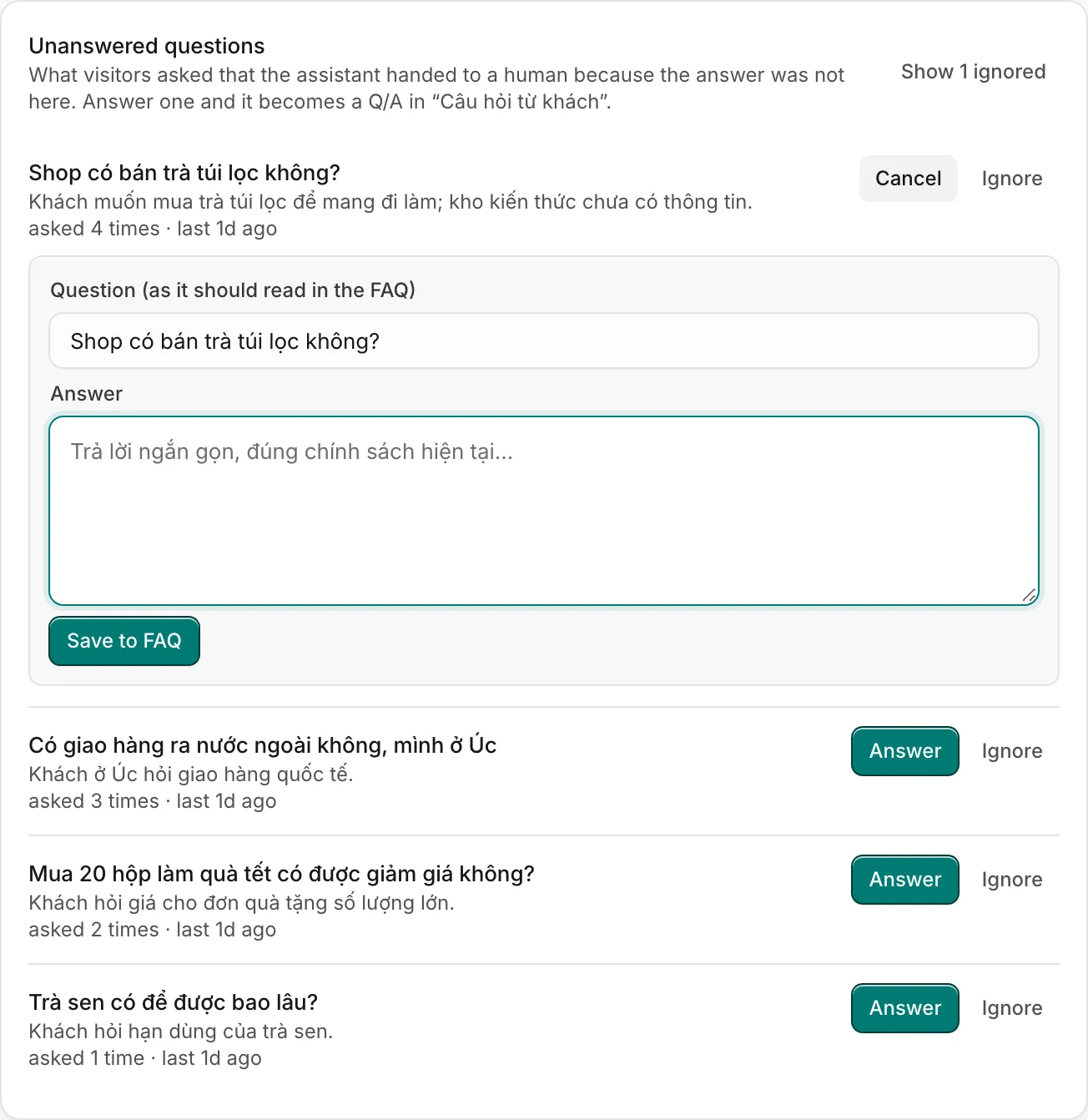
For each question you see:
- the question as the customer wrote it;
- the assistant's one-line summary of what the customer wanted;
- how many times it was asked and when it was last asked, with a link to the latest conversation (open conversation).
Questions that differ only in accents, capitals or punctuation are counted as one: "Phí ship bao nhiêu?" and "phi ship bao nhieu" are the same question. The most asked come first.
Answer a question
- Click Answer next to the question.
- Under Question (as it should read in the FAQ), tidy the wording. Customers rarely phrase it the way you want it in your FAQ.
- Write the Answer: short, exact, true today.
- Click Save to FAQ.
The pair is added to an FAQ source named "Câu hỏi từ khách" (created the first time), which is indexed again right away. The question leaves the list, and the next customer who asks gets your answer.
Ignore a question
Some questions should stay with a person: job applications, personal requests, things you do not want the AI to answer. Click Ignore. The question is hidden, but its count keeps growing if customers keep asking, so you can change your mind. Click Show N ignored to see them, and Restore to put one back in the list.
Correct a reply from the inbox
Agents can fix a wrong or clumsy answer while they work:
- In the conversation, under the assistant's reply, open Knowledge used to see the passages it relied on. If it used none, it says so.
- Click Improve this reply.
- Tidy the Question and write The right answer.
- Click Save to knowledge.
The pair is saved to the same "Câu hỏi từ khách" source, and the assistant answers that way next time. The reply is also flagged as corrected in AI runs.
When it is your own reply that answered the question, you do not need to retype it: Teach the AI from your replies drafts the question and answer from the conversation for you.
When to change the source instead
If several questions point to the same gap (shipping to the provinces, a new product line), it is better to update the original source, or add a text source on the topic, than to collect many single answers. The "Câu hỏi từ khách" source holds up to 200,000 characters; when it is full, move some pairs into another FAQ source.
Useful next steps
Was this article helpful?
Related articles
- Add knowledge for the AIGive the assistant your FAQs, policies, website, Google Docs, Notion pages and files, or push documents from your own system through the API, and write them so it finds the right answer.
- Teach the AI from your repliesAfter you answer a customer, let the AI turn your reply into a knowledge entry, so it can answer the same question itself next time.
- When the AI hands off to your teamWhy the assistant passes a conversation to a person, what the customer and your agents see, and how to take over or give it back.
- Test the AI before customers doWrite the questions that matter, say what a good answer does, and let Ha Tang grade the assistant on them after every change.
Not finding what you are looking for?
Our team answers in the chat, in English or Vietnamese.